Some links on this page are affiliate links. If you buy through them I may earn a commission, at no extra cost to you. It never changes a rating. Read the disclosure
- There's no public TubeBuddy coupon code that we could confirm.
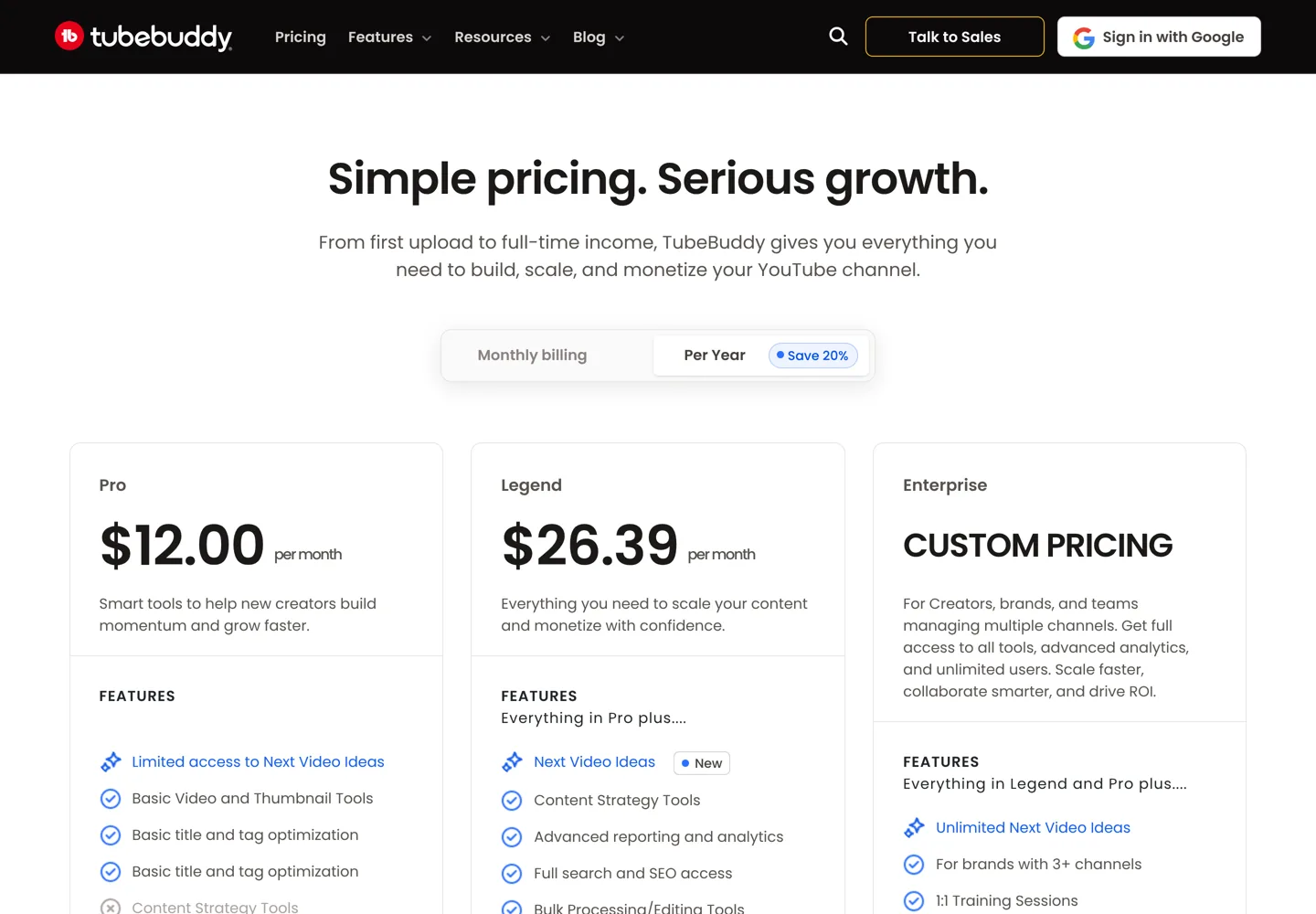
- Yearly billing saves 20%: Pro $12.00/mo, Legend $26.39/mo.
- Start on the free plan and upgrade only if you need more.
- TubeBuddy has a 30-day refund policy through support.
- Registered 501(c)(3) non-profits get a special discount.
Live offers
- You get: Pro $12.00/mo or Legend $26.39/mo, billed yearly
- Best for: Creators who'll use it all year
- Ends: no end date given
- You get: Basic TubeBuddy tools inside YouTube
- Best for: Trying TubeBuddy first
- Ends: no end date given
- You get: Ask TubeBuddy Support for a refund within 30 days
- Best for: Testing a paid plan
- Ends: no end date given
How to claim it
- 1Open the pricing page
Use the button on this page.
- 2Choose yearly
Select Per Year to save 20%.
- 3Pick a plan
Pro for new channels, Legend for full keyword research and bulk tools.
- 4Sign in and pay
Use the Google account that owns the channel.
Looking for a TubeBuddy discount coupon code? The honest answer is that TubeBuddy doesn’t publish public coupon codes, and you don’t need one. The real saving is TubeBuddy’s own: pay yearly and you save 20%, which brings Pro to $12.00 a month and Legend to $26.39 a month (prices on TubeBuddy’s pricing page on 12 October 2026). There’s also a free plan, a 30-day refund policy and a special discount for registered non-profits. This page explains each option and how to claim it.
TubeBuddy discounts that actually work
| Way to save | What you get | Best for |
|---|---|---|
| Pay yearly | Save 20%: Pro $12.00/mo, Legend $26.39/mo | Creators who’ll use it all year |
| Free plan | Basic tools in YouTube with the extension | Trying TubeBuddy first |
| 30-day refund policy | Ask for a refund within 30 days | Testing a paid plan safely |
| Non-profit discount | A special discount for 501(c)(3) non-profits | Registered charities |

1. Pay yearly and save 20%
TubeBuddy‘s pricing page shows a “Per Year: Save 20%” option. Billed yearly, Pro costs $12.00 a month and Legend $26.39 a month. When we checked on 11 October, monthly billing was $15 for Pro and $32.99 for Legend. Pro covers basic title and tag optimisation; Legend adds full search and SEO access, advanced reporting and bulk processing. Enterprise, for brands with three or more channels, has custom pricing.
2. Start with the free plan
TubeBuddy works as a browser extension inside YouTube, and you can start without paying. Its FAQ explains that when a paid plan is cancelled, paid features stay active until the end of the period you paid for, then the channel moves to the free plan. That makes the free plan a sensible first step: install the extension, try the basic tools on your channel, and upgrade only if you’ll use the paid features. Our guide to the TubeBuddy extension shows how to set it up.
3. Use the 30-day refund policy
TubeBuddy says it currently offers a 30-day refund policy, and that users who need a refund should contact TubeBuddy Support. If you buy a paid plan to test it, set a reminder for day 25 and decide before the window closes.
4. The non-profit discount
TubeBuddy’s pricing page says 501(c)(3) non-profits qualify for a special discount. If your channel belongs to a registered US non-profit, contact TubeBuddy through the pricing page before you buy.
How to claim the yearly discount

- Open the pricing page with the button on this page.
- Select yearly billing (“Per Year, Save 20%”).
- Choose Pro or Legend. Pro suits new channels; Legend suits creators who need full keyword research and bulk tools.
- Sign in with the Google account that owns your channel, and pay.
- Note the date, in case you decide to use the 30-day refund.
Licences are per channel: TubeBuddy notes that Pro and Star licences are limited to one user, and Legend includes two user seats.
What about TubeBuddy coupon codes on other sites?
Some sites list TubeBuddy codes promising 25% to 50% off. We couldn’t find a working public code, and TubeBuddy’s checkout is built around its own yearly saving. If a code doesn’t work, the yearly price above is the real best price we could confirm.
Is TubeBuddy worth it?
For a channel that publishes regularly, keyword research, tag tools and A/B testing can save time and help videos get found. For a channel that posts occasionally, the free plan may be enough. Our guide to YouTube rank checker tools compares TubeBuddy with other options, and our guide on how to make money on YouTube explains where it fits in growing a channel.
What to test during the trial
- Keyword ExplorerResearch the topic of your next video.
- SEO StudioOptimise a new upload's title, tags and description.
- A/B testTest a thumbnail on a video that already gets views.
If you decide not to keep it
Questions people ask
Is there a TubeBuddy coupon code?
We couldn't find a working public code. The real saving is TubeBuddy's own 20% discount for yearly billing.
How much does TubeBuddy cost?
On 12 October 2026, yearly billing made Pro $12.00 and Legend $26.39 a month. Monthly billing was $15 and $32.99 when we checked on 11 October.
Does TubeBuddy have a free plan?
Yes. You can use basic tools for free, and a cancelled paid plan moves back to the free plan at the end of the paid period.
Does TubeBuddy offer refunds?
TubeBuddy says it currently offers a 30-day refund policy; contact TubeBuddy Support to ask for one.
Is there a TubeBuddy discount for non-profits?
Yes. TubeBuddy's pricing page says 501(c)(3) non-profits qualify for a special discount.
Sources
- TubeBuddy pricing www.tubebuddy.com · checked October 12, 2026
- What browsers does the TubeBuddy extension support? (TubeBuddy Help) support.tubebuddy.com · checked October 12, 2026

Building websites since 2006: 500+ web projects of every size and $300K+ in website deals sold or brokered. Founder of A Digital Motive and DigiFlippers. I share the whole process here, plainly.
Founder of A Digital Motive and DigiFlippers