- Typefully's free plan allows 10 posts a month; Creator is billed annually.
- Hypefury Flexible is $6 a month for one channel; Full is $19 with all channels.
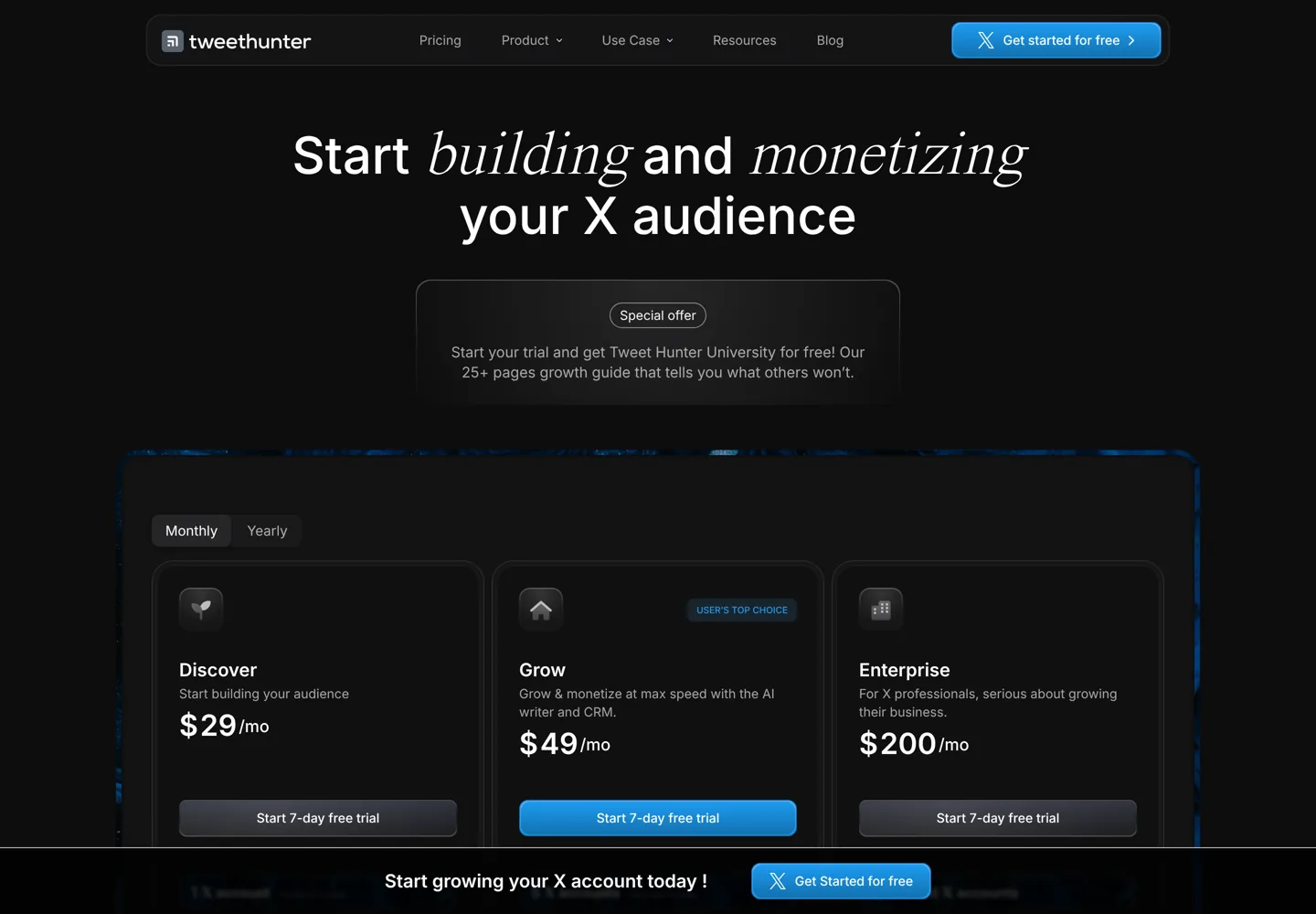
- Tweet Hunter's Discover plan was $29 a month when we checked, with auto-DMs and AI.
- Buffer's free plan includes 1 threaded post; paid plans allow unlimited threads.
- Check X's automation rules before using auto-DMs or auto-retweets.
A Twitter thread scheduler lets you write a whole thread on X ahead of time and publish it automatically, post by post, at the time you choose. X’s own X Pro dashboard can schedule posts, but dedicated tools such as Typefully, Hypefury and Tweet Hunter are built around threads, with drafts, previews, analytics and automation. This guide compares the best thread schedulers on features and price, using each tool’s own pricing page.
Prices and limits are as listed when we checked, on the date at the end. Where a page didn’t show a price, we say so rather than guess.
Twitter thread scheduler tools compared
| Tool | Free option | Paid from | Best for |
|---|---|---|---|
| Typefully | Free plan, 10 posts a month | Creator (annual billing only) | Writing great threads, cross-posting |
| Hypefury | 7-day trial, no card | $6 a month (1 channel) | Cheap unlimited scheduling |
| Tweet Hunter | 7-day trial | $29 a month (Discover) | Growth tools, AI and automation |
| Buffer | Free plan, 3 channels | $6 a month per channel | X plus other networks |
| SocialBee | 14-day trial | $29 a month ($290 a year) | Content categories across many networks |
| X Pro | Part of X | See X’s terms | Scheduling inside X itself |
From each tool’s pricing page, checked 11 October 2026. X Pro details are from X’s Help Center, checked 12 October 2026.

What makes a good thread scheduler
- A thread editor that splits your text into posts and shows how each will look.
- Reliable scheduling that publishes every post of the thread in order.
- Drafts and a calendar so you can plan a week of threads at once.
- Analytics to see which threads and hooks perform.
- Optional extras such as retweeting your own thread later, adding a final “follow me” post, or cross-posting to other networks.
1. Typefully: best for writing threads
Typefully is a distraction-free editor built for threads, with scheduling, a team calendar and cross-posting to X, LinkedIn, Bluesky, Threads and Mastodon. Its Thread Finisher adds a closing post to your threads, it can schedule retweets of your own posts, and you can type a schedule in plain language. Typefully says more than 10,000 customers use it.
- Free: 10 posts a month, 1 social set, 1 user, limited media uploads, plus agents, API and MCP access.
- Creator: annual billing only; up to 1,000 posts a month, X analytics, AI writing features and unlimited media uploads, for 1 social set and 1 user.
- Business: priced per social set and billed yearly; up to 1,500 posts a month, collaborative writing, comments and Slack notifications, teams and permissions, up to 50 social sets and unlimited users.
Typefully’s paid prices didn’t display for us, so check them on its pricing page before you choose between Creator and Business.
2. Hypefury: cheapest unlimited scheduling
Hypefury keeps pricing simple. The Flexible plan is $6 a month for one connected channel, plus $6 a month for each extra channel; the Full plan is $19 a month with all channels included. Both include unlimited scheduling, threads and a minimal, distraction-free editor for writing a week’s worth of content in one sitting, and both start with a 7-day free trial that doesn’t need a credit card. Yearly billing is also offered. Hypefury no longer has a free plan, and it works with Bluesky, LinkedIn, Instagram and Threads as well as X.

3. Tweet Hunter: growth and automation
Tweet Hunter goes beyond scheduling with a library of viral tweets for inspiration, an AI writer, a CRM and automation. Its plans, as shown when we checked during a limited-time discount, were Discover at $29 a month (1 X account, tweet and thread scheduling, 3,000 auto-DMs a month), Grow at $49 (5 X accounts, 7,500 auto-DMs, thread ideas and hooks) and Enterprise at $200 (unlimited accounts, 15,000 auto-DMs). It also offers evergreen tweets, auto-plug and auto-retweet, and X analytics, with a 7-day free trial.
Use automation features such as auto-DMs and auto-retweets carefully: check X’s own rules on automation before you switch them on, because breaking them can get an account limited.
4. Buffer: X plus your other networks
Buffer schedules posts across X, Instagram, LinkedIn, Threads, Bluesky and more. Its free plan covers 3 channels with 10 scheduled posts each and 1 threaded post; paid plans allow unlimited threaded posts. Essentials is $6 a month per channel, or $5 billed yearly, with a 14-day trial. Choose Buffer if X is one of several networks you post to, rather than your main focus.
5. SocialBee: content categories for many networks
SocialBee posts directly to X profiles along with Facebook, Instagram, Threads, LinkedIn, Pinterest, TikTok and Bluesky, and organises content into categories you can recycle. Bootstrap is $29 a month (or $290 a year) for 5 social profiles, Accelerate $49 ($490 a year) for 10, and Pro $99 ($990 a year) for 25 profiles and 3 users, each with a 14-day free trial. It’s a general scheduler, so choose it for a mix of networks rather than for X threads alone.
6. X Pro: scheduling inside X
X’s own X Pro dashboard (formerly TweetDeck) can schedule posts for the future and shows them in a Scheduled column, according to X’s Help Center, along with multiple timelines in one view and managing several accounts. It’s the simplest option if you only need basic scheduling, but dedicated tools offer better thread editing, previews and analytics. Check X’s current terms for who can use X Pro.
What a year costs for one X account
| Tool and plan | About a year |
|---|---|
| Hypefury Flexible, 1 channel (monthly) | $72 |
| Buffer Essentials, 1 channel (billed yearly) | $60 |
| SocialBee Bootstrap (yearly, up to 5 profiles) | $290 |
| Tweet Hunter Discover ($29 a month) | $348 |
| Typefully Creator | See its pricing page (annual only) |
Our calculations from the prices listed when we checked.
How to choose a thread scheduler
- You mainly write threads and care about quality: Typefully.
- You want unlimited scheduling for the lowest price: Hypefury at $6 a month for one channel.
- You’re growing an X audience and want AI and automation: Tweet Hunter.
- X is one of several networks: Buffer or SocialBee.
- You only need the basics: X Pro.

How to schedule a thread that performs
- Write the hook first. The first post decides whether anyone opens the thread.
- One idea per post, each readable on its own.
- End with a clear next step: a link to the full article, a question or a follow prompt.
- Schedule for when your followers are active, using your tool’s analytics.
- Reshare your best threads later with scheduled retweets or evergreen posting, rather than writing everything from scratch.
Threads work best as a doorway to deeper content. Link to a full post on your site, and use the keyword research guide to choose topics people search for.
Common thread mistakes
- A weak first post. If the hook doesn’t promise something specific, nobody opens the rest.
- Too long. Cut any post that doesn’t add a new point; five strong posts beat fifteen padded ones.
- Scheduling and disappearing. Be around when the thread goes live to answer replies.
- The same time every day without checking. Use your analytics to find when your own followers are active.
Measuring what works
Scheduling is only half the job; the other half is learning which threads land. Typefully’s Creator plan and Tweet Hunter include X analytics, Buffer’s paid plans include advanced analytics, and SocialBee’s plans include analytics history. Watch three numbers for each thread: how many people saw the first post, how many opened and read on, and how many clicked your link or visited your profile. Then reuse the hooks and formats that work, and drop the ones that don’t. Over a few weeks, that feedback loop does more for growth than posting more often.
Turning threads into blog traffic
A thread can send readers to your site, but only if it gives them a reason to click. Share the most useful part of an article in the thread, then link to the full version in the last post, where readers who made it to the end are most interested. Make sure the page they land on loads fast and answers the promise of the thread; the WordPress SEO tutorial covers the basics, and how to earn money from a blog explains how that traffic turns into income.
Repurposing: one idea, many posts
The easiest way to keep a schedule full is to repurpose. Turn each new blog post into a thread, a single summary post and a LinkedIn version; turn your best threads back into blog posts or newsletter issues. Typefully and Hypefury both cross-post to other networks, and AI writing tools can draft the variations for you to edit; the AI writer comparison covers the options. Keep a simple list of your best-performing threads so you know which ideas deserve a second life.
Use scheduling and automation responsibly
Scheduling saves time, but the reason threads grow accounts is conversation. Reply to comments yourself, avoid mass automated DMs to people who didn’t ask for them, and keep automated retweets to your genuinely best content. Platforms change their rules on automation, so check X’s current rules before using any automation feature.
Scheduling for other networks too? See the best Instagram schedulers.
Questions people ask
What is the best Twitter thread scheduler?
Typefully is the best for writing and scheduling threads, Hypefury the cheapest for unlimited scheduling, and Tweet Hunter the most complete for growth and automation. Buffer and SocialBee suit people posting to several networks.
Can you schedule a thread on X for free?
Yes. Typefully's free plan allows 10 posts a month, Buffer's free plan includes one threaded post, and X's own X Pro dashboard can schedule posts.
How much does Hypefury cost?
Hypefury's Flexible plan is $6 a month for one channel, plus $6 for each extra channel, and its Full plan is $19 a month with all channels. Both have a 7-day free trial without a card. It no longer has a free plan.
Is Tweet Hunter worth it?
If you're actively growing an X audience and will use its AI writer, viral tweet library, CRM and automation, yes. For scheduling alone, cheaper tools do the job.
Can Buffer schedule Twitter threads?
Yes. Buffer's free plan allows one threaded post, and paid plans allow unlimited threaded posts, from $6 a month per channel.
Is automation on X allowed?
Some automation is allowed, but X has rules, especially on automated DMs and retweets. Check X's current automation rules before switching these features on.
Sources
- Typefully pricing typefully.com · checked October 11, 2026
- Hypefury features and pricing hypefury.com · checked October 11, 2026
- Tweet Hunter pricing tweethunter.io · checked October 11, 2026
- Buffer pricing (machine-readable) buffer.com · checked October 11, 2026
- SocialBee pricing socialbee.com · checked October 11, 2026
- How to use X Pro (X Help Center) help.x.com · checked October 11, 2026

Building websites since 2006: 500+ web projects of every size and $300K+ in website deals sold or brokered. Founder of A Digital Motive and DigiFlippers. I share the whole process here, plainly.
Founder of A Digital Motive and DigiFlippers