- Apps can auto-post only to Instagram business or creator accounts.
- Meta Business Suite schedules Instagram posts for free.
- Buffer's free plan covers 3 channels with 10 scheduled posts each.
- Later, Buffer and Sprout Social pricing pages open on yearly billing; monthly costs more.
- Use notification publishing for Reels that need trending audio or stickers.
An Instagram auto post scheduler lets you plan posts, Reels and Stories ahead and have them published for you at the time you choose, so you don’t have to be on your phone at 7 pm every day. Meta’s own free tool, Meta Business Suite, can schedule Instagram posts, and apps such as Later, Buffer, Metricool, Planoly, Hootsuite, Sendible and Sprout Social add calendars, analytics, link-in-bio pages and team approvals.
This guide explains how auto-posting to Instagram works, what you need first, and what each scheduler costs, with every price taken from the company’s own pricing page and the monthly price shown wherever a page opens on yearly billing. We haven’t been paid to rank any of them; the order follows what most bloggers and small businesses need, from free upwards.
Instagram auto post scheduler apps compared
| App | Free plan | Paid from (monthly billing) | Free trial | Best for |
|---|---|---|---|---|
| Meta Business Suite | Free | Free | Not needed | One Instagram and Facebook account |
| Buffer | 3 channels, 10 scheduled posts each | $6 a month per channel | 14 days | Bloggers and solo creators |
| Metricool | 1 brand, 20 posts a month | $25 a month | Free plan instead | Scheduling plus analytics |
| Later | No | $25 a month | 14 days | Visual planning and link in bio |
| Planoly | App only, 10 uploads a month | $14 a month | 14 days | Grid planning |
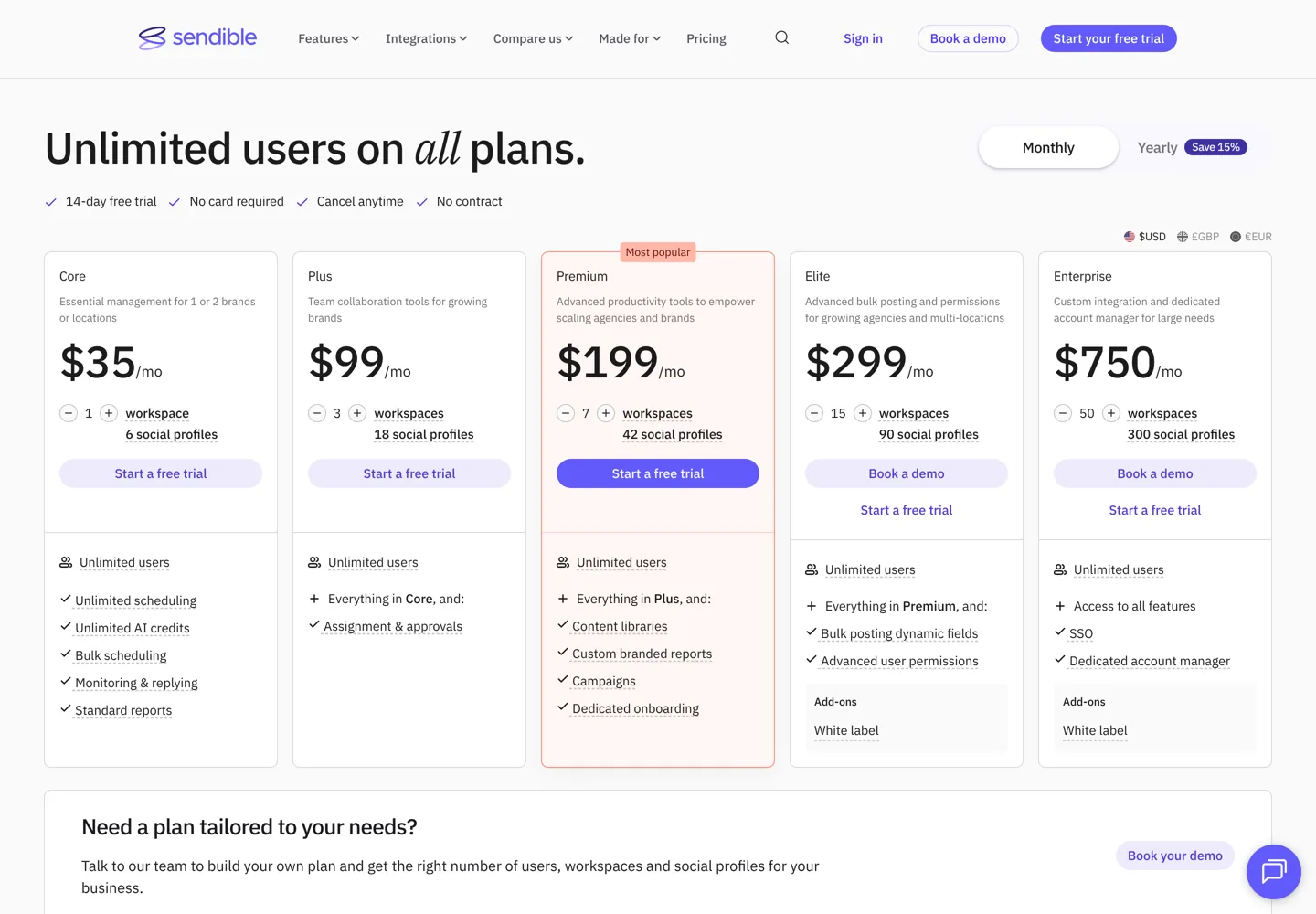
| Sendible | No | $35 a month | 14 days, no card | Agencies with many clients |
| Hootsuite | No | $99 per user a month (billed yearly) | 14 days, no card | Teams with a social inbox |
| Sprout Social | No | $99 per seat a month | 30 days, no card | Larger marketing teams |
US prices from each company’s pricing page when this guide was updated. Yearly billing is cheaper on every paid app; the yearly prices are below.

How auto-posting to Instagram works
Instagram allows approved apps to publish to professional accounts, meaning business or creator accounts. A personal account can’t be auto-posted to, so the first step is switching your account type in Instagram’s settings, which is free and takes a minute. Later’s pricing page, for example, says its auto publish works for Instagram business and creator accounts.
Most schedulers then offer two ways to post:
- Auto-publish: the app posts for you at the scheduled time. This suits feed posts, carousels, Reels and Stories where you’ve finished everything in the app.
- Notification publishing: the app sends a reminder to your phone at the right time, then opens the post in Instagram so you can add things only the Instagram app can, such as trending music or stickers, and publish it yourself. Later and Buffer both offer this.

Meta Business Suite: the free option from Instagram’s owner
Meta Business Suite is Meta’s free tool for managing a Facebook Page and its connected Instagram account. Meta describes it as free on desktop and in its mobile app, with a planner to create and schedule Facebook and Instagram posts, insights, one inbox for messages, and quick ads. If you post to one Instagram account and one Facebook Page, it does the basic job without any extra app or bill.
What it doesn’t offer is everything around the post: a visual grid planner, a link-in-bio page, posting to TikTok, LinkedIn or Pinterest from the same place, or approvals for a client. That’s where the paid schedulers come in. If you haven’t set up a Page yet, see how to create a Facebook business page.
Buffer
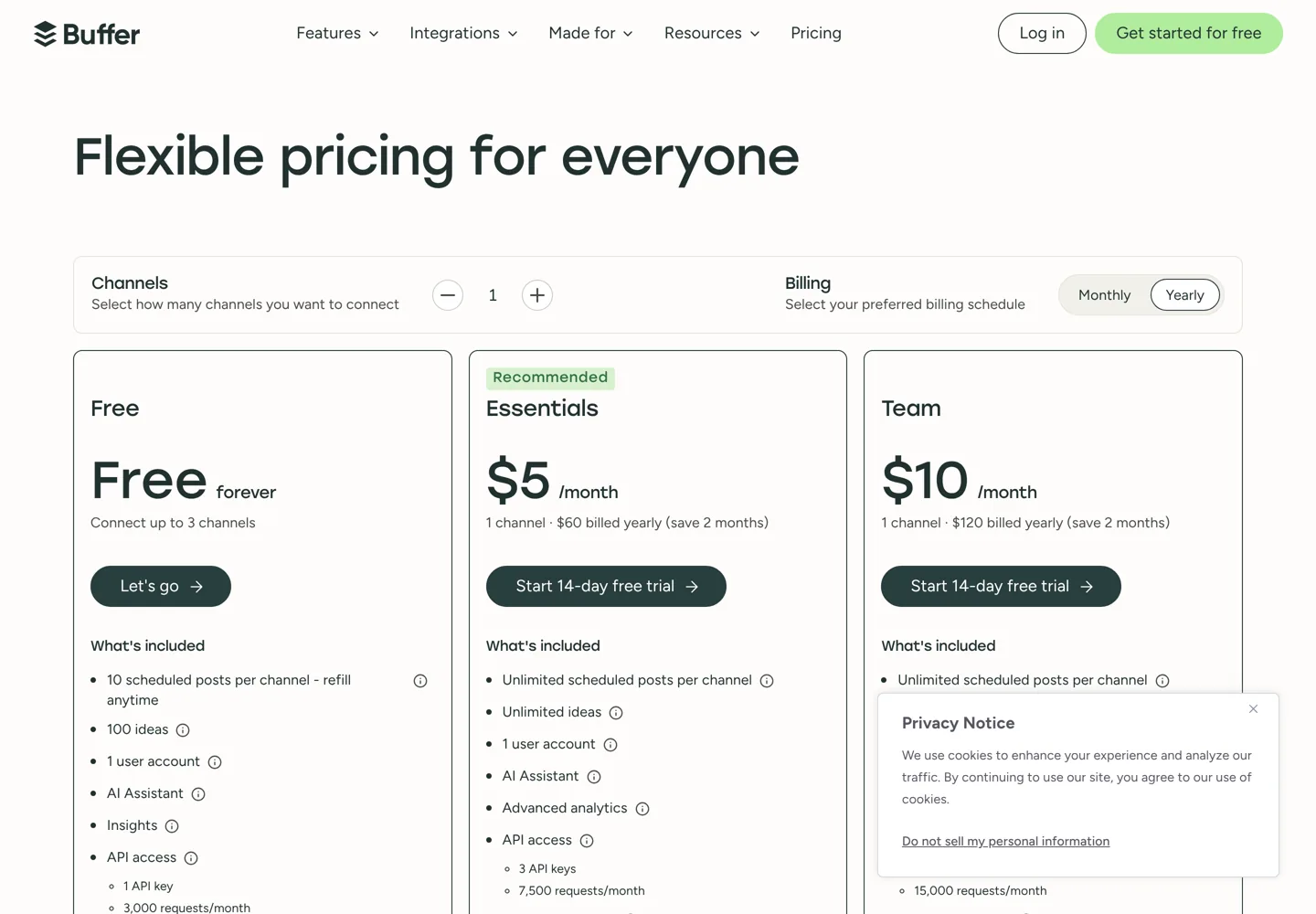
Buffer is the simplest paid choice and has the most useful free plan. Its Instagram page says you can set posts, Stories and Reels to auto-publish, or get notifications to post at the right time.
- Free: up to 3 channels, 10 scheduled posts per channel at any one time (once one is published, you can add another), 100 ideas, 1 user and 30 days of insights.
- Essentials: $6 a month per channel billed monthly, or $5 billed yearly (about 2 months free). Unlimited scheduled posts, advanced analytics, a hashtag manager and first comment scheduling for Instagram.
- Team: $12 a month per channel monthly, or $10 yearly. Adds unlimited team members, access levels and approval workflows.
Buffer’s price per channel falls as you add more (for 11 to 25 channels, Essentials is $4 each). Both paid plans start with a 14-day free trial. Buffer’s pricing page opens with yearly billing selected, so the first price you see is the yearly one.
Metricool
Metricool combines scheduling with analytics and competitor tracking, and has a real free plan.
- Free: 1 brand (its social networks except LinkedIn and X), up to 20 scheduled posts a month, 5 competitor profiles and 30 days of analytics.
- Starter: from $25 a month billed monthly ($20 billed yearly) for up to 5 brands, or $45 ($36 yearly) for up to 10. Unlimited publishing, analytics with unlimited history, PDF reports and multiple link-in-bio pages.
- Advanced: from $67 a month monthly ($53 yearly) for up to 15 brands, adding team and client management, roles and a post approval system.
Metricool says annual billing saves up to 24%. It’s a good fit if you want to see which posts work as well as schedule them.
Later
Later started as an Instagram planner and is still built around visual planning. Plans cover a “social set”: one profile each on Instagram, Facebook, TikTok, Pinterest, LinkedIn, YouTube, Threads and Snapchat.
| Plan | Monthly | Billed yearly | What’s included |
|---|---|---|---|
| Starter | $25/month | $18.75/month | 1 social set, 1 user, 30 posts per profile a month, Link in Bio |
| Growth | $50/month | $37.50/month | 2 social sets, 2 users, 180 posts per profile, approvals, social inbox |
| Scale | $110/month | $82.50/month | 6 social sets, 4 users, unlimited posts, competitive benchmarking |
Later’s pricing page opens with yearly billing, which it describes as 3 months free (25% off). Every plan has a 14-day free trial; there’s no free plan on the pricing page. Post counts include Reels, Stories and carousels and are counted when you schedule them.

Planoly
Planoly says it invented grid planning: you preview how your Instagram feed will look and rearrange posts until it’s right, with a calendar that also covers TikTok, LinkedIn, Facebook, YouTube, Threads and Pinterest. Plans start at $14 a month for Starter (1 social set, 1 user), then $24 for Growth (2 social sets, 2 users) and $47 for Pro (6 social sets, 6 users), each with unlimited uploads, a free link-in-bio page and automated Instagram DMs. Annual plans, billed upfront, save up to 15%, and every paid plan has a 14-day free trial. A free plan in the Planoly mobile app includes 10 uploads a month.
Sendible
Sendible is made for agencies and businesses managing several brands, and every plan includes unlimited users.
- Core: $35 a month ($30 billed yearly) for 1 workspace and 6 social profiles, with unlimited scheduling and bulk scheduling.
- Plus: $99 a month for 3 workspaces and 18 profiles, with team collaboration tools.
- Premium: $199 a month for 7 workspaces and 42 profiles. Elite ($299, 90 profiles) and Enterprise ($750, 300 profiles) go further.
Yearly billing saves 15%, and the 14-day free trial doesn’t need a card.
Hootsuite
Hootsuite is one of the oldest social media managers. Its plans are Standard (up to 10 social accounts from one calendar, unlimited scheduled posts), Professional (unlimited social accounts and automated inbox replies), Advanced (team approvals and message routing) and Enterprise. Each paid plan has a 14-day free trial without a credit card, though Hootsuite says trial accounts have daily posting limits of 10 to 20 posts and no bulk scheduling. Hootsuite’s plans page lists Standard at $99, Professional at $199 and Advanced at $399 per user a month, billed annually; Enterprise is priced on request.
Sprout Social
Sprout Social is built for marketing teams that need a shared inbox, reporting and approvals more than a cheap scheduler. Prices are per seat (per user): Essentials is $99 a month billed monthly ($79 billed yearly) for up to 5 profiles, Standard $249 ($199), Professional $399 ($299) and Advanced $499 ($399). It has a 30-day free trial without a credit card, the longest here.
What to look for in an Instagram scheduler
- Post types: make sure it can auto-publish the formats you use most (feed posts, carousels, Reels and Stories), not just single images.
- Post limits: free and entry plans cap posts. Buffer’s free plan holds 10 scheduled posts per channel at a time, Metricool’s free plan allows 20 a month, and Later’s Starter plan allows 30 per profile a month.
- How price grows: Buffer charges per channel, Later per social set, Sendible per bundle of profiles, and Hootsuite and Sprout Social per user. Work out the cost for the number of accounts and people you’ll really have.
- Extras you’d otherwise pay for: a link-in-bio page, analytics history, a first-comment option and approvals for a client or team.
- Monthly versus yearly: yearly saves 15% to 25% on these apps, but start monthly or on a free trial until you’re sure.
Which Instagram scheduler should you choose?
- One account, no budget: Meta Business Suite, or Buffer’s free plan if you also post elsewhere.
- A blogger or solo creator: Buffer Essentials for a few dollars per channel, or Metricool if you want analytics too.
- Visual planning and a link-in-bio page: Later or Planoly.
- An agency or several brands: Sendible or Metricool Advanced.
- A team that answers lots of messages: Hootsuite or Sprout Social.
Tips for scheduling Instagram posts
- Switch to a professional account first, or no app can auto-post for you.
- Use notifications for Reels with trending audio, since music and stickers are added in the Instagram app.
- Batch your content. Plan a week or a month at once, then spend the saved time replying to comments, which schedulers can’t do for you.
- Check your best times. Your own Instagram insights, or the best-time features in Later, Hootsuite and Sprout Social, show when your followers are online.
- Send people somewhere. Instagram captions don’t make links clickable, so a link-in-bio page (included with Later, Buffer and Metricool) is how a post sends traffic to your blog.
For more on turning followers into visitors, see how to increase Instagram engagement and drive traffic. Scheduling for X instead? See the best Twitter thread scheduler tools, and for Pinterest, ways to get more Pinterest followers.
Questions people ask
Can you auto post to Instagram?
Yes, if your account is a professional (business or creator) account. Meta Business Suite and apps such as Later, Buffer and Metricool can then publish posts, carousels, Reels and Stories at the time you schedule.
What is the best free Instagram scheduler?
Meta Business Suite is free and made by Instagram's owner. Buffer's free plan covers 3 channels with 10 scheduled posts each, and Metricool's free plan allows 20 scheduled posts a month for one brand.
Can I schedule Instagram posts from a personal account?
Apps can't auto-publish to a personal account. Switch to a business or creator account in Instagram's settings first; it's free.
Can schedulers post Instagram Reels and Stories?
Yes. Buffer and Later, for example, can auto-publish Reels and Stories, or send you a reminder so you can add music or stickers in the Instagram app and post it yourself.
How much does Later cost?
Later's Starter plan is $25 a month billed monthly or $18.75 billed yearly, Growth is $50 or $37.50, and Scale is $110 or $82.50. Each starts with a 14-day free trial.
Is Hootsuite free?
No. Hootsuite has no free plan; Standard is $99 per user a month billed annually. Its paid plans start with a 14-day free trial without a credit card, with daily posting limits during the trial.
Sources
- Buffer pricing buffer.com · checked October 11, 2026
- Buffer pricing (machine-readable) buffer.com · checked October 11, 2026
- Buffer for Instagram buffer.com · checked October 11, 2026
- Later pricing later.com · checked October 11, 2026
- Metricool pricing metricool.com · checked October 11, 2026
- Sendible pricing www.sendible.com · checked October 11, 2026
- Hootsuite plans www.hootsuite.com · checked October 11, 2026
- Sprout Social pricing sproutsocial.com · checked October 11, 2026
- Set up a professional Instagram account (Instagram Help) help.instagram.com · checked October 11, 2026
- Planoly pricing www.planoly.com · checked October 11, 2026

Building websites since 2006: 500+ web projects of every size and $300K+ in website deals sold or brokered. Founder of A Digital Motive and DigiFlippers. I share the whole process here, plainly.
Founder of A Digital Motive and DigiFlippers