Some links on this page are affiliate links. If you buy through them I may earn a commission, at no extra cost to you. It never changes a rating. Read the disclosure
- WordHero's site now lives at aivolut.com/wordhero.
- Monthly prices: Starter $19, Pro $39, Business $79; yearly: $180, $348, $708.
- The 7-day trial needs a card; you're not charged if you cancel before day 7.
- Pro adds Articles, custom templates and Enhanced writing; Starter doesn't.
- WordHero says plainly it doesn't guarantee SEO rankings.
How WordHero scores
How I tested: Features, plans, prices (monthly and yearly toggles) and FAQ answers checked on WordHero's page at aivolut.com/wordhero on 11 October 2026; alternatives on their own pricing pages the same day. No new trial was run for this update. The rating is an editorial score from these checks (features, value, terms, fit for bloggers), not a hands-on test.
Who it’s for
This WordHero review looks at what the AI writing tool offers today, what each plan costs, and who it suits. WordHero has changed a lot since it launched: it’s now an “AI content workspace for marketers” that remembers your brand, audience and voice, and turns one brief into blog posts, ads, emails and social posts organised on a single Canvas. Its site now lives at aivolut.com/wordhero, alongside the other products of Aivolut.
Everything below comes from WordHero’s own product, pricing and FAQ page, checked on the date at the end. We didn’t run a new trial for this update, so there are no output samples or quality scores here, and no testimonials we can’t verify.
WordHero review at a glance
| What it is | An AI writing workspace for marketing content, with brand memory |
|---|---|
| Price | Starter $19, Pro $39, Business $79 a month; billed yearly, $15, $29 or $59 a month |
| Free trial | 7 days; a card is required, and you’re not charged if you cancel before day 7 |
| Languages | 108 |
| Best for | Solo marketers and small teams producing content across several channels |

What WordHero does
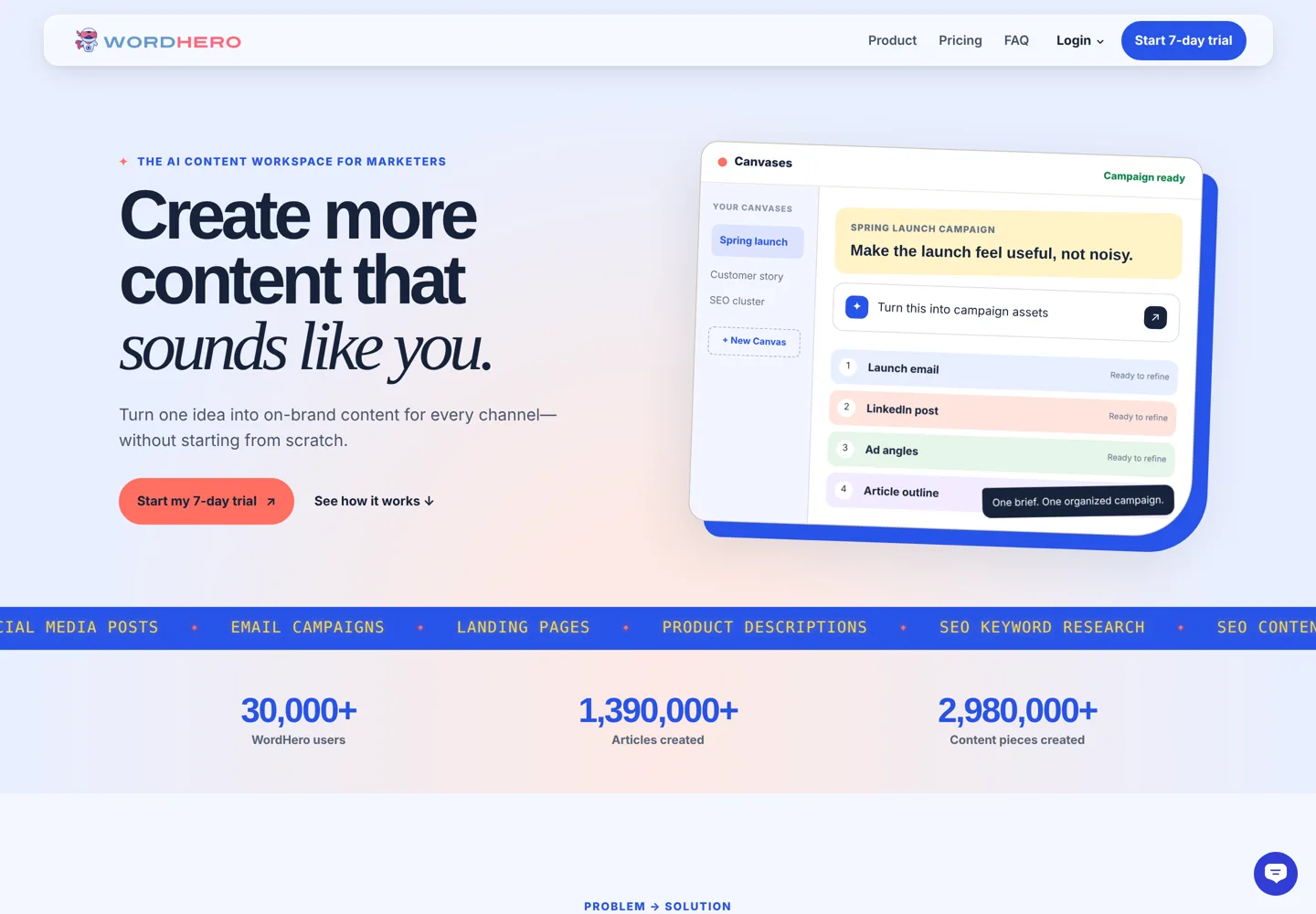
WordHero creates marketing content from a brief: blog posts, Facebook, Instagram, Google and LinkedIn ads, social posts, email campaigns, landing pages, product descriptions and meta descriptions, plus SEO keyword research, SEO content briefs and AI images. It writes in 108 languages and can prepare WordPress drafts. WordHero says it has more than 30,000 users, who have created more than 1.39 million articles and 2.98 million pieces of content.
The main ideas behind the current version:
- Projects and Project Memory: save your audience, offer, proof points and tone once, so you don’t repeat them in every prompt.
- Brand Voices: keep copy sounding like your brand across channels.
- Canvases: one brief becomes a set of campaign assets (for example a launch email, a LinkedIn post, ad angles and an article outline) kept together and ready to refine.
- Custom templates: save workflows you repeat.
- Articles: from a keyword to a brief, title, outline, full draft and featured image, then a WordPress draft for your final review.
What you can create with WordHero
| Channel | Content types |
|---|---|
| Website and blog | Blog posts, landing pages, product descriptions, meta descriptions, SEO content briefs |
| Ads | Facebook, Instagram, Google and LinkedIn ads |
| Social and email | Social media posts, email campaigns |
| Research and visuals | SEO keyword research, AI images |
A typical blogging workflow in WordHero
- Set up a project for your blog, with Project Memory describing your readers and a brand voice built from your best posts.
- Research a topic with Keyword Research and choose one with clear intent.
- Create the article in Articles: brief, title, outline, full draft and a featured image.
- Edit it yourself: add first-hand experience, check every fact and link, and cut anything generic.
- Send it to WordPress as a draft, review the formatting and publish.
- Repurpose it on a Canvas into a newsletter email and social posts in the same voice.
On Pro, that workflow fits within 100 keyword searches and 100 image credits a month, which is plenty for most solo bloggers publishing a few posts a week.
WordHero pricing
| Plan | Monthly | Billed yearly | Includes |
|---|---|---|---|
| Starter | $19/month | $180/year ($15/month, save $48) | Unlimited fair-use Standard writing; 1 project and 1 brand voice; 20 keyword searches and 20 image credits a month |
| Pro | $39/month | $348/year ($29/month, save $120) | 3 projects and 5 brand voices; Enhanced AI usage, Articles and custom templates; 100 keyword searches and 100 image credits a month |
| Business | $79/month | $708/year ($59/month, save $240) | 10 projects and 20 brand voices; advanced workflows, 500 keyword searches and 900 image credits; up to 3 invited team members |
From WordHero’s pricing section, checked 11 October 2026. The page opens on yearly billing, which saves up to 25%.
Every plan starts with a 7-day trial. WordHero says a card is required, and that you won’t be charged if you cancel before day 7, so set a reminder if you’re only testing.
Which WordHero plan do you need?
- Starter ($19 a month, or $15 billed yearly) works if you mostly write shorter marketing copy (posts, ads, emails) for one brand. You get unlimited fair-use Standard writing but only one project and one brand voice, 20 keyword searches and 20 images a month, and no Articles workflow.
- Pro ($39 a month, or $29 billed yearly) is the plan for bloggers: Articles, custom templates and Enhanced writing, with 3 projects and 5 brand voices for several sites or clients.
- Business ($79 a month, or $59 billed yearly) suits a small team or agency: 10 projects, 20 brand voices, 500 keyword searches, 900 image credits and up to 3 invited members.
On yearly billing, Pro costs $348 a year instead of $468 paid monthly, a saving of $120. If you’re unsure, pay monthly after the trial, then switch to yearly once you know you’ll keep it.
Standard vs Enhanced writing
WordHero splits AI use into two levels. Standard writing covers normal, human-led content work with unlimited fair use on every plan. Enhanced writing uses extra AI capacity for more demanding tasks, with an allowance that depends on your plan; Starter doesn’t list it, while Pro and Business include it. If you plan to write long articles with the Articles workflow, Pro is the realistic starting point.
What about the old lifetime deal?
WordHero was once known for lifetime deals, and the earlier version of this page promoted one. Today WordHero’s site lists only monthly and yearly plans. For existing customers, its FAQ says to use the same email address and follow the migration guidance for your account, and that WordHero will communicate eligible access and next steps before a change affects you. If you bought a lifetime deal, check your account for what still applies.
WordHero vs ChatGPT
WordHero’s own answer: ChatGPT is a general-purpose assistant, while WordHero remembers your brand and keeps articles, ads, emails, images and other marketing content organised in one workflow. In practice, the difference is structure. A general assistant can write almost anything if you give it full context each time; WordHero stores that context in projects and brand voices, groups campaign assets on Canvases and connects keyword research to articles and WordPress drafts. If you mostly write one-off pieces, a general assistant may be enough; if you run repeat campaigns across channels, a structured workspace saves setup time.
SEO features and limits
WordHero’s Keyword Research finds topics, and the Articles workflow turns a topic into a brief, outline, draft and featured image, then a WordPress draft. WordHero is clear that it doesn’t guarantee rankings: its FAQ says rankings depend on many factors outside the product, including competition, site quality and distribution.
That matches Google’s guidance on helpful content, which rewards pages made primarily for people. AI drafts are a starting point: add your own experience, check facts, and edit for clarity before publishing. The keyword research guide and the WordPress SEO tutorial cover the parts a tool can’t do for you.

Using AI content responsibly
Google’s spam policies include “scaled content abuse”: producing many pages primarily to manipulate rankings rather than help people, however they’re made. AI tools make it easy to publish a lot quickly, which is exactly the risk. Use WordHero to speed up research and first drafts, not to flood your site with pages nobody needs. Keep a human editor on every piece, publish only what you’d stand behind, and be open with readers about how you create content if your audience expects it.
Who WordHero suits
- Solo marketers and small business owners who write content for several channels and want it consistent: Starter or Pro.
- Bloggers who want keyword research, outlines and drafts in one place, with WordPress drafts at the end: Pro.
- Small teams sharing brand context and workflows: Business, with up to 3 invited members.
It suits people less if they need long-form expert content with no editing, or a large team with advanced governance, where enterprise tools such as Jasper’s Business plan aim higher.
Before you start the free trial
- Plan what to test: one real blog post, one email and a set of social posts for your own brand.
- Set up Project Memory first, or you’ll be judging the tool on generic output.
- Put a reminder on day 5 or 6. The trial needs a card, and you’re only not charged if you cancel before day 7.
- Compare against your current process: time saved, editing needed and whether the voice sounds like you.
Questions to ask any AI writing tool
- Does it remember my brand, or do I re-explain it every time?
- What are the real limits: words, articles, images, keyword searches, team members?
- Does the trial need a card, and when does it charge?
- Can it connect to where I publish, such as WordPress?
- Does it make honest claims, or promise rankings it can’t control?
WordHero answers most of these clearly on its own page, which is a good sign in a market full of bold claims.
Using WordHero with a team
The Business plan lets you invite up to three team members and share projects, Project Memory and brand voices, so everyone writes from the same brief and tone. With 10 projects and 20 brand voices, it also suits a freelancer or small agency handling several clients, each with its own project. Larger teams that need many seats, approval workflows or admin controls will outgrow it; that’s where enterprise platforms aim.
How WordHero fits with your other tools
WordHero covers research, drafting and repurposing, but you’ll still want a few other tools around it. An SEO plugin on your site handles titles, descriptions and schema; a keyword or backlink tool helps you check competition beyond WordHero’s monthly keyword searches; and an image editor helps when AI images need adjusting. The best keyword research tools list compares the research side if you need more than WordHero includes.
WordHero pros and cons
Pros
- Affordable: from $19 a month, or $180 a year ($15 a month).
- Brand memory through projects and brand voices.
- Canvases keep a whole campaign’s assets together.
- Keyword research, articles and WordPress drafts connected.
- Writing in 108 languages, for content in other markets.
- Honest about SEO: no ranking guarantees.
Cons
- The trial needs a card, and you’re charged after 7 days unless you cancel.
- Starter has no Enhanced writing or Articles workflow.
- Keyword searches and image credits are capped by plan.
- Business allows only 3 invited team members.
- Lifetime-deal customers must follow migration guidance to keep access.
WordHero alternatives
- Jasper: Pro is $69 per seat a month, or $59 billed yearly, with a 7-day free trial; Business adds custom agents, API access and admin controls at custom pricing.
- Writecream: a free forever plan, then Unlimited at $29 a month for individuals and Pro Max at $49 a month with 5 seats.
- General assistants such as ChatGPT and Claude, if you’re comfortable providing context yourself each time.
For a side-by-side decision, see WordHero vs Jasper vs Writecream.
How to get the most from WordHero
- Fill in Project Memory properly: audience, offer, proof and tone. Better context means less editing.
- Create a brand voice from examples of your best writing.
- Use a Canvas per campaign so related assets stay consistent.
- Start long articles from real keyword research, then edit the draft with your own knowledge and examples.
- Review every WordPress draft before publishing: check facts, links and formatting.
Is WordHero worth it? The verdict
WordHero is a well-priced AI workspace for marketers who produce content across several channels and want it to stay on-brand. At $39 a month, or $29 billed yearly, Pro is the plan most bloggers and marketers will want, because it adds Articles, custom templates and Enhanced writing. It isn’t a replacement for your own expertise: treat its drafts as a fast first version, and remember the 7-day trial needs a card and renews unless you cancel. If you only need occasional one-off pieces, a general AI assistant may be all you need; if you write every week across several channels, the trial is worth a proper test with your own content.
Pros and cons
- Brand memoryProjects, Project Memory and Brand Voices keep content consistent.
- Campaigns in one placeCanvases turn one brief into several connected assets.
- Blog workflowKeyword research, articles and WordPress drafts connected on Pro.
- Honest claimsNo ranking guarantees; clear plan limits.
- Card for the trialYou're charged after 7 days unless you cancel.
- Starter is limitedNo Articles workflow or Enhanced writing on Starter.
- Capped extrasKeyword searches and image credits are limited by plan.
- Small team limitBusiness allows up to 3 invited members.
WordHero vs alternatives
| Tool | Main job | Best for | My rating |
|---|---|---|---|
WordHero | Solo marketers, bloggers and small teams writing for several channels | 3.9/5 | |
Jasper | AI marketing platform for teams | Brand control at scale | Review coming |
Writecream | Budget AI writer with a free plan | Low cost and unlimited words | Review coming |
ChatGPT | General AI assistant | One-off writing tasks | Review coming |
Have you used WordHero? Rate it
No reader ratings yet. Be the first.
Questions people ask
How much does WordHero cost?
Starter is $19, Pro $39 and Business $79 a month on monthly billing. Billed yearly they're $180, $348 and $708 a year ($15, $29 and $59 a month).
Does WordHero have a free trial?
Yes, 7 days on every plan. WordHero says a card is required and you won't be charged if you cancel before day 7.
Is WordHero better than ChatGPT?
For repeat marketing work, WordHero's brand memory, Canvases and keyword-to-WordPress workflow save setup time. For one-off tasks, a general assistant like ChatGPT can be enough.
Does WordHero still offer a lifetime deal?
Its site lists only monthly and yearly plans. Existing customers are asked to use the same email and follow the migration guidance for their account.
Can WordHero write SEO articles?
Yes. Pro includes Articles, which turns a keyword into a brief, outline, draft and featured image, and can prepare a WordPress draft. WordHero says it doesn't guarantee rankings.
How many languages does WordHero support?
WordHero says it writes in 108 languages.
Sources
- WordHero (Aivolut) aivolut.com · checked October 11, 2026
- Jasper pricing www.jasper.ai · checked October 11, 2026
- Writecream www.writecream.com · checked October 11, 2026
- Spam policies for Google web search (scaled content abuse) developers.google.com · checked October 11, 2026

Building websites since 2006: 500+ web projects of every size and $300K+ in website deals sold or brokered. Founder of A Digital Motive and DigiFlippers. I share the whole process here, plainly.
Founder of A Digital Motive and DigiFlippers