- JustDeleteMe links straight to each service's deletion page.
- Difficulty runs from easy (a button) to impossible.
- Download your data first; Just Get My Data helps.
- Close your main email account last.
- In the UK, organisations normally have a month to answer erasure requests.
JustDeleteMe is a free directory of direct links to the account deletion pages of web services, from big social networks to small apps. Search for a service, check its colour-coded difficulty (easy, medium, hard, limited availability or impossible), read the short instructions, and follow the link straight to the right page. It’s maintained by volunteers on GitHub and lists around 2,600 services. This guide shows how to use JustDeleteMe to clean up old accounts safely: what to download first, the order to delete in, and your legal right to ask for data deletion, checked on 12 October 2026.
Building a brand and need a name that’s free everywhere? Our guide to username availability checkers covers claiming accounts. This page is about closing the ones you no longer need.

Why delete old accounts at all?
Every account you’ve stopped using still holds something: an email address, a password, perhaps your address, payment details or old posts. If that service is breached, the data can leak even though you haven’t logged in for years, and a reused password can open other accounts too. Have I Been Pwned lets you check whether your email address appears in a known data breach, which is often the push people need to tidy up. Fewer accounts means fewer places for your data to leak from, and fewer passwords to manage.
For bloggers and online business owners there’s a second reason: old profiles under your name or brand can confuse readers and clients. Closing the ones you won’t maintain keeps your public presence clean and consistent. For a profile you’ll keep, such as a Facebook Page, our guide to setting up a Facebook business Page covers the settings worth checking.
What JustDeleteMe is
JustDeleteMe describes itself as “a directory of direct links to delete your account from web services”. Rather than hunting through settings menus or help centres, you find the service in the list and click straight through to its deletion page or instructions. The project is open source under the MIT License, hosted on GitHub, where hundreds of contributors add and update entries; when we checked, the most recent change was two days old.
The site also links to a Chrome and Firefox extension, an unofficial Android app, and a sister directory, Just Get My Data, which lists links to download your data from web services, useful before you delete anything.
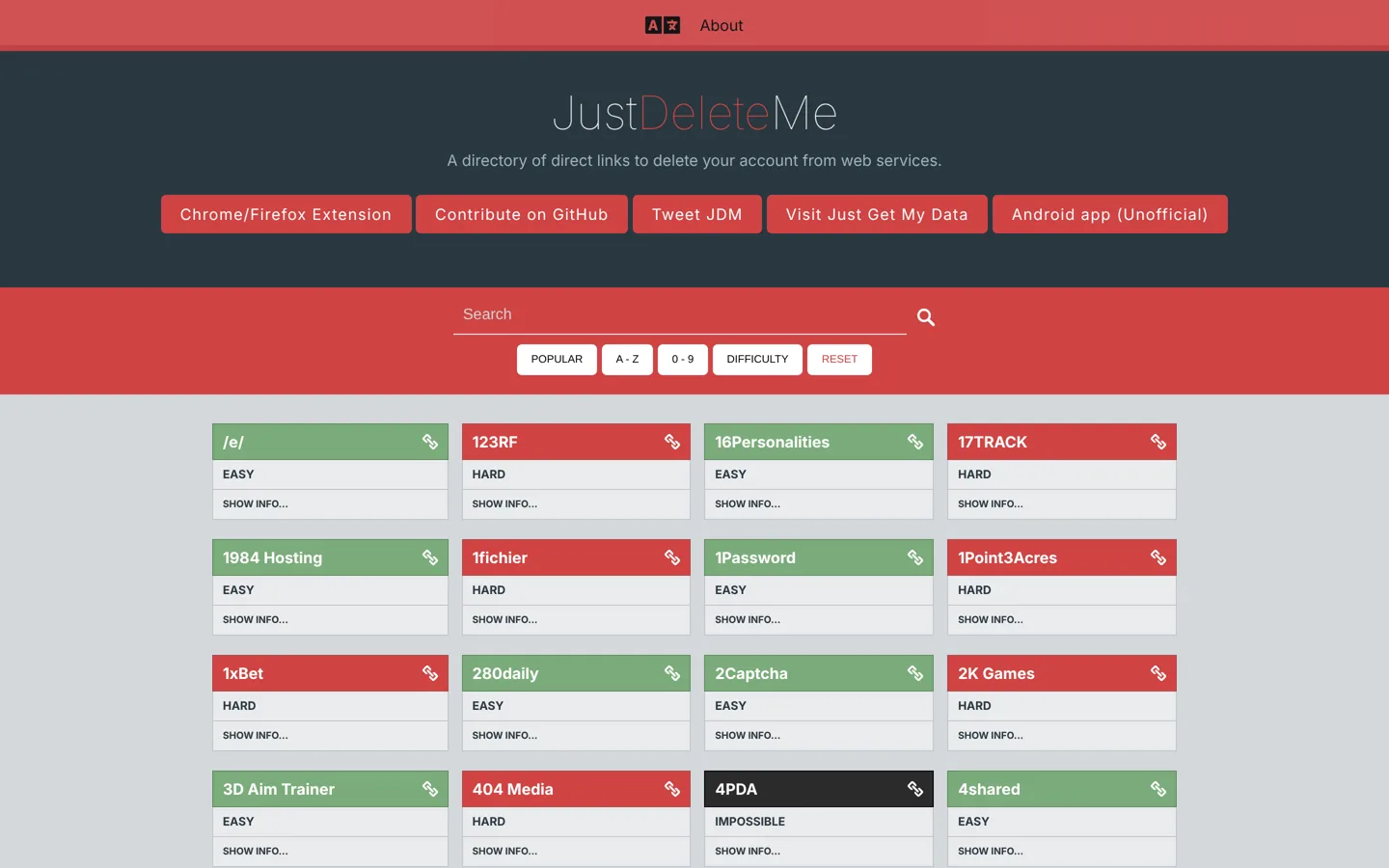
The difficulty colours explained

Each entry has a difficulty label, and JustDeleteMe explains what each one means:
- Easy: a simple process, usually a button in your account settings.
- Medium: some extra steps involved, such as confirming by email or waiting for a period.
- Hard: the account can’t be fully deleted without contacting customer services.
- Limited availability: the account can only be deleted if you live in a location with privacy rights.
- Impossible: the account can’t be deleted.
Click Show info on an entry to see the short instructions contributors have written, for example which menu to use or which email address to write to. You can sort the list by popularity, alphabetically or by difficulty, and search for a service by name.
How to use JustDeleteMe, step by step
- List your accounts. Your password manager, the “Sign in with Google” or “Sign in with Apple” connections in those accounts’ settings, and a search of your email for “welcome” or “verify your email” will turn up most of them.
- Download anything you want to keep. Check Just Get My Data for the service’s export page, or the service’s own download option.
- Search JustDeleteMe for the service and read its difficulty and instructions.
- Follow the link, sign in, and complete the deletion. For hard entries, send the request the instructions describe and keep a copy.
- Confirm it worked. Watch for a confirmation email, and try signing in again after any waiting period has passed.
- Remove the saved login from your password manager, and update any service that used that email address.
Back up before you delete
Deletion is usually permanent once any waiting period ends. Google’s help centre, for example, says that deleting a Google Account means losing “all the data and content in that account, like emails, files, calendars, and photos”, along with purchases on YouTube or Google Play. It recommends reviewing and downloading your data first, adding a new email address to banking, social media and apps that use your Gmail address, and updating your recovery information. Google’s download tool (Google Takeout) can take “from a few minutes to a few days” to prepare an archive, though Google says most people get the link the same day.
The same habits apply to any service: export posts, photos, invoices and messages you’ll need, and move any logins that depend on the account before you close it.
Which accounts to delete first
- Accounts in a known breach, especially where you reused a password. Change that password everywhere else too.
- Shopping and payment accounts with saved cards or addresses you no longer use.
- Old social profiles under your name or brand that you won’t keep up.
- Forums, newsletters and app trials you signed up for once and forgot.
Leave your main email account until last. Many other accounts send their deletion confirmations and password resets there, so closing it early can lock you out of the rest.
When a service won’t delete your account
For entries marked hard, you’ll need to write to the company. If you’re in the UK, the Information Commissioner’s Office explains that the “right to erasure” lets you ask an organisation to delete data it holds about you, and in some circumstances it must. You can ask verbally or in writing (the ICO recommends following up in writing), the organisation normally has one calendar month to respond, and in most circumstances it can’t charge a fee. The right doesn’t apply in every case: an organisation can refuse, for example, where it must keep data for legal reasons or where an exemption applies. The ICO also notes this guidance is under review after the Data (Use and Access) Act. Other countries have their own rules; the “limited availability” label on JustDeleteMe shows where deletion depends on where you live.
Keep your request short: say which account (the email address or username), that you want the account and personal data deleted, and ask for confirmation when it’s done.
Business accounts need extra care
If you run a blog or small business, some old accounts are tied to money or other people. Before closing an affiliate programme, ad network, payment or hosting account, download your invoices and payment history for your tax records, make sure any balance has been paid out, and remove saved cards. If a social Page or ad account is shared with a client, partner or assistant, hand over ownership or remove your access rather than deleting something they still depend on. And if an account holds a username that matches your brand, consider keeping it, with a short note pointing to your website, so nobody else can claim the name.
Deleting vs deactivating
Many services offer to “deactivate” or “disable” an account instead of deleting it. That usually hides your profile but keeps your data, and signing in again may restore everything. If you want your data gone, look for the deletion option specifically. JustDeleteMe’s notes often point out where a service only disables accounts, which is one reason to read Show info before you start.
A 30-minute account clean-up
- 10 minutes: list accounts from your password manager and email search.
- 5 minutes: check your main email address on Have I Been Pwned.
- 15 minutes: delete the five easiest accounts you don’t need, using JustDeleteMe’s links, and note the hard ones for later.
Repeat once a quarter and the list shrinks quickly. Writing the requests for hard accounts is a good job for a quiet afternoon.
Keep the accounts you keep safe
- Use a password manager such as Bitwarden or 1Password and a unique password for every account; Have I Been Pwned gives the same advice.
- Turn on two-factor authentication wherever it’s offered, starting with email and banking.
- Use an email address you control for business accounts, ideally on your own domain.
- Review “Sign in with” connections in your Google, Apple or Facebook settings and remove apps you no longer use.
Helping improve the directory
JustDeleteMe is community-maintained, so entries can go out of date when a service changes its settings. If a link is broken or the steps have changed, the project’s GitHub page explains how to contribute a fix, and it welcomes translations too. Checking the date of a service’s own help page before you follow old instructions is a good habit either way.
Common mistakes
- Deleting before downloading photos, invoices or posts you’ll want later.
- Closing your main email first, then losing access to other accounts’ resets.
- Stopping at “deactivate” when you meant to delete.
- Forgetting the password manager entry, so the old account keeps appearing.
- Leaving paid subscriptions running: cancel any paid plan first, including ones billed through an app store, then delete the account.
- Following old instructions without checking the service’s current help page.
Tidying old accounts is part of running a professional online presence. For the bigger picture of a blog readers trust, see our good-blog checklist.
Questions people ask
What is JustDeleteMe?
A free directory of direct links to the account deletion pages of web services, with a difficulty level and short instructions for each. It's open source and maintained by volunteers on GitHub.
Is JustDeleteMe safe to use?
It's a list of links; you sign in and delete on each service's own site. Check that the page you land on belongs to the service before entering your password.
What do the colours on JustDeleteMe mean?
Easy is a simple process, medium involves extra steps, hard needs customer services, limited availability depends on privacy laws where you live, and impossible means the account can't be deleted.
What is the new JustDeleteMe address?
The directory is at justdeleteme.xyz. Its sister site, Just Get My Data, lists links to download your data.
Can a company refuse to delete my data?
Sometimes. In the UK, the ICO says the right to erasure applies only in certain circumstances, and organisations can refuse, for example, where an exemption applies. They normally have one month to respond.
Should I deactivate or delete?
Delete if you want the data gone. Deactivating usually hides your profile but keeps the data, and signing in may restore it.
Sources
- JustDeleteMe justdeleteme.xyz · checked October 12, 2026
- JustDeleteMe on GitHub github.com · checked October 12, 2026
- Just Get My Data justgetmydata.com · checked October 12, 2026
- Delete your Google Account (Google) support.google.com · checked October 12, 2026
- How to download your Google data (Google) support.google.com · checked October 12, 2026
- Have I Been Pwned haveibeenpwned.com · checked October 12, 2026
- Your right to get your data deleted (ICO) ico.org.uk · checked October 12, 2026

Building websites since 2006: 500+ web projects of every size and $300K+ in website deals sold or brokered. Founder of A Digital Motive and DigiFlippers. I share the whole process here, plainly.
Founder of A Digital Motive and DigiFlippers