- Know your reader in one sentence; it shapes every post.
- Google asks for complete, original content and says it has no preferred word count.
- Headlines should summarise, not exaggerate.
- Core Web Vitals targets: LCP 2.5 s, INP 200 ms, CLS 0.1.
- Change a post's date only when the content really changed.
What makes a good blog is that each post helps a specific reader do or understand something better than the alternatives, written by someone who clearly knows the topic, on a site that’s easy to read, quick to load and honest about who runs it. This guide turns that into a ten-point quality checklist, using Google’s own questions for helpful content, its Core Web Vitals thresholds and the accessibility guidelines web.dev cites, checked on 12 October 2026.
Starting from zero? Our guide on how to start a blog covers setup. For the SEO side of each page, use the on-page SEO checklist. This page is about quality.

What makes a good blog: 10 qualities
1. A clear reader and topic
Good blogs know who they’re for. “WordPress tips for small-business owners who run their own site” sets every choice: what to write, how technical to be, which tools to cover. If you can’t describe your reader in one sentence, readers can’t tell whether your blog is for them either.
2. Posts that fully answer one question
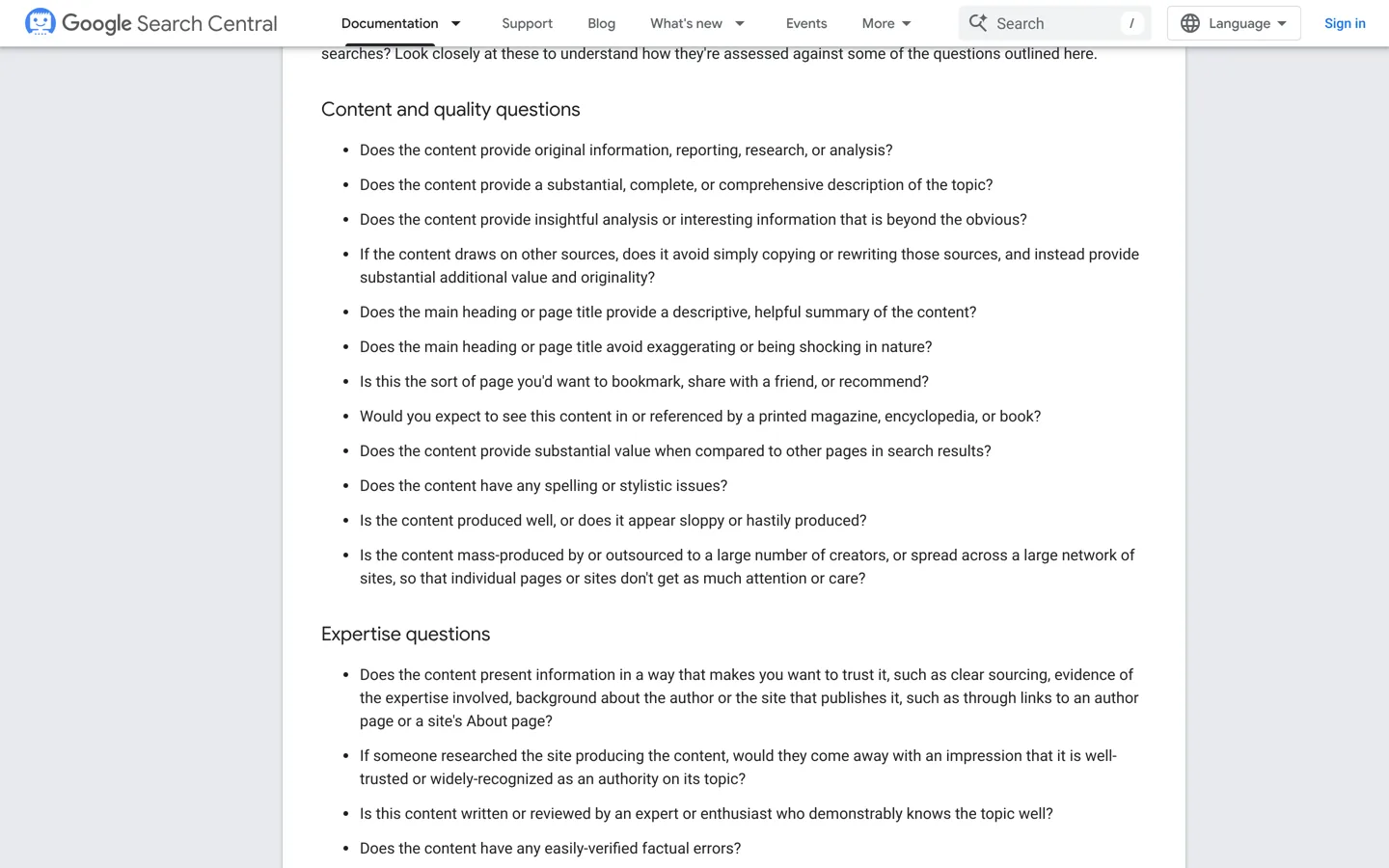
Google suggests asking whether content provides “a substantial, complete, or comprehensive description of the topic”. Each post should answer its question so well the reader doesn’t need to search again. That doesn’t mean long for its own sake: Google also asks whether you’re “writing to a particular word count because you’ve heard or read that Google has a preferred word count”, and says it doesn’t have one.
3. Something original
Google’s questions include whether content provides “original information, reporting, research, or analysis” and “insightful analysis or interesting information that is beyond the obvious”. On a blog that means your own tests, screenshots, results, mistakes and opinions: the things a reader can’t find on ten other pages.
4. Real expertise, shown
Google asks whether content demonstrates “first-hand expertise and a depth of knowledge (for example, expertise that comes from having actually used a product or service)”. Show it: explain how you tested something, show your own results, and say where your experience ends. Our SEO basics guide explains Google’s “who, how and why” questions in more detail.
5. Honest headlines
Google asks whether the main heading “provide[s] a descriptive, helpful summary of the content” and whether it avoids “exaggerating or being shocking in nature”. A headline that promises exactly what the post delivers earns trust, and readers who come back.
6. Easy to read
- Short paragraphs, clear headings and lists where readers scan.
- Plain words, defined the first time if they’re technical.
- No spelling or stylistic errors: Google lists “spelling or stylistic issues” among its quality questions.
- Readable text: web.dev notes that a contrast ratio of 4.5:1 is the minimum set by the Web Content Accessibility Guidelines for normal text.
7. Fast and stable pages
Google’s Core Web Vitals, explained on web.dev, give three targets for a good experience: Largest Contentful Paint within 2.5 seconds of the page starting to load, Interaction to Next Paint of 200 milliseconds or less, and Cumulative Layout Shift of 0.1 or less. In practice: a good host, compressed images, few plugins and no ads that push the text around as they load.
8. Clear about who runs it
Readers trust a blog when they can see who writes it and how it makes money. Add an About page with a real name and photo, author bios on posts, a contact page, and a clear disclosure wherever you use affiliate links or sponsorships.
9. Kept up to date
Prices, menus and features change. Review your most-read posts regularly, fix what’s out of date and note when you updated them. Google’s questions also warn against “changing the date of pages to make them seem fresh when the content has not substantially changed”, so only change the date when the content has really changed.
10. Built to help, not just to rank
Google’s final test is whether someone reading “will leave feeling like they’ve had a satisfying experience”. If a reader finishes your post and does what they came to do, the post is good, whatever its length or format.

A weak post and a good post, side by side
An illustration of the difference, using a post about choosing a password manager. The weak version opens with three paragraphs on why security matters, lists ten apps with descriptions copied from their websites, calls each one “amazing”, and ends without a recommendation. The good version answers in the first two sentences which manager suits which reader, compares four the writer actually used, shows screenshots of setting each one up, gives current prices checked on each official page with the date, says plainly what annoyed them about each, and recommends one for most people and one for families. Both might be the same length. Only one helps the reader decide.
Where SEO fits
Quality and SEO aren’t opposites. Google’s guidance says SEO, the work of helping search engines discover and understand your content, “can be a helpful activity when it is applied to people-first content, rather than search engine-first content”. Write the best answer for the reader first, then make sure search engines can find and read it: a clear title, descriptive headings, internal links and a fast page. The on-page SEO checklist covers those steps.
Accessibility basics
A good blog works for everyone, including readers using screen readers, keyboard navigation or zoom. A few habits cover most of it:
- Alt text that describes what each meaningful image shows.
- Headings in order (H2, then H3), so the structure makes sense when read aloud.
- Link text that says where it goes, not “click here”.
- Enough contrast, at least the 4.5:1 minimum web.dev cites from WCAG for normal text.
- Captions or transcripts for videos and audio.
Signs a blog post isn’t good enough yet
- It repeats what the top results already say, with nothing added.
- It has a long introduction before the answer.
- The headline promises more than the post delivers.
- Prices or steps are out of date.
- There’s no sign the writer has used, tested or seen what they describe.
- It’s hard to read on a phone, or slow to load there.
How to review an existing post
- Read it as the reader: search the post’s main question, then read your post first. Does it answer faster and better?
- Check the facts: prices, features and steps against the official source.
- Add your evidence: a screenshot, a result, a short note on how you tested.
- Tighten it: cut repetition, shorten the introduction, add headings.
- Check it on a phone and in a speed test.
- Update the date only if the content substantially changed.
Design that helps instead of distracting
A good blog design gets out of the way. Choose a clean, fast theme, a readable font size, enough space between lines and plenty of contrast. Keep the menu short: your main topics, About and Contact. Limit pop-ups and ads so the article stays the focus; Google’s own guidance warns that intrusive dialogs can make content hard to use. Our guide on choosing a blog theme covers the options.
A consistent publishing rhythm
Readers and search engines both notice a blog that’s looked after. Publish on a schedule you can keep (weekly, fortnightly or monthly) and keep your best older posts current. A smaller number of excellent, up-to-date posts helps readers more than a large archive of thin or outdated ones. When two old posts cover the same question, combine them into one better post and redirect the old address, so nobody lands on a page that’s gone.
Good blogs earn money without losing trust
Ads, affiliate links and sponsorships are normal on a blog, and readers accept them when they’re honest. Keep ads from crowding the text, recommend only what you’d recommend anyway, disclose affiliate links near the links themselves and label sponsored posts clearly. If a product doesn’t hold up, say so, even if it pays well. The blogs that keep readers for years are the ones whose recommendations keep working. Our guide to ways to earn money from a blog covers each income stream and how to keep it honest.
Learn from your readers
Your readers tell you what’s good, if you listen. Read every comment and email, note the questions people ask after reading a post, and add the answers to the post itself. Look at which posts readers spend the longest on and which they leave quickly. A short “Was this helpful?” question at the end of posts can show which ones need work.
Your good-blog checklist
- I can describe my reader in one sentence.
- Each post answers one question completely.
- Each post adds something original: a test, a result, an opinion.
- Headlines describe the post without exaggerating.
- Text is easy to read on a phone, with enough contrast.
- Pages load quickly and don’t jump around.
- Readers can see who writes the blog and how it earns money.
- My most-read posts have been reviewed recently.
- Every page works with a keyboard and a screen reader, with alt text and ordered headings.
Questions people ask
What makes a good blog?
A clear reader, posts that fully answer one question with something original, real expertise, honest headlines, readable text, fast pages, transparency about who runs it, and regular updates.
How long should a blog post be?
As long as it takes to answer the question completely. Google says it doesn't have a preferred word count.
What does Google consider helpful content?
Google's questions include whether content provides original information or analysis, a complete description of the topic, first-hand expertise, and a descriptive headline that doesn't exaggerate.
How fast should a blog load?
web.dev's Core Web Vitals targets are Largest Contentful Paint within 2.5 seconds, Interaction to Next Paint of 200 milliseconds or less and Cumulative Layout Shift of 0.1 or less.
Should I update old blog posts?
Yes, especially your most-read ones. Fix outdated facts and add evidence, and change the date only when the content substantially changed, as Google advises.
What contrast should blog text have?
web.dev notes that 4.5:1 is the minimum contrast ratio set by WCAG for normal text.
Sources
- Creating helpful, reliable, people-first content (Google) developers.google.com · checked October 12, 2026
- Web Vitals (web.dev) web.dev · checked October 12, 2026
- Color and contrast accessibility (web.dev) web.dev · checked October 12, 2026
- Avoid intrusive interstitials and dialogs (Google) developers.google.com · checked October 12, 2026

Building websites since 2006: 500+ web projects of every size and $300K+ in website deals sold or brokered. Founder of A Digital Motive and DigiFlippers. I share the whole process here, plainly.
Founder of A Digital Motive and DigiFlippers