- Mailchimp's policy lists affiliate marketing among businesses it may not allow.
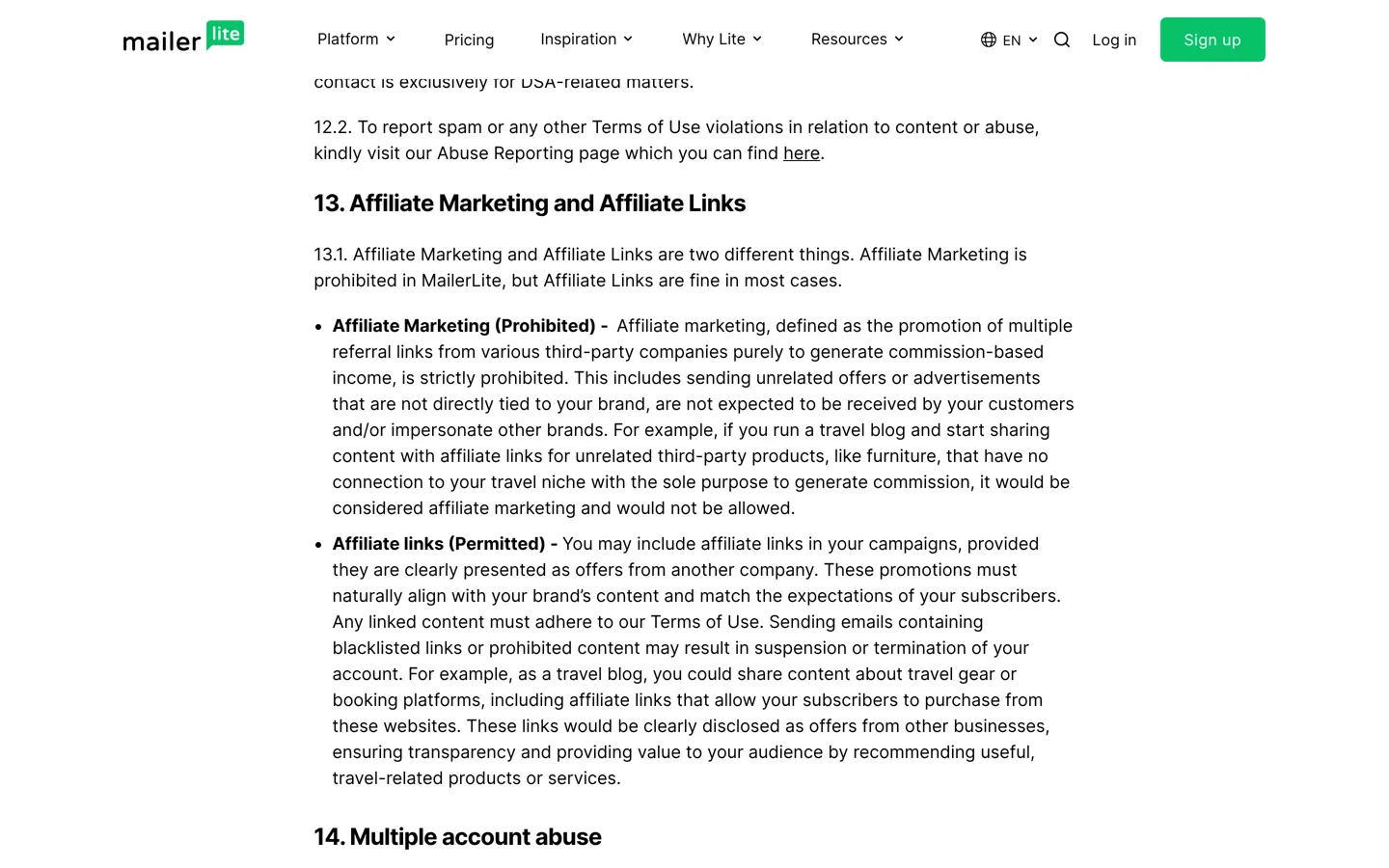
- MailerLite allows affiliate links that fit your brand but bans affiliate marketing.
- beehiiv allows occasional affiliate links, not content made mainly for them.
- Amazon allows its links in email only to people who opted in.
- One idea, one recommendation and a disclosure next to the link per issue.
An affiliate newsletter is an email you send to people who chose to hear from you, recommending products with affiliate links where they genuinely help. It works when three things line up: an email provider that allows the links, programme terms that allow them in email, and issues built around one useful recommendation with a clear disclosure. This guide covers the rules from the providers’ and programmes’ own terms, checked on 12 October 2026, and the parts of an issue that earn trust and clicks.
Still building your list? Our guide to getting your first 1,000 email subscribers covers sign-ups. This page is about what you send them.

First, check your email provider’s rules
Email providers protect their sending reputation, so several restrict affiliate content. Read your provider’s terms before you plan an affiliate newsletter:
- Mailchimp‘s Acceptable Use Policy lists “Affiliate marketing” among the industries with higher-than-average abuse complaints whose businesses it “may not allow”.
- MailerLite‘s terms (updated 22 September 2026) separate the two clearly: “Affiliate Marketing is prohibited in MailerLite, but Affiliate Links are fine in most cases.” It defines the banned kind as promoting many third-party referral links purely to earn commission, such as a travel blog sending unrelated furniture offers. Affiliate links are allowed when they’re clearly presented as offers from another company and match your brand’s content and subscribers’ expectations.
- beehiiv‘s Acceptable Use Policy says “the occasional use of affiliate links is allowed”, but content created primarily for affiliate marketing is not, including “excessive or manipulative use of affiliate links solely for revenue generation, without adding genuine value”.
The pattern is the same everywhere: a newsletter about your topic that sometimes recommends a relevant product is fine; a stream of offers is not. Other providers, such as Kit, have their own terms, so check the current version for the one you use.
Then check each programme’s email rules
Affiliate programmes set their own rules for email, and they differ. Amazon Associates is a good example of why you should read them. Its programme policies say you may include its links in emails, SMS and direct messages from your social media sites only when the communications are solicited (opted into by the recipient), and that you’re the legal “Sender” under laws such as the US CAN-SPAM Act. Its trademark guidelines also don’t allow Amazon’s marks in offline material or email. Because those rules are narrow, many newsletter writers link to their own review page instead of directly to the store.
Every other programme has its own terms, so read the section on promotion methods for each one you plan to mention. If the terms don’t mention email, ask the affiliate manager in writing before you send.
The 5 parts of an affiliate newsletter that converts

1. A subject line that matches the email
Say what’s inside: “The free tool I use to check broken links” sets an honest expectation; “You won’t believe this” doesn’t. A subject that over-promises gets opened once and trusted less next time.
2. One useful idea, then one recommendation
Lead with something worth reading on its own: a tip, a short lesson from your own work, an answer to a reader’s question. Then recommend the one product that helps with it. One recommendation per issue keeps the email focused and makes the link the natural next step, not an interruption.
3. Proof from your own use
Explain why you recommend it: what you used it for, what changed, and what it doesn’t do well. A screenshot of your own result or a one-line limitation (“it’s overkill if you only have one site”) makes the recommendation believable.
4. A disclosure next to the link
Tell subscribers you may earn from the link, near the link itself, in plain words: “This is an affiliate link: I earn a commission if you buy, at no extra cost to you.” Add any wording a programme requires. MailerLite’s terms also ask that affiliate links be clearly presented as offers from another company.
5. One clear link and an easy way out
Use one obvious link or button with an honest label, such as “See the plans on the official site”. Every marketing email also needs a working unsubscribe link: MailerLite requires a clear, visible one in each newsletter, and Mailchimp’s policy forbids sending marketing emails without its own unsubscribe mechanism.
Link to your review, or straight to the merchant?
Sending subscribers to your own review page has real advantages. It’s safer where programmes restrict links in email, the page explains the product fully, and it can carry an up-to-date price, comparison and disclosure. Linking straight to the merchant is one click shorter, but only do it where the programme and your provider allow it. For most affiliate newsletters, a short pitch in the email and the full case on your site work best.
How often to recommend something
There’s no proven ratio, so use your subscribers’ reactions as the guide. If most issues help without selling, the occasional recommendation feels like advice. Watch for warning signs after a promotional issue: more unsubscribes or spam complaints than usual mean you’re recommending too often, or the product didn’t fit the list.
Write the recommendation paragraph
The paragraph that carries the link does most of the work. Keep it short and specific: who the product is for, the one problem it solved for you, what it costs or whether there’s a free plan, and one honest limitation. Then the disclosure and the link. If you’d need more than a paragraph to make the case, that’s a sign the full case belongs in a review on your site, with the email pointing there. The same principles that make an affiliate page helpful apply here; our guide on how to start affiliate marketing explains them.
How the newsletter and your site work together
Your site and your newsletter do different jobs. The site answers searches and holds the full reviews and comparisons; the newsletter brings readers back and points them to the right page at the right time. Keep the affiliate links on your site in one place, with a link manager, so a link you send today still works when someone opens an old email next year. Our guide to affiliate marketing with WordPress shows that setup, and our overview of ways to earn money from a blog shows where email fits alongside ads, products and sponsorships.
Measure what each issue earns
- Clicks per issue: your provider’s report shows which links were clicked.
- Sales per programme: the programme’s dashboard shows commissions. Some programmes let you add a sub-ID or tracking label to a link; use one for email so you can tell those sales apart.
- Unsubscribes and complaints: compare promotional issues with regular ones.
A recommendation with many clicks and few sales usually points to a mismatch between the email’s promise and the product page.
An example issue, start to finish
Here’s an illustration of the structure, not a real campaign. Subject: “How I find broken links in five minutes”. The email opens with the problem: an old post’s “check price” button had pointed to a dead page for months. It explains the quick check you now run every month, step by step. Then one paragraph recommends the link checker you use, with what it costs and what it misses, followed by the disclosure and one button to your review. It closes with a question for readers to reply to. The tip is useful even to readers who never click.
Welcome emails: the best place for a first recommendation
New subscribers are most interested in the days after they join. A short welcome series (a few emails over the first week or two) can introduce who you are, deliver what they signed up for and, in one of the later emails, recommend the tool or resource you’d suggest to any beginner in your topic. Write it once, set it to send automatically, and review it every few months so prices and links stay current. Check its click and unsubscribe numbers at each review, and rewrite any email that loses more readers than it helps.
Mistakes that hurt an affiliate newsletter
- Sending to people who didn’t opt in. Programmes such as Amazon only allow links in solicited messages, and providers require evidence of consent: Mailchimp asks that you be able to point to an opt-in form or other evidence.
- Several unrelated offers in one email. That’s exactly what MailerLite describes as banned affiliate marketing.
- Hiding the disclosure at the bottom, after the link.
- Using a programme’s brand where its terms forbid it, such as Amazon’s marks in email.
- Recommending what you haven’t used. One bad recommendation costs more trust than a dozen good ones earn.
Before you hit send
- Your provider’s terms allow affiliate links in your kind of content.
- Each programme in the email allows email promotion.
- Every subscriber opted in.
- One idea, one recommendation, your own proof.
- A plain disclosure next to the link.
- One honest link label, and a working unsubscribe link.
Questions people ask
Can you put affiliate links in emails?
Often, yes, if both your email provider and the affiliate programme allow it and subscribers opted in. MailerLite and beehiiv allow relevant affiliate links; Mailchimp's policy lists affiliate marketing among businesses it may not allow.
Does Mailchimp allow affiliate links?
Mailchimp's Acceptable Use Policy lists 'Affiliate marketing' among industries with higher abuse complaints whose businesses it may not allow. Check its current policy before planning affiliate emails.
Can I use Amazon affiliate links in a newsletter?
Amazon's policies allow its links in emails, SMS and direct messages from your social media sites only when recipients opted in, and make you the legal sender. Many writers link to their own review page instead.
Do I need to disclose affiliate links in emails?
Yes. Put a plain disclosure next to the link and use any wording a programme requires. MailerLite also asks that affiliate links be clearly presented as offers from another company.
How often should I promote affiliate products by email?
There's no proven ratio. Keep most issues useful without selling, and watch unsubscribes and complaints after promotional issues.
Which email provider is best for affiliate newsletters?
One whose terms allow affiliate links in your kind of content. MailerLite and beehiiv state that relevant affiliate links are allowed; read the current terms of any provider before you choose.
Sources
- Mailchimp Acceptable Use Policy mailchimp.com · checked October 12, 2026
- MailerLite Terms of Use (section 13) www.mailerlite.com · checked October 12, 2026
- beehiiv Acceptable Use Policy www.beehiiv.com · checked October 12, 2026
- Amazon Associates Program Policies affiliate-program.amazon.com · checked October 12, 2026

Building websites since 2006: 500+ web projects of every size and $300K+ in website deals sold or brokered. Founder of A Digital Motive and DigiFlippers. I share the whole process here, plainly.
Founder of A Digital Motive and DigiFlippers