- Publishing plugins make your podcast feed; player plugins show a feed made by your host.
- Seriously Simple Podcasting leads with 30,000+ installs and says every feature is free.
- PowerPress supports several podcasts and Podcasting 2.0 features like transcripts and chapters.
- Podcast hosting starts at $7 a month (Blubrry); Buzzsprout has a limited free plan.
- Simple Podcast Press, Fusebox and Libsyn's plugin are no longer available on WordPress.org.
The best WordPress podcast plugins are Seriously Simple Podcasting and PowerPress if you want to publish your podcast feed from WordPress, and Podcast Player if your show is hosted elsewhere and you only want to play it on your site. This guide compares the main WordPress podcast plugins using each plugin’s real numbers from the WordPress.org directory (active installations, rating, last update, tested WordPress version), plus the podcast hosts they pair with and their prices, all checked on 12 October 2026.
Building a podcast site from scratch? Start with our WordPress guide for beginners; this page is about the podcast plugins only.

WordPress podcast plugins compared
| Plugin | Job | Active installs | Rating | Last updated |
|---|---|---|---|---|
| Seriously Simple Podcasting | Publish your feed | 30,000+ | 4.7 (329) | 12 Aug 2026 |
| PowerPress | Publish your feed | 20,000+ | 4.6 (231) | 1 Oct 2026 |
| Podcast Player | Play any feed | 10,000+ | 4.8 (113) | 1 Oct 2026 |
| Buzzsprout Podcasting | Embed a Buzzsprout show | 5,000+ | 5.0 (5) | 4 Sep 2026 |
| Podcast Importer SecondLine | Import episodes as posts | 4,000+ | 4.8 (13) | 21 Sep 2026 |
| Podcast Subscribe Buttons | Follow buttons | 4,000+ | 5.0 (11) | 13 Oct 2025 |
| Podlove Podcast Publisher | Publish your feed (advanced) | 3,000+ | 4.4 (44) | 26 Sep 2026 |
Ratings are WordPress.org star averages with the number of ratings in brackets. All are free on WordPress.org.
Publishing vs playing: two kinds of plugin
Every podcast has an RSS feed: the list of episodes that Apple Podcasts, Spotify and other apps read. The first question is which tool makes that feed.
- WordPress makes the feed. A publishing plugin turns your WordPress posts into podcast episodes and produces the feed you submit to the apps. You still store the audio files with a podcast host (or your web host), but WordPress is your control panel.
- Your podcast host makes the feed. If you already publish through a host such as Buzzsprout, you only need a player plugin to show the episodes on your site. Don’t install a publishing plugin as well, or you may end up with two feeds.

Best WordPress podcast plugins for publishing
Seriously Simple Podcasting
Seriously Simple Podcasting is built by Castos and is the most installed publishing plugin here, with 30,000+ active installs and a 4.7 rating from 329 reviews. Its developer says all features are in the free plugin, with no paid add-ons required and no requirement to use a particular host. An onboarding wizard sets up your podcast’s title, description and cover art, and the plugin generates a feed it describes as compliant with Apple Podcasts, Spotify and Amazon Music. If you host with Castos, episode files and podcast details sync automatically; with other hosts you update the details in both places. One thing to note: it was last tested with WordPress 7.0.7, slightly behind the current 7.1.3.
PowerPress
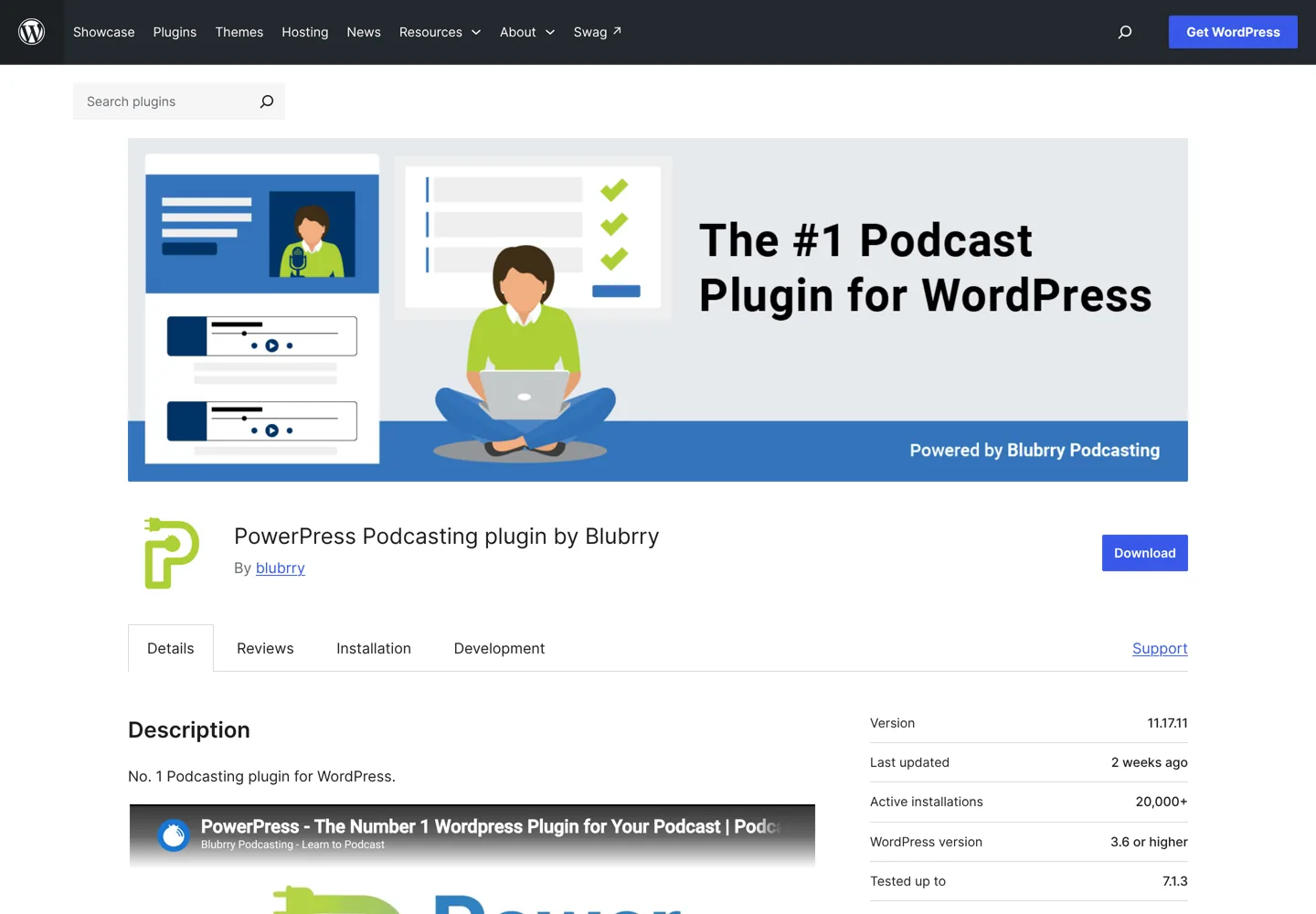
PowerPress is made by Blubrry and has 20,000+ installs, a 4.6 rating and an update from 1 October 2026, tested with WordPress 7.1.3. It handles one or several podcasts on a site, includes audio and video players, a subscribe page and sidebar widget, and supports Podcasting 2.0 features such as transcripts, chapters and funding. Its import and migration tools help you move from hosts such as Spotify for Podcasters, SoundCloud and Libsyn. Some extras, including the Blubrry player with captions and chapters, are only for Blubrry hosting customers.
Podlove Podcast Publisher
Podlove Podcast Publisher is for podcasters who want fine control. It has been developed since 2012 and offers detailed feed control, multiple audio and video formats, chapter marks, contributor profiles, WebVTT transcripts, seasons and an Auphonic integration for audio post-production. With 3,000+ installs it’s smaller than the two above, and it requires PHP 8.0 or newer. Choose it if you’re comfortable with technical settings and want features the others don’t offer.
Best plugins for showing a podcast hosted elsewhere
Podcast Player
Podcast Player by Veda works with any podcast: you paste your feed address and it shows your episodes in a responsive player, with live episode search and playback speed controls. It has 10,000+ installs and the highest rating of the larger plugins here (4.8 from 113 reviews). A paid Pro version is also available.
Buzzsprout Podcasting
If you host with Buzzsprout, its official plugin adds editor blocks: a player block that can always play your latest episode, and an episode list block that can show a playlist or a simple list and filter episodes by tag. It’s tested with WordPress 7.1.3; with only five ratings, there’s little review history yet.
Podcast Importer SecondLine and Podcast Subscribe Buttons
Podcast Importer SecondLine imports your episodes from any feed into WordPress posts and can keep importing new ones automatically, so every episode gets its own page for search engines. The same developer’s Podcast Subscribe Buttons plugin adds follow buttons for 90+ podcast apps, including Spotify, Apple Podcasts and YouTube; note that it was last updated in October 2025.
Podcast hosting the plugins work with
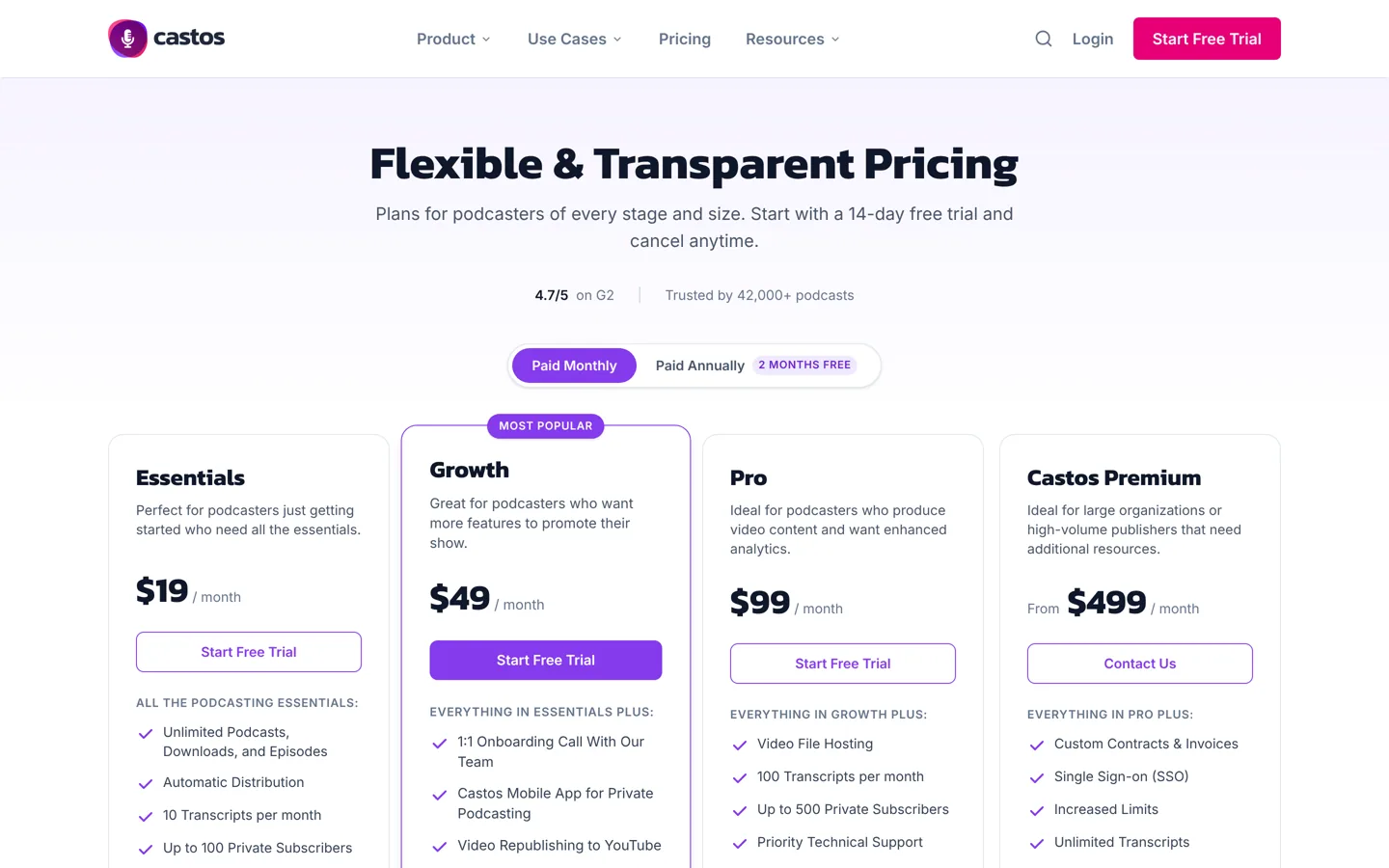
Audio files are large, and most podcasters store them with a dedicated podcast host instead of their web hosting. Seriously Simple Podcasting’s developer recommends this too, though it’s not required. These are the hosts behind the plugins above, with prices from their own pricing pages:

- Castos: Essentials $19 a month or $190 a year, with unlimited podcasts, downloads and episodes; Growth $49 a month; Pro $99 a month, which adds video hosting. There’s a 14-day free trial.
- Blubrry: priced by hours you publish each month: Standard 1.5 at $7 a month, Standard 3 at $15, Advanced 6 at $25 and Advanced 12 at $50, with unlimited downloads. Several plans include a free managed WordPress website.
- Buzzsprout: a free plan with 2 hours of uploads a month, with episodes hosted for 90 days; paid plans from $15 a month billed annually for up to 72 hours of audio a year.
Other hosts, such as Libsyn, Podbean, Captivate and Spotify for Creators, give you a feed you can show with Podcast Player.
What to look for in WordPress podcast plugins
- A compliant feed. The feed must carry everything the apps need: show title, description, category, cover art, explicit rating and episode files. Both Seriously Simple Podcasting and PowerPress set these from WordPress.
- Active maintenance. Check the last update and the “tested up to” version on WordPress.org. A podcast feed you depend on for years needs a plugin that keeps up with WordPress.
- Hosting fit. Pairing a plugin with its own host (Seriously Simple Podcasting with Castos, PowerPress with Blubrry) saves steps, but check that the plugin also works if you change host later. Both say they do.
- Player quality. The player should work well on phones, offer playback speed and show more than one episode if you want visitors to keep listening.
- Room to grow. Video episodes, several shows on one site, transcripts and chapters matter more as a podcast grows; PowerPress and Podlove cover the most here.
- A way out. Your feed address is what subscribers follow. Prefer a setup where you control that address, or where your host offers a proper feed redirect if you ever leave.
For the episode pages themselves, the usual WordPress SEO rules apply; our WordPress SEO tutorial covers titles, descriptions and internal links.
Which WordPress podcast plugin should you choose?
- New podcast, run from WordPress: Seriously Simple Podcasting, especially if you’ll host with Castos.
- Several shows, or moving from another host: PowerPress, especially with Blubrry hosting.
- Technical control, transcripts and chapters: Podlove Podcast Publisher.
- Already hosted elsewhere: Podcast Player, or Buzzsprout’s plugin if you’re on Buzzsprout.
- Episode pages for search: add Podcast Importer SecondLine.
How to set up a podcast on WordPress
- Choose where your audio lives: a podcast host from the list above, or your own hosting for a small show.
- Install one publishing plugin (or a player plugin if your host makes the feed).
- Fill in your show details: title, description, category, cover art and explicit setting. Apps read these from your feed.
- Publish your first episode with show notes written for readers, not just a player.
- Submit your feed to Apple Podcasts, Spotify and the other apps you want to be on.
- Add follow buttons and link each episode to related posts on your site.
Tips for getting found
- Give every episode a real page. Written show notes, a summary and key points give search engines something to rank; a player alone gives them nothing.
- Add transcripts where your plugin or host supports them: they make episodes accessible and searchable.
- Keep one feed. Moving hosts later? Use your plugin’s migration tools and your old host’s redirect option so subscribers aren’t lost.
Planning to earn from the show as well? Our guide to earning money from a blog covers sponsorships, affiliate links and more, and our blogging tools list includes recording and editing tools.
What changed since our last update
Three plugins from our previous version of this list are no longer available on WordPress.org: Simple Podcast Press and Fusebox’s podcast player can’t be found in the directory, and Libsyn’s publishing plugin is listed as closed. That’s why this list now leads with plugins that are actively maintained, and why it’s worth checking a plugin’s last update date before you rely on it.
Questions people ask
What is the best podcast plugin for WordPress?
Seriously Simple Podcasting for most new podcasts run from WordPress, PowerPress if you have several shows or host with Blubrry, and Podcast Player if your podcast is hosted elsewhere.
Can I host podcast files on my WordPress hosting?
You can, and Seriously Simple Podcasting works without a podcast host, but audio files are large, so most podcasters use a dedicated podcast host to keep their site fast.
Are WordPress podcast plugins free?
Yes, all the plugins here are free on WordPress.org. Podcast Player has a paid Pro version, and podcast hosting usually costs extra.
Do I need a podcast plugin if I use Buzzsprout?
Only to show episodes on your site. Buzzsprout makes your feed; its official plugin or Podcast Player embeds your episodes.
Which plugin supports transcripts and chapters?
PowerPress supports Podcasting 2.0 features including transcripts and chapters, and Podlove Podcast Publisher supports chapter marks and WebVTT transcripts.
How much does podcast hosting cost?
Blubrry starts at $7 a month, Buzzsprout at $15 a month billed annually (with a limited free plan), and Castos at $19 a month.
Sources
- Seriously Simple Podcasting (WordPress.org) wordpress.org · checked October 12, 2026
- PowerPress (WordPress.org) wordpress.org · checked October 12, 2026
- Podlove Podcast Publisher (WordPress.org) wordpress.org · checked October 12, 2026
- Podcast Player (WordPress.org) wordpress.org · checked October 12, 2026
- Buzzsprout Podcasting (WordPress.org) wordpress.org · checked October 12, 2026
- Podcast Importer SecondLine (WordPress.org) wordpress.org · checked October 12, 2026
- Podcast Subscribe Buttons (WordPress.org) wordpress.org · checked October 12, 2026
- Castos pricing castos.com · checked October 12, 2026
- Blubrry podcast hosting blubrry.com · checked October 12, 2026
- Buzzsprout pricing www.buzzsprout.com · checked October 12, 2026

Building websites since 2006: 500+ web projects of every size and $300K+ in website deals sold or brokered. Founder of A Digital Motive and DigiFlippers. I share the whole process here, plainly.
Founder of A Digital Motive and DigiFlippers