Some links on this page are affiliate links. If you buy through them I may earn a commission, at no extra cost to you. It never changes a rating. Read the disclosure
- The four common types are informational, navigational, commercial investigation and transactional.
- The live results are the best evidence: note the content type, format and angle that rank.
- Many queries have a dominant and several common interpretations, and intent can change over time.
- Give each intent one address, so your own pages never compete.
- Google's rater guidelines judge results by how well they meet the searcher's needs.
Search intent is the goal behind a search: what the person typing it actually wants to know, do or find. It decides which kind of page Google shows, so it decides which kind of page you need to write. This guide explains the four common types of search intent with blogging examples, how to read intent from the live results, what to do when intent is mixed or changes, and how to map and fix your own pages. I’ve worked on SEO since 2006 and on more than 500 web projects, and missing the intent is still the most common reason I see a well-written page fail to rank.
This page is about intent itself. The full process of finding keywords lives in our keyword research guide, and the wider picture of how Google works is in SEO basics.

What is search intent?
Search intent (also called user intent or keyword intent) is the reason behind a query. Two people can type almost the same words and want very different things: “WordPress” might mean “what is it?”, “download it” or “log in to my site”. A page ranks well when it gives most searchers what they came for, in the form they expect.
Google describes this as its first job. Its “How Search works” pages say that to return relevant results, “we first need to establish what you’re looking for – the intent behind your query.” Google’s systems use the words in the query, its language, the searcher’s location and current events to work that out. For example, a query that includes “pictures” tells Google that images may suit the searcher best, and “pizza” usually gets nearby places that deliver.
For a blogger, this means a keyword is not just a phrase with a search volume. It’s a request, and your page has to answer that request better than the pages already ranking.
The four types of search intent
Most SEO tools and guides sort queries into four broad types. Here they are with examples from the blogging and online-earning niche:
| Intent | The searcher wants to | Blog example | Page that fits |
|---|---|---|---|
| Informational | Learn something or solve a problem | how to start a blog, what is a backlink | Guide, tutorial, explainer |
| Navigational | Reach a specific site or page | wordpress login, google search console | That brand’s own page |
| Commercial investigation | Compare options before buying | best wordpress hosting, kinsta vs siteground | Comparison, review, “best” list |
| Transactional | Buy, sign up or download now | semrush free trial, bluehost coupon | Deal, pricing or sign-up page |
Informational intent
The searcher wants an answer. Question words (how, what, why), “guide”, “tutorial”, “ideas” and “examples” are strong clues. Most blog posts target informational searches, and they’re where a new blog can win first, because big brands rarely write deep how-to guides on small topics. The page that fits answers the question in the first lines, then goes deeper. Our guide on how to start a WordPress blog is an informational page.
Navigational intent
The searcher already knows where they want to go and uses Google as a shortcut: “semrush login”, “flippa”, “youtube studio”. These searches almost always belong to the brand’s own site. Don’t target them with a blog post: you can’t beat the official page for someone who wants the official page. The exception is a navigational search with a question attached, such as “where is the Search Console links report”, which is really informational.
Commercial investigation intent
The searcher plans to buy or choose something soon but hasn’t decided yet. Words such as “best”, “top”, “review”, “vs”, “alternatives” and “compared” signal it. These are the pages that earn affiliate income on a blog, and they’re also where searchers are most suspicious of thin, copied lists. The page that fits compares real options on clear criteria, as our ranking of the best WordPress hosting does.
Transactional intent
The searcher is ready to act: “buy”, “coupon”, “discount”, “pricing”, “free trial”, “download”, “sign up”. A transactional page should make the next step easy and tell the plain truth about the offer. Our Semrush discount page is an example: what the offer includes, how to claim it and what to check first.
Google’s own words for intent: Know, Do, Website, Visit-in-person
Google’s Search Quality Rater Guidelines (the handbook for the people who test Google’s results) use different labels. They describe queries as having one or more of these intents:
- Know: the user wants to find information or explore a topic. A Know Simple query wants one specific fact that fits in a sentence or two, such as a height or a date.
- Do: the user wants to accomplish a goal or activity: download, buy, obtain, be entertained, or interact with a site or app.
- Website: the user wants a specific website or page.
- Visit-in-person: the user wants a business or place nearby.
The two systems line up neatly: informational is Know, navigational is Website, and commercial and transactional are both kinds of Do. The guidelines also note that the line between Know and Do “is sometimes blurry”, which is a useful reminder that these labels are tools for thinking, not rules.
How to read search intent from the live results
Labels are a starting point; the search results are the evidence. Google has already tested what satisfies people for that query, so the first page shows you what kind of page is expected. Search your keyword in a private window (so your history doesn’t change the results) and look at the top results for three things:

- Content type: are the top results blog posts, product pages, category pages, videos, tools or official brand pages? If they’re all tools, a 2,000-word article will struggle, however good.
- Content format: among blog posts, are they step-by-step guides, list posts, comparisons, reviews or definitions? Match the format that’s winning.
- Content angle: what’s the hook in the titles? “For beginners”, “free”, “in 10 minutes”, “without a plugin” and a year in the title all tell you what searchers care about for that query.
Then look at the search features on the page. A “People also ask” box shows the follow-up questions your page should answer. Video results suggest people want to watch the steps. Image results, shopping results or a map each point to a different need. None of these is a ranking rule, but each is a clue about what the searcher wants.
A worked example
Say you run a blog about blogging tools and you’ve found three keywords: “keyword research”, “best keyword research tools” and “semrush pricing”. Before writing, you search each one and note what you see.
- If “keyword research” returns mostly long how-to guides and definitions, the intent is informational and the page you need is a step-by-step guide.
- If “best keyword research tools” returns list posts that compare tools with prices, the intent is commercial investigation and the page you need is a comparison with clear criteria.
- If “semrush pricing” returns Semrush’s own pricing page first, the dominant intent is navigational and transactional. A blog can still help with a related angle, such as which plan fits a small blog, but it won’t replace the official page for that query.
Three keywords that look alike, three different pages. On this site they really are three separate pages: the keyword research guide, the best keyword research tools comparison and the Semrush review.
Mixed and changing search intent
Many queries don’t have one clean intent. The rater guidelines describe three levels of interpretation:
- Dominant interpretation: what most users mean. Not every query has one.
- Common interpretation: what many or some users mean. A query can have several.
- Minor interpretation: what fewer users mean. Reasonable minor interpretations are still worth serving; unlikely ones are not.
The guidelines’ own example is [apple], which might mean the computer brand or the fruit. In blogging, “WordPress theme” might mean “show me themes to choose from” or “how do I install a theme”. When the results mix guides and lists, the intent is mixed. Build the page around the dominant interpretation, cover a common one in a short section, and link to a separate page for anything bigger.
Intent also changes over time. The guidelines show that [iphone] meant the first iPhone in 2007 and now usually means the latest model. Some queries also need fresh information: the guidelines describe “breaking news” and current-events searches where last year’s answer is useless. For a blog, this is why “best” lists, prices and tool reviews need regular updates, and why the results for a keyword should be checked again before you refresh a page.
How to match a page to search intent
Once you know the intent, the page needs to fit it in every part, not just the title. Before I publish, I check five things:
- Page type: guide, comparison, review, deal or tool, chosen from the live results.
- Answer first: the main question is answered in the first two or three sentences, before any background.
- Format: steps for a how-to, a comparison table for a “best” list, a verdict and pros and cons for a review.
- Depth: the follow-up questions searchers ask are answered on the page, so nobody has to search again.
- Next step: the page points to what the reader will want next, such as the review after the comparison, or the tutorial after the definition.
The on-page SEO checklist covers titles, headings and the rest of the page once the intent is right.
Why one search intent per URL matters
Every address on this site owns one search intent. It’s a rule I set for the rebuild of this blog, and there are good reasons for it:
- Pages don’t compete with each other. Two posts that answer the same intent split clicks and links, and often neither ranks as well as one strong page would.
- Each page can be the best answer. A page that tries to serve “what is WordPress hosting”, “best WordPress hosting” and “Bluehost coupon” at once serves none of them well.
- Internal links become clear. When each page has one job, it’s obvious which page to link for which topic, which is the heart of a good internal linking strategy.
When two old posts did target the same intent, I merged them into one page and redirected the old address with a 301 redirect, so no visitor or link lands on an error page.
Search intent mapping for a keyword list
Intent mapping means giving every keyword on your list an intent and a page. It turns a long spreadsheet into a content plan and stops you from writing two posts for the same search.

- Export your keywords into a sheet, from a research tool or from Search Console.
- Label each one with its intent. Tools can speed this up: Semrush shows an intent type for each keyword in Keyword Overview, and its Keyword Magic Tool has an Intent filter. Check the live results for the important ones.
- Group keywords that want the same page. “Start a blog” and “how to start a blog for beginners” belong together; “best blogging platforms” does not.
- Choose the page type for each group from the live results.
- Assign one address to each group: an existing page to improve, or a new page to write.
- Link the groups into clusters around a pillar page, so the guides, comparisons and reviews on one topic support each other. Our guide to topic clusters and pillar pages explains how.
A simple sheet is enough:
| Keyword group | Intent | Page type | Address |
|---|---|---|---|
| how to start a blog, start a blog for beginners | Informational | Step-by-step guide | /how-start-blog/ |
| best wordpress hosting, top wordpress hosts | Commercial investigation | Comparison | /best-wordpress-hosting/ |
| bluehost review, is bluehost good | Commercial investigation | Review | /bluehost-review/ |
| bluehost coupon, bluehost discount | Transactional | Deal page | /deals/bluehost-coupon-discount/ |
If a research tool is new to you, our comparison of the best keyword research tools shows which ones label intent, and searching for keywords on Google covers the free route.
How to fix a page that misses search intent
A page that misses intent often shows the same pattern: it gets impressions in Google but few clicks, or it ranks on page two and never moves. Here’s how I find and fix those pages.

- Find the queries. In Google Search Console, open the Performance report, filter by the page and look at the Queries tab. Our Google Search Console guide shows where everything is.
- Compare with the results. Search the main queries and compare the top pages with yours: type, format and angle.
- Decide what kind of fix it needs.
- Right type, weak answer: move the answer to the top and fill the gaps the top results cover.
- Wrong format: rebuild it, for example turning a long essay into steps or a comparison table.
- Two intents on one page: split them into two pages, each with its own job.
- Two pages on one intent: merge them into the stronger page and 301-redirect the other.
- Update the title and description so they promise what the page now delivers.
- Wait and measure. Compare clicks and average position for the same queries over the following weeks, not days.
Search intent and Google’s guidance
Google doesn’t publish a “search intent” ranking factor, but its guidance keeps returning to the same idea: the page should satisfy the person who searched.
Helpful, people-first content
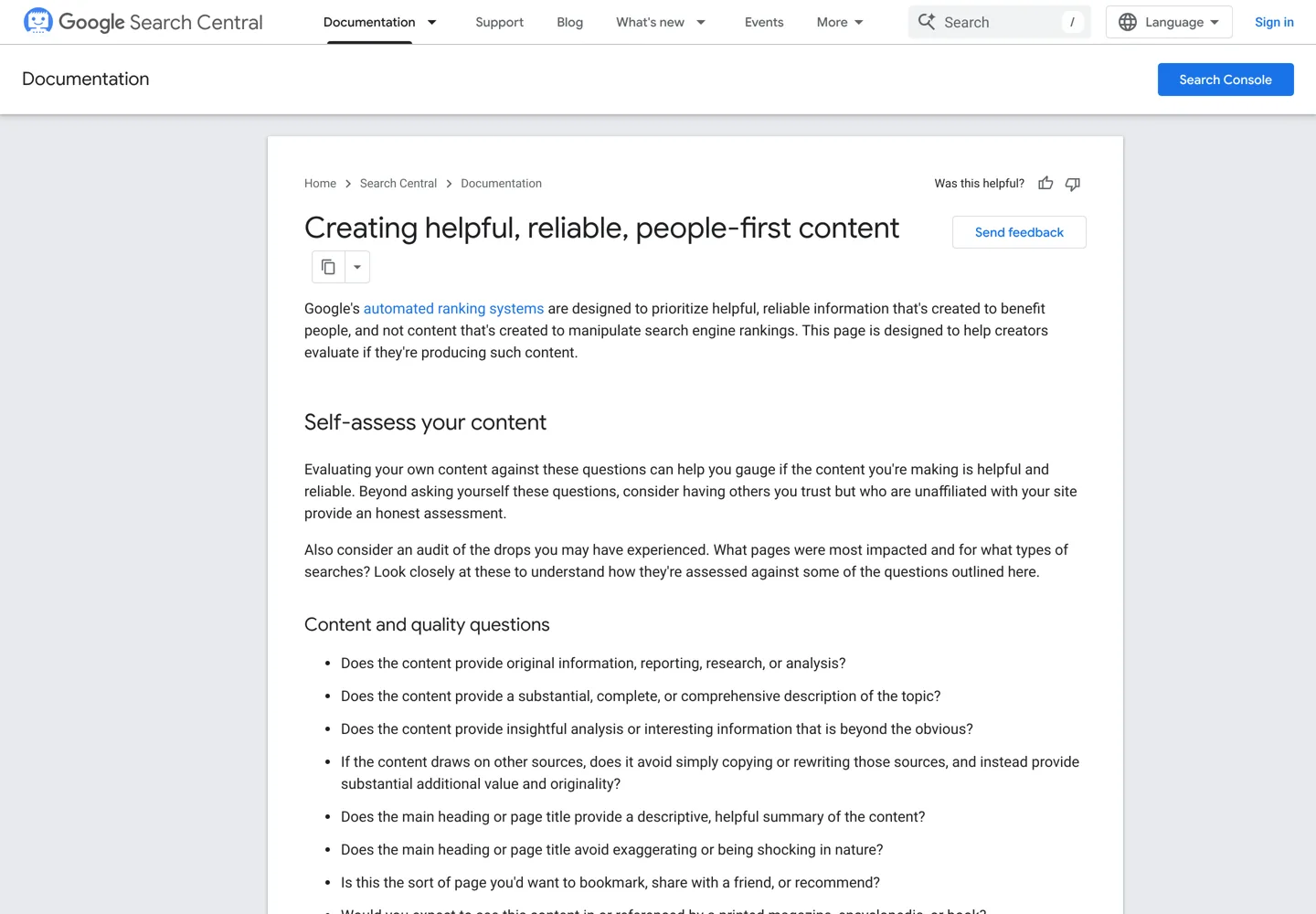
Google’s guide to creating helpful, reliable, people-first content gives self-assessment questions. Several are really intent questions:
- “After reading your content, will someone leave feeling they’ve learned enough about a topic to help achieve their goal?”
- “Does your content leave readers feeling like they need to search again to get better information from other sources?” (a warning sign)
- “Does the main heading or page title provide a descriptive, helpful summary of the content?”
The same page says Google has no preferred word count. Length should follow the intent: a Know Simple query wants a short answer, a “how to start a blog” query wants a full walkthrough.
“Needs Met” in the Search Quality Rater Guidelines
The rater guidelines (version dated September 11, 2025) ask raters to judge each result on a Needs Met scale: “how helpful and satisfying the result is for the users.” Google’s own definitions, in short:

- Fully Meets: a special rating only for queries with a clear intent to find one specific result, when the result is exactly that.
- Highly Meets: a very helpful result for a dominant, common or reasonable minor interpretation.
- Moderately Meets: a helpful result for one of those interpretations.
- Slightly Meets: a less helpful result, or a helpful one for an unlikely interpretation.
- Fails to Meet: fails the needs of all or almost all users, for example off-topic.
Two details matter for bloggers. First, Needs Met depends on both the query and the result, while Page Quality does not depend on the query: a well-made page can still fail a query it doesn’t answer. Second, Google says rater data “is not used directly in our ranking algorithms”; raters help Google check that its systems work. So treat the guidelines as a way to judge your own pages, not as a list of ranking tricks.
Common search intent mistakes
- Choosing keywords by volume alone. A big number means nothing if the results are all brand pages you can’t replace.
- Writing a guide for a “best” query, or a list for a how-to query.
- Burying the answer under a long introduction.
- Targeting navigational searches for brands you don’t own.
- Creating a new post when an existing page already serves the same intent.
- Never rechecking the results for pages you wrote years ago, even though intent can change.
Search intent checklist
- I searched the keyword in a private window and noted the content type, format and angle.
- I know the dominant interpretation and any common ones.
- No other page on my site targets this intent.
- The page answers the main question in the first lines.
- The format matches the pages that rank.
- The follow-up questions are answered on the page.
- The page links to its pillar and to the next step a reader will want.
Once each page has one clear job, the next step is to connect those pages so readers and Google can move between them: start with topic clusters and then an internal linking strategy.
Questions people ask
What are the four types of search intent?
Informational (learn something), navigational (reach a specific site), commercial investigation (compare before buying) and transactional (buy, sign up or download now).
How do I find the search intent of a keyword?
Search it in a private window and look at the top results: what type of page they are, what format they use and what angle their titles take. Tools such as Semrush also label intent, but the results are the better evidence.
Can a keyword have more than one search intent?
Yes. Google's rater guidelines describe dominant, common and minor interpretations. Build the page for the dominant one, cover a common one briefly and link to a separate page for anything bigger.
Is search intent a Google ranking factor?
Google doesn't list it as a single factor, but its systems first try to establish the intent behind a query, and its guidance asks whether readers leave having achieved their goal.
What is Needs Met in Google's rater guidelines?
A scale raters use to judge how helpful and satisfying a result is for a query: Fully Meets, Highly Meets, Moderately Meets, Slightly Meets and Fails to Meet. Rater data is not used directly in ranking.
Can search intent change?
Yes. Google's own example is [iphone], which meant the first model in 2007 and now usually means the latest one. Recheck the results before you update an old page.
Sources
- How Search works: ranking results (Google) www.google.com · checked October 12, 2026
- Creating helpful, reliable, people-first content (Google Search Central) developers.google.com · checked October 12, 2026
- Search Quality Rater Guidelines (Google, PDF, September 11, 2025) static.googleusercontent.com · checked October 12, 2026
- Performance report (Search results), Search Console Help support.google.com · checked October 12, 2026
- Keyword intent (Semrush blog) www.semrush.com · checked October 12, 2026

Building websites since 2006: 500+ web projects of every size and $300K+ in website deals sold or brokered. Founder of A Digital Motive and DigiFlippers. I share the whole process here, plainly.
Founder of A Digital Motive and DigiFlippers