
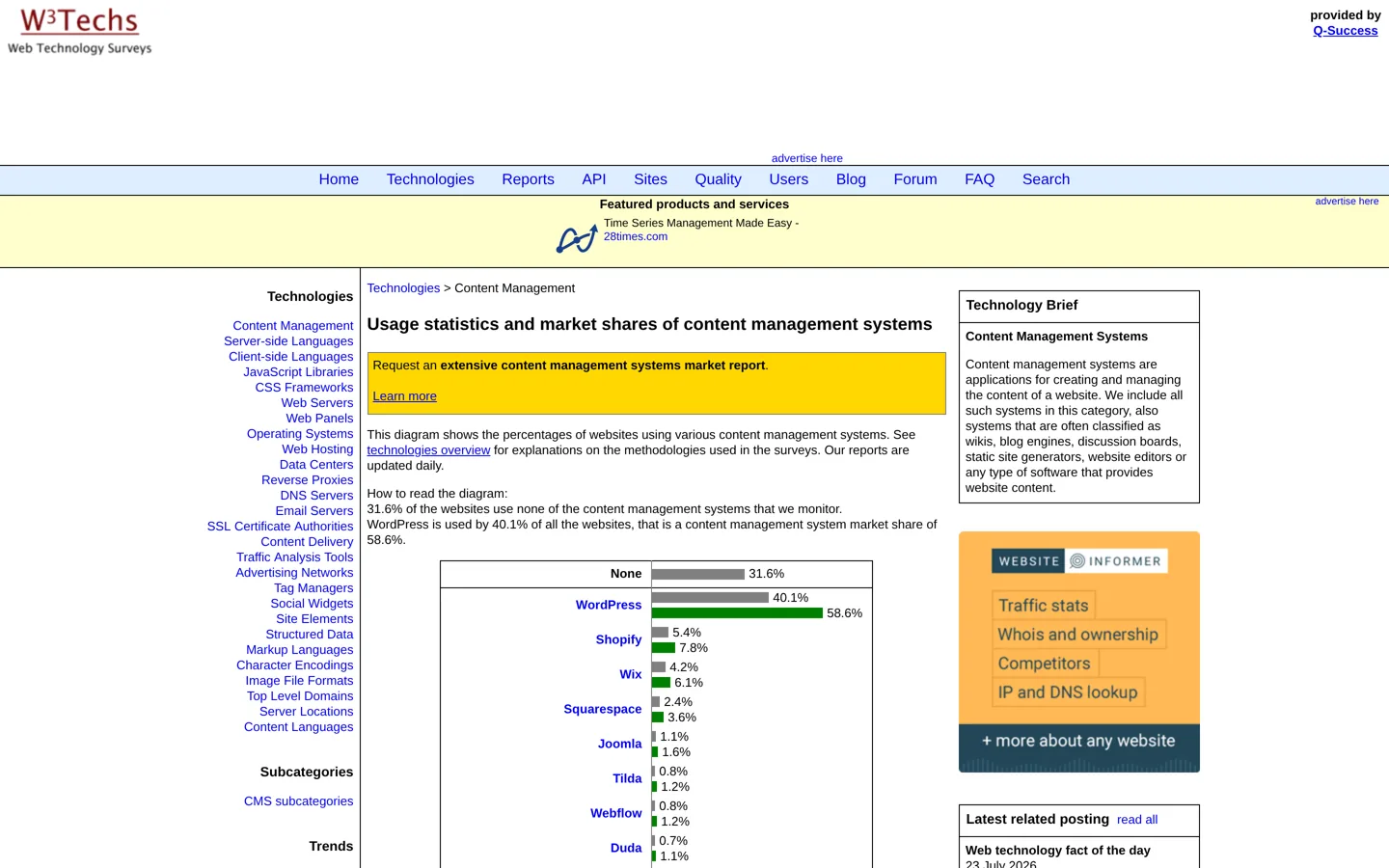
- WordPress is on 40.1% of all websites, a 58.6% share of known CMSs (W3Techs).
- Open-source CMSs give full ownership; hosted builders give convenience and lock-in.
- Drupal is free under the GPL but usually needs developers.
- Ghost's hosted plans start at $15 a month for newsletters and memberships.
- Webflow's CMS plans start at $25 a month billed yearly.
Comparing WordPress vs other CMS platforms comes down to one trade-off: WordPress gives you free, open-source software with the biggest choice of themes and plugins, while hosted builders such as Wix, Squarespace and Webflow trade some freedom for less technical work. W3Techs’ survey on 12 October 2026 found WordPress on 40.1% of all websites, a 58.6% share of sites using a known CMS. This guide compares WordPress with Drupal, Joomla, Ghost and the main hosted builders, with prices from each company’s own pages.
New to WordPress itself? Our guide to what WordPress is explains the basics, and Blogger vs WordPress covers that specific choice. Selling products? Our ecommerce platform comparison goes deeper on shops.

What a CMS is, and the two kinds
A content management system (CMS) lets you create, edit and publish a website without writing every page in code. They come in two kinds:

- Open-source, self-hosted: free software you install on hosting you choose. You own the site completely and can move it anywhere, but you (or your host) handle updates and security. WordPress, Drupal, Joomla and Ghost all work this way, and Ghost also sells hosting.
- Hosted builders: you pay a monthly plan and the company runs everything. Setup is easy, but you’re limited to the platform’s features and moving away later is harder. Wix, Squarespace, Webflow and Shopify are examples.
WordPress vs other CMS options compared
| CMS | Type | Share of all sites | Cost | Best for |
|---|---|---|---|---|
| WordPress | Open source | 40.1% | Free + hosting | Blogs, content and most business sites |
| Shopify | Hosted (shops) | 5.4% | From $29/mo yearly | Online stores |
| Wix | Hosted builder | 4.2% | From $17/mo yearly | Simple design-led sites |
| Squarespace | Hosted builder | 2.4% | From $19/mo yearly | Portfolios, small businesses |
| Joomla | Open source | 1.1% | Free + hosting | Sites needing built-in multilingual and access control |
| Webflow | Hosted builder | 0.8% | From $15/mo yearly (CMS from $25) | Designers who want visual control |
| Drupal | Open source | 0.6% | Free + hosting + developers | Large, complex sites |
| Ghost | Open source or hosted | 0.1% | Hosted from $15/mo yearly | Newsletters and paid memberships |
W3Techs measures the share of all websites; 31.6% use no CMS it monitors. Wix prices are US prices from its plans page, checked on 12 October 2026.
WordPress: the default choice for most sites
WordPress is free, open-source software. Its strengths are scale and choice: thousands of free themes and plugins, a huge community, and hosting from almost every web host. It suits blogs, content sites, business sites and, with WooCommerce, shops. The trade-offs are that you’re responsible for updates, security and backups (or pay a managed host to handle them), and that plugin quality varies. Our WordPress guide for beginners walks through getting started.
Drupal: power for complex sites
Drupal.org describes Drupal as free, open-source software distributed under the GPL with no licensing fees, built by a global community and supported by the non-profit Drupal Association. It’s known for handling large, complex sites with detailed content structures and user permissions, and offers tens of thousands of add-on modules. Drupal now also offers Drupal CMS, a ready-to-use product built on Drupal core, aimed at making it easier to start. In practice, most Drupal sites need a developer to build and maintain them.
Joomla: the middle ground
Joomla describes itself as a free and open-source CMS for publishing web content, built on a model–view–controller framework that can also be used to build online applications. It’s currently on Joomla 6. Joomla sits between WordPress and Drupal in complexity, with multilingual features and access control built in, but it has a much smaller share and ecosystem than WordPress.
Ghost: built for publishers and newsletters
Ghost calls itself an open-source blog and newsletter platform. It focuses on writing, email newsletters and paid memberships, with less need for plugins. You can self-host the software, or use Ghost’s own hosting: Starter costs $15 a month billed yearly for one staff user and up to 1,000 members, with a free custom domain; Publisher costs $29 and adds custom themes, paid subscriptions and more integrations; Business costs $199. It’s a strong choice if your blog is really a newsletter business.
Hosted builders: Wix, Squarespace and Webflow
- Wix is a drag-and-drop builder. Plans start at $17 a month billed yearly, with selling online from its $29 Core plan.
- Squarespace is known for polished templates. Plans start at $19 a month billed yearly; its Basic plan adds a 2% online store transaction fee.
- Webflow gives designers visual control close to code. Its Basic site plan is $15 a month billed yearly for sites without a CMS; CMS plans start at $25.
- Shopify is the specialist for shops, from $29 a month billed yearly.
They’re good when you want a site running quickly and don’t need WordPress’s flexibility. The downside is lock-in: your design and many features only exist on that platform, so switching later means rebuilding.
What four years of a small site costs
Monthly prices hide how quickly costs add up. Here’s an illustration for a small blog over four years, using each company’s published starting price billed yearly, and for WordPress a budget host’s four-year price:
| Option | Price used | Four years |
|---|---|---|
| WordPress on budget hosting | Hostinger WordPress Premium, 48-month term | $143.52 (then renews higher) |
| Ghost (hosted) | Starter, $15/mo yearly | $720 |
| Squarespace | Basic, $19/mo yearly | $912 |
| Webflow | CMS plan, from $25/mo yearly | $1,200 |
| Wix | Core, $29/mo yearly | $1,392 |
An illustration from published prices, not a quote: prices change, taxes and add-ons are excluded, and premium themes or plugins add to WordPress’s cost. The Hostinger figure is from our cheap WordPress hosting comparison.
Over a longer period the gap usually narrows, because budget hosting renews at a higher price. WordPress is usually the cheapest to run, but you pay in time: updates, backups and security are your job unless you choose managed hosting. Hosted platforms cost more because that work is done for you.
Maintenance and security compared
- WordPress, Drupal and Joomla (self-hosted): you or your host keep the core software, themes and plugins updated, run backups and watch security. Good hosting and a short list of well-maintained plugins make this manageable.
- Ghost (hosted) and the builders: the company updates and secures the platform for you, and backups are included or available. You can’t install arbitrary code, which limits flexibility but also limits what can go wrong.
- Moving away: open-source systems export standard content and run on any compatible host. Hosted builders usually let you export posts or products, but not the design, so a move means rebuilding.
What hosted builders don’t let you do
Hosted builders are deliberately closed. You can’t install any plugin you like, run custom server code, or choose your own host for speed or price, and features you depend on are only as permanent as the company’s plans. For a portfolio or a small business page that’s often fine. For a blog you hope to grow for years, with ads, affiliate links and custom features, WordPress’s openness is usually worth the extra responsibility.
Which CMS should you choose?

- A blog or content site you want to grow and earn from: WordPress.
- A newsletter or membership publication: Ghost.
- A large site with complex content and a development team: Drupal.
- A small, design-led site you want running this week: Wix or Squarespace; Webflow if you’re a designer.
- An online shop: Shopify or WordPress with WooCommerce.
Questions to ask before you pick a CMS
- Who will run the site? If no one technical, a hosted builder or managed WordPress hosting.
- What will it cost over three years? Include hosting, plans, themes, plugins or apps, and any developer time.
- Can you leave? Check how you’d export content. Open-source systems are the easiest to move.
- Will it grow with you? Think about content volume, features and people working on the site.
- Does it suit search? All the options here can rank well. What matters more is content, speed and the basics in our on-page SEO checklist.
Common myths about choosing a CMS
- “WordPress is only for blogs.” It started as blogging software, but it now runs business sites, shops (with WooCommerce), membership sites and more, which is part of why its share is so large.
- “Hosted builders are bad for SEO.” Any of these platforms can rank. Search results depend far more on helpful content, links and speed than on the CMS’s name.
- “Open source means insecure.” Popular open-source software is widely reviewed and patched quickly. Most problems come from outdated plugins, weak passwords or poor hosting, which good habits prevent.
- “You can always switch later.” You can, but the cost grows with every page and design detail you build. Choosing carefully now saves a rebuild later.
- “The most popular CMS must be the best for me.” WordPress is the safest default, but a newsletter writer may be happier on Ghost and a designer on Webflow.
Switching from another CMS to WordPress
WordPress has importers for several platforms in Tools → Import, and many hosts offer migration help. Whatever you move from, plan your redirects so every old address leads to its new page, export your content first, and rebuild the design in a WordPress theme. Our guide to moving from Blogger to WordPress shows the process for one common move.
Questions people ask
Is WordPress better than other CMSs?
For most blogs and content sites, yes: it's free, widely supported and has the most themes and plugins. Drupal, Ghost or a hosted builder can suit specific needs better.
How many websites use WordPress?
W3Techs found WordPress on 40.1% of all websites on 12 October 2026, a 58.6% share of sites using a CMS it tracks.
WordPress vs Drupal: which is better?
WordPress is easier to run and has more themes and plugins; Drupal suits large, complex sites and usually needs developers.
WordPress vs Ghost: which should a blogger use?
Ghost if your blog is mainly a newsletter with paid memberships; WordPress if you want more flexibility, plugins and ways to earn.
Is Wix or Squarespace better than WordPress?
They're easier to start with, but you're tied to their platform. WordPress gives more control and is easier to move between hosts.
Is Joomla still used?
Yes. W3Techs found Joomla on 1.1% of all websites, and it's currently on Joomla 6.
Sources
- Usage statistics of content management systems (W3Techs) w3techs.com · checked October 12, 2026
- About Drupal (Drupal.org) www.drupal.org · checked October 12, 2026
- About Joomla www.joomla.org · checked October 12, 2026
- Joomla core features www.joomla.org · checked October 12, 2026
- Ghost pricing ghost.org · checked October 12, 2026
- Webflow pricing webflow.com · checked October 12, 2026

Building websites since 2006: 500+ web projects of every size and $300K+ in website deals sold or brokered. Founder of A Digital Motive and DigiFlippers. I share the whole process here, plainly.
Founder of A Digital Motive and DigiFlippers