- Links in long-form descriptions, comments and posts are clickable with advanced features.
- URLs in Shorts descriptions and comments aren't clickable, to reduce spam.
- You can add up to 14 channel profile links; the first sits by the subscribe button.
- End screen and card links to websites are for Partner Program members.
- Link to the exact page the video promised, and tag links to measure them.
To drive traffic from YouTube to your website, make videos that answer a question and promise something more on your site, then put a clickable link where viewers will see it: the first lines of a long-form video’s description, a pinned comment, your channel profile links, and end screens and cards if you’re in the YouTube Partner Program. This guide covers each of those places, YouTube’s rules on which links are clickable (links in Shorts descriptions aren’t), and how to measure the visits, based on YouTube’s own Help Center, checked on 12 October 2026.
Earning from the videos themselves is covered in our guide to making money on YouTube. This page is only about sending viewers to your site.

Why traffic from YouTube is worth having
YouTube describes itself in its Help Center as one of the largest search engines in the world. Viewers who click through from a video already trust you: they’ve watched you explain something. That makes YouTube visitors more likely to read, subscribe to your email list or buy through your affiliate links than someone who lands on a random page. And the videos keep sending visitors for months or years after you publish them.
Know which links are clickable

YouTube’s page on sharing links lists exactly where links work. Clickable: channel profile links, links in long-form video descriptions and comments, and links in posts. Not clickable: URLs in Shorts descriptions and Shorts comments, which YouTube made non-clickable to reduce spam and scams. Instead, a Short can show a Related video link to one of your long-form videos, which can carry your website link.
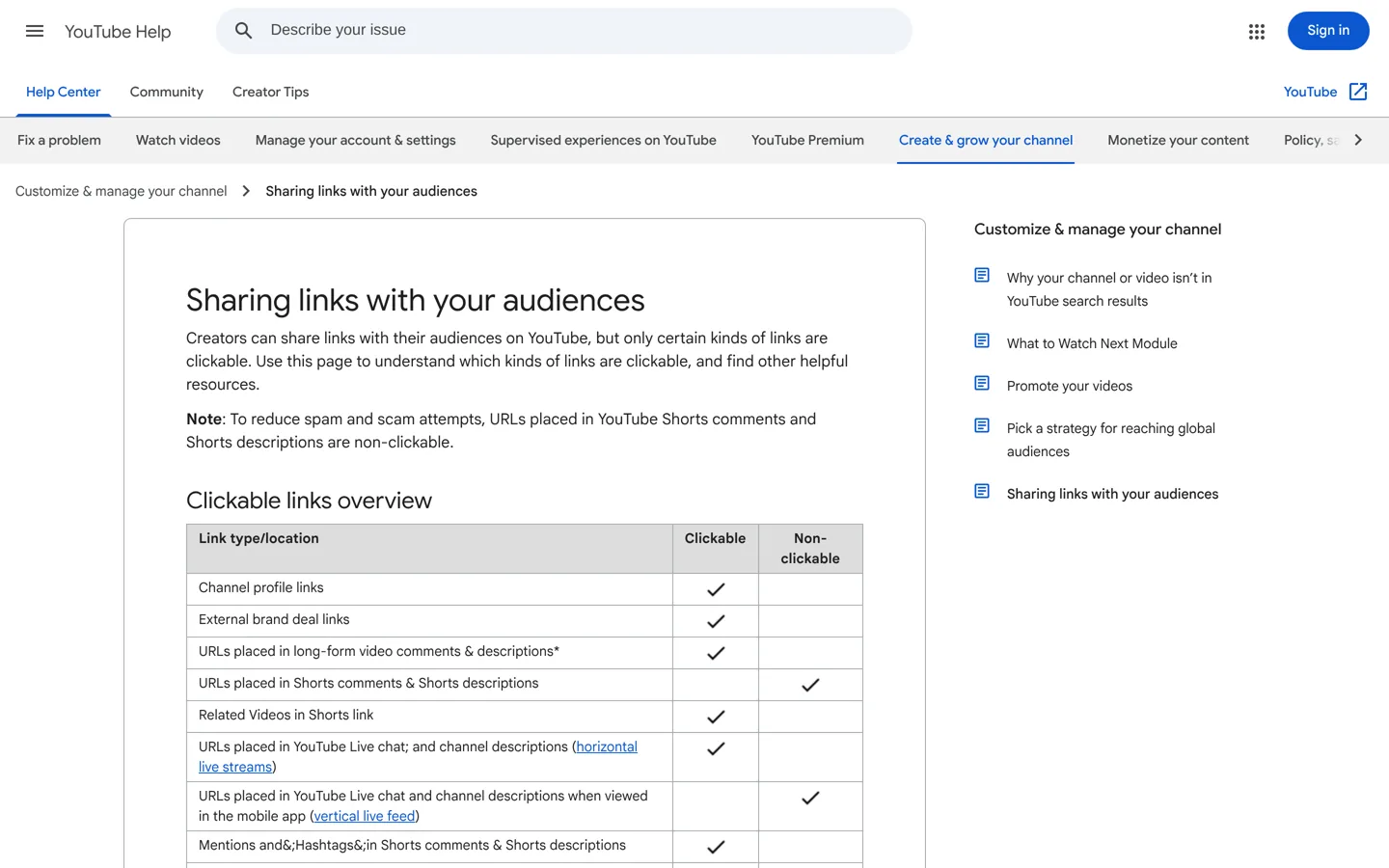
One requirement applies to most external links: YouTube says that to add clickable links in descriptions and posts, your channel needs access to advanced features, which you can check in YouTube Studio. All links must also follow YouTube’s external links policy, which bans links to harmful content such as malware, phishing or pirated material.
How to drive traffic from YouTube: the main places to put your link

1. The first lines of the description
YouTube’s description tips explain that viewers see only the first few lines before clicking “Show more” (or “more” on mobile). Put your link, with a reason to click, in those lines: “Get the free checklist: yoursite.com/checklist”. Descriptions can be up to 5,000 characters, so you have room for more links and detail lower down, but the top is what gets clicked. YouTube also recommends a unique description for every video, with one or two main keywords, which helps the video appear in search.
2. A pinned comment
Pin a comment under each long-form video with the same link and a short line about what’s there. It sits at the top of the comments, where engaged viewers look.
3. Channel profile links
You can showcase up to 14 links on your channel. Add them in YouTube Studio under Customization → Profile → Links. YouTube says the first link is shown prominently near the subscribe button, so make it your website’s home page or your best resource.
4. End screens (Partner Program)
End screens appear in the last 5–20 seconds of a video, which must be at least 25 seconds long. You can add up to four elements to a standard 16:9 video. If you’re in the YouTube Partner Program, one element can be a link to an external website; otherwise you can still use end screens to point to another video or playlist that carries your link. End screens aren’t shown on videos set as made for kids, on mobile web or on 360 videos, and viewers can hide them.
5. Info cards (Partner Program)
Cards appear during a video, up to five per video. Like end screens, a card can link to an external website only if you’re in the Partner Program. Time a card for the moment you mention your resource. Cards aren’t available on videos set as made for kids.
6. Say it in the video
Tell viewers what’s waiting on your site and where to find the link: “The full template is linked at the top of the description.” A spoken reason to click works better than a link alone.
7. Posts
YouTube posts (on your channel’s community feed) can include clickable links, subject to the same advanced-features requirement. Use them when you publish a new article or resource.
What to offer on your site
People leave YouTube for something the video can’t give them. The best offers are:
- The written version of a tutorial, with screenshots and copyable steps.
- A checklist, template or worksheet that goes with the video.
- Tool comparisons and prices that change over time and are easier to keep up to date on a web page.
- A free email course or newsletter for viewers who want more.
Whatever you promise, the page must deliver it at once, near the top. If viewers land on a generic home page, most will leave.
Make videos that send visitors
- Answer searchable questions. How-to and comparison videos attract viewers with a problem to solve, who are more likely to want the full guide. Our guide to YouTube rank checker tools shows how to see where your videos rank.
- Pair each video with one page. A video about choosing hosting links to your hosting guide, not your whole blog.
- Embed the video in the matching article. Readers who find the article in Google may watch the video, and the two support each other.
- Use Shorts as trailers. Because Shorts links aren’t clickable, link each Short to a related long-form video that carries the website link.
Add chapters that lead to your resource
Chapters break a video into sections with titles, which helps viewers jump to what they need and shows them exactly where your offer comes up. YouTube’s chapters guide explains how: add a list of timestamps and titles to the description, starting with 00:00, with at least three timestamps in ascending order, each chapter at least 10 seconds long. A chapter titled “Free template (link in description)” reminds viewers of your link right when it’s relevant. If you don’t have access to chapters yet, YouTube says to apply for access to advanced features.
Turn viewers into subscribers on your site
A single visit is good; a returning reader is better. The most reliable way to bring YouTube viewers back to your site is an email list:
- Offer the resource in exchange for an email address only when it’s genuinely valuable, such as a full checklist or template pack; keep simple answers free.
- Send a short welcome email with your best articles and videos, so new subscribers see both sides of your work.
- Link back to new videos from your newsletter, so the two channels grow each other.
- Keep the sign-up page fast and simple: a headline that matches the video, one field and one button.
Over time, the visitors YouTube sends become an audience you can reach directly, whatever changes in YouTube’s recommendations.
Measure the traffic
To know which videos send visitors, add campaign tags (UTM parameters) to your links, for example ?utm_source=youtube&utm_medium=video&utm_campaign=hosting-guide. Google Analytics then shows visits by video or campaign. In YouTube Studio’s analytics, compare views with the clicks you see in your site’s analytics to spot the videos that convert best, and make more like them.
Mistakes that cost you clicks
- Burying the link below a wall of hashtags and gear lists.
- Linking to your home page instead of the page the video promised.
- Relying on Shorts links, which aren’t clickable.
- Link shorteners or redirects that look suspicious. Use your own domain so viewers know where they’re going.
- Undisclosed affiliate or sponsored links. If a video promotes a product for payment, YouTube requires you to tick the paid promotion box in the video’s details.
Use your older videos too
Your back catalogue is a traffic source waiting to be switched on. Go through your most-watched videos in YouTube Studio and update their descriptions with a link at the top to the most relevant page on your site, add a pinned comment, and refresh end screens or cards where you can. Because older videos often keep getting views from search and suggestions, a few minutes on each can send visitors for years without making anything new. Start with the ten videos that get the most views; that’s usually where most of the clicks will come from.
A simple routine for every video
- Decide the one page on your site the video should send people to.
- Mention it in the video, ideally twice.
- Put the link, with a reason to click, in the first lines of the description.
- Pin a comment with the link.
- Add an end screen and a card pointing to it if you’re in the Partner Program, or to a video that carries it if not.
- Tag the link with UTM parameters and check the results a month later.
Ready to grow the site those visitors land on? Our guide to earning money from a blog covers what to do with the traffic once it arrives.
Questions people ask
How do I get traffic from YouTube to my website?
Offer something extra on your site in the video, then link it at the top of the description, in a pinned comment and in your channel links, plus end screens and cards if you're in the Partner Program.
Can I put clickable links in YouTube Shorts?
No. YouTube made URLs in Shorts descriptions and comments non-clickable to reduce spam. Use a Related video link to a long-form video that has your link.
Do I need the Partner Program to link to my website?
Only for end screen and card links. Description, comment, post and channel profile links work without it, though some need advanced features enabled.
How many links can I add to my YouTube channel?
Up to 14 channel profile links, set under Customization → Profile → Links in YouTube Studio.
How long must a video be for an end screen?
At least 25 seconds. End screens appear in the last 5 to 20 seconds, with up to four elements on 16:9 videos.
How can I track visits from YouTube?
Add UTM parameters to your links and check the campaign or source reports in Google Analytics.
Sources
- Sharing links with your audiences (YouTube Help) support.google.com · checked October 12, 2026
- Add end screens to videos (YouTube Help) support.google.com · checked October 12, 2026
- Add info cards to videos (YouTube Help) support.google.com · checked October 12, 2026
- Tips for video descriptions (YouTube Help) support.google.com · checked October 12, 2026
- Manage your YouTube channel's profile (YouTube Help) support.google.com · checked October 12, 2026
- External links policy (YouTube Help) support.google.com · checked October 12, 2026
- Video chapters (YouTube Help) support.google.com · checked October 12, 2026

Building websites since 2006: 500+ web projects of every size and $300K+ in website deals sold or brokered. Founder of A Digital Motive and DigiFlippers. I share the whole process here, plainly.
Founder of A Digital Motive and DigiFlippers