- Facebook's Feed is ranked by predicted value, using signals such as past interaction and post type.
- Meta reduces distribution of clickbait links and engagement bait.
- Honest, specific headlines are what both readers and Facebook prefer.
- Mix link posts with posts that are useful on Facebook itself.
- Tag shared links with utm parameters to see visits in Google Analytics.
To get website traffic from Facebook, post links to genuinely useful articles from your Page with an honest headline and a sentence on why it’s worth reading, mix them with posts that are useful on Facebook itself, link your site in the Page’s details and action button, and measure clicks with tagged links in your analytics. Avoid clickbait headlines and “like and share” requests: Meta’s Content Distribution Guidelines say it reduces the distribution of both. This guide uses Meta’s own explanations of Feed ranking and Google Analytics’ help pages, checked on 12 October 2026.
Don’t have a Page yet? Start with our guide on how to create a Facebook business Page. This page is about turning the Page into visits.

How Facebook decides who sees your posts
Meta explains that an AI system orders each person’s Feed by predicting what they’ll find most valuable and relevant. It gathers posts from friends, Pages they follow and groups they’ve joined, then considers signals such as who created the post and how the person interacted with them before, whether the post is a photo, a video or a link, and how many of their friends liked it. It scores about 500 posts and puts them in order, while trying to keep a balanced mix of content types.
Two practical points follow. First, people who have interacted with your Page before are more likely to see your next post, so engagement on everyday posts helps your link posts too. Second, a Feed full of nothing but links from you isn’t the “balanced mix” Facebook aims for, so link posts work best alongside other kinds of posts.
What Facebook shows less
Meta’s Content Distribution Guidelines list types of content it shows less of in Feed. Two matter most for bloggers:
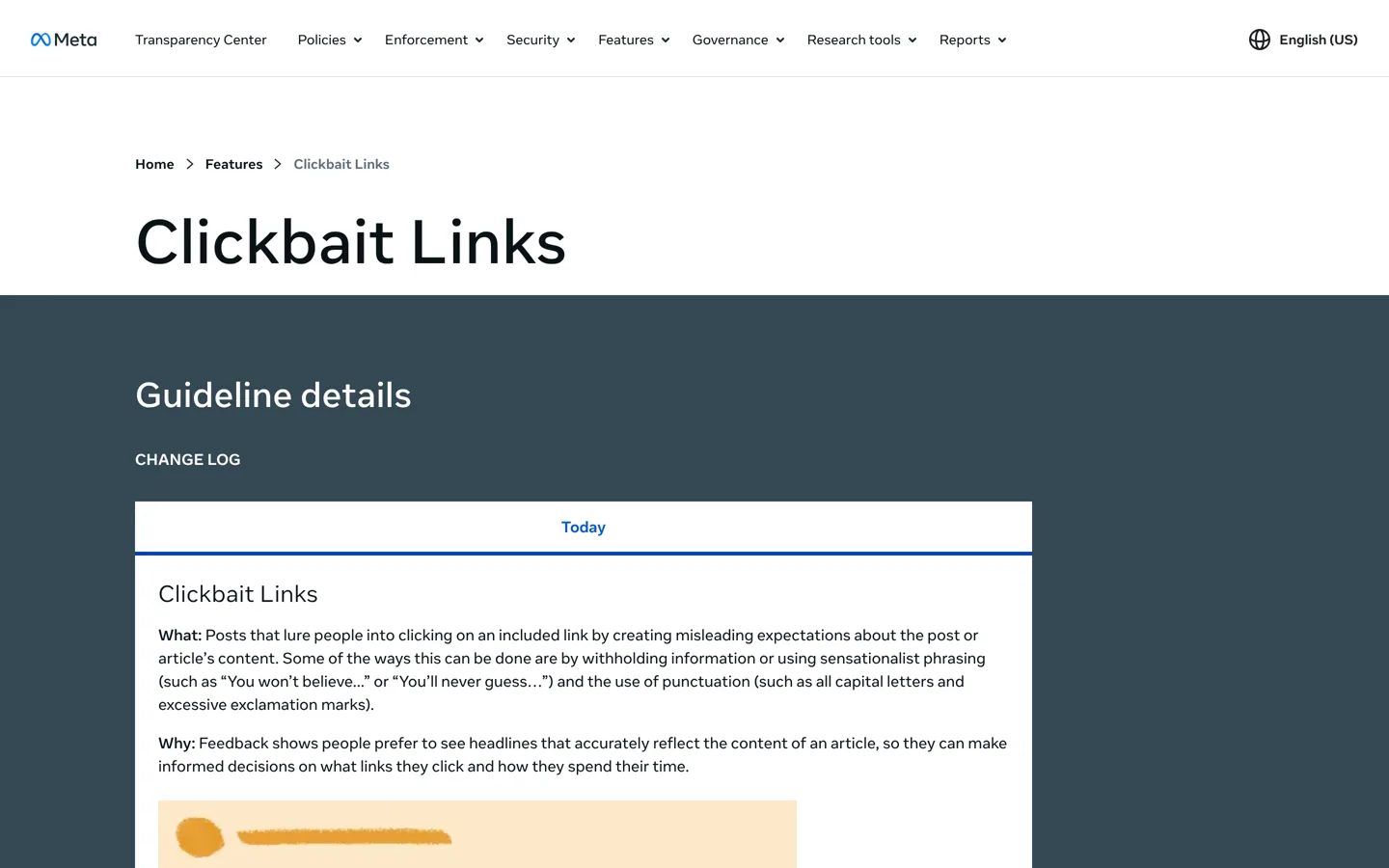
- Clickbait links: posts that “lure people into clicking on an included link by creating misleading expectations”, for example by withholding information, using sensational phrases such as “You won’t believe…” or “You’ll never guess…”, or using all capital letters and excessive exclamation marks.
- Engagement bait: posts that explicitly ask for votes, shares, comments, tags, likes or reactions, other than for a specific call to action such as finding a missing person, raising money or sharing a petition.
Meta says people prefer headlines that accurately reflect the article, so they can decide what to click. That’s good news for honest bloggers: a clear headline is also the one Facebook prefers.

How to get website traffic from Facebook: 7 steps
1. Put your website everywhere on the Page
Add your site to the Page’s details and point the action button to your most useful page, such as a start-here guide or your newsletter sign-up. Pin a post that links to your best article, so new visitors to the Page see it first.
2. Share each article with a reason to read it
Don’t just paste a link. Write one or two sentences in your own words: the problem the article solves and one specific thing the reader will learn. “Your backups may not include your database. Here’s how to check in two minutes” tells people exactly why to click.
3. Use honest, specific headlines
The article’s title appears in the link preview, so make it accurate. Avoid the phrases and capitalisation Meta lists as clickbait. If your post’s wording promises something, the article should deliver it near the top.
4. Make the link preview look right
Facebook builds the preview from your page’s Open Graph tags: its title, description and image. Set a clear featured image and a description on each post; your SEO plugin’s social settings control these tags. Paste the link into a test post (without publishing) to check the preview before you share it widely.
5. Mix link posts with posts that stand on their own
Share tips, short videos, photos and questions that are useful without leaving Facebook. They build the interaction history that helps your future posts reach followers, and they make the Page worth following. Ask genuine questions rather than “comment YES if you agree”, which Meta treats as engagement bait.
6. Reply to comments and messages
Answer questions under your posts and in messages, and link to a relevant article when it genuinely answers the question. A helpful reply is often the most clicked link on a Page.
7. Post consistently, and re-share your best work
Share new articles when they’re published, and re-share older evergreen guides from time to time with a new angle. A steady rhythm keeps the Page active without flooding followers.
Which articles to share
Not every post suits Facebook. Share the articles that solve a problem your followers talk about, the ones with a clear before-and-after, and seasonal guides just before the season starts. Long reference pages and highly technical guides often do better in search than on social media, so share them with a specific angle (“the one setting most people miss”) rather than the whole topic. Look at your analytics every month: the articles Facebook visitors read longest are the ones to share again.
Three ways to write the post
- The problem: “Your WordPress backups may be missing your database. Here’s a two-minute check.”
- The result: “Three free changes that made this page load faster, and how to check yours.”
- The question: “Which do you use for email: MailerLite or beehiiv? We compared what their free plans include.”
Each says what the reader gets, and none hides the point to force a click. Keep it short; the article does the rest.
Help followers keep seeing you
Meta’s explanation of Feed lists controls people can use, including choosing people and Pages to prioritise so their posts are shown higher and the newest appear first, and a “Following” view that shows posts from accounts they follow in reverse chronological order. You can mention this to your most engaged followers once in a while: people who want every post can add your Page to their favourites. Don’t make it a routine request in every post, which would start to look like the engagement bait Meta reduces.
Measure the clicks
Facebook’s Page insights show how your posts perform on Facebook; your analytics show what visitors did after clicking. To tell Facebook visits apart, add campaign tags to the links you share. Google Analytics’ help page explains that adding utm parameters to a link lets you see which campaigns refer traffic, in the Traffic acquisition report. For example:
https://yoursite.com/guide/?utm_source=facebook&utm_medium=social&utm_campaign=page_postutm_sourceis the referrer (here, facebook);utm_mediumis the marketing medium (here, social);utm_campaignnames the campaign;utm_contentcan tell two links in the same post apart.
Use the same tags every time, so reports stay clean. Our guide to blog traffic tools covers where to read the numbers.
Turn Facebook visitors into returning readers
Facebook decides how many followers see each post, so the visits it sends can rise and fall. Give new visitors a reason to come back directly: a newsletter sign-up at the end of each article, related guides to read next, and a clear start-here page. Our guide to getting your first 1000 email subscribers covers the sign-up offer.
Facebook groups: helpful, not promotional
Groups can send real visitors, but only if you help first. Read each group’s rules (many limit or ban links), answer questions in your own words, and share a link only where it genuinely answers what was asked and the rules allow it. Dropping links into many groups is the quickest way to be removed, and it isn’t the kind of interaction that builds a reputation.
When Facebook traffic drops
Visits from Facebook can fall for reasons you don’t control, because the Feed is personalised and changes often. Before changing everything, check three things. Did you post less, or only links? Did a headline slip into clickbait wording? Did the articles you shared match what your followers usually click? If none of those changed, keep posting useful content, lean on your email list for the visits you can count on, and compare a full month rather than a single week.
A sample week of Page posts
- Monday: share a new article with two sentences on why it’s useful.
- Tuesday: a quick tip as a photo or short video, no link.
- Wednesday: a genuine question to your readers about their biggest problem with the topic.
- Thursday: re-share an older guide with a new angle.
- Friday: a behind-the-scenes post or a reader’s question answered.
Adjust the mix to what your Page insights and your analytics show works best for your own followers.
Mistakes that cut your reach
- Clickbait headlines that withhold the point or shout in capitals.
- “Like and share” requests, which Meta counts as engagement bait.
- Only posting links, with nothing useful on Facebook itself.
- Links that don’t deliver what the post promised.
- No tracking, so you can’t tell which posts actually send readers.
- Sending every click to the home page instead of the article the post was about.
Running Instagram too? Our guide to increasing Instagram engagement covers the same goal there.
Questions people ask
How do I get website traffic from my Facebook Page?
Share useful articles with honest headlines and a reason to read them, mix in posts that stand on their own, add your site to the Page details and button, reply to comments, and post consistently.
Does Facebook show fewer link posts?
Meta says its Feed considers whether a post is a photo, video or link among many signals and aims for a balanced mix. It explicitly reduces clickbait links and engagement bait.
What counts as clickbait on Facebook?
Meta defines it as posts that lure people into clicking with misleading expectations, such as withholding information, sensational phrases like 'You won't believe…', all capitals or excessive exclamation marks.
What is engagement bait?
Posts that explicitly ask for votes, shares, comments, tags or likes for purposes other than a specific call to action, such as finding missing people or raising money.
How do I track visits from Facebook?
Add utm parameters (utm_source=facebook, utm_medium=social, utm_campaign=…) to the links you share; Google Analytics shows them in the Traffic acquisition report.
Should I post links in Facebook groups?
Only where the group's rules allow it and the link genuinely answers a question. Help first, in your own words.
Sources
- Facebook Feed ranking explained (Meta Transparency Center) transparency.meta.com · checked October 12, 2026
- Types of content we demote (Meta) transparency.meta.com · checked October 12, 2026
- Clickbait links (Meta) transparency.meta.com · checked October 12, 2026
- Engagement bait (Meta) transparency.meta.com · checked October 12, 2026
- URL builders: collect campaign data with custom URLs (Google Analytics Help) support.google.com · checked October 12, 2026

Building websites since 2006: 500+ web projects of every size and $300K+ in website deals sold or brokered. Founder of A Digital Motive and DigiFlippers. I share the whole process here, plainly.
Founder of A Digital Motive and DigiFlippers