- Choose between request-and-confirm and instant confirmation.
- Five Star Restaurant Reservations: 10,000+ sites, free.
- ReDi's free plan allows up to 100 guests a month.
- Enter phone bookings in the same system to avoid clashes.
- Test confirmation emails; spam folders lose bookings.
The best WordPress restaurant reservation plugin depends on how your restaurant takes bookings. For a simple request-and-confirm form, Five Star Restaurant Reservations is the most installed free option (10,000+ sites). For instant confirmation based on real capacity, ReDi checks seats before it confirms. If you also want menus and online ordering, WPCafe combines them with WooCommerce, and VikRestaurants adds rooms, tables and take-away. This guide compares them on their WordPress.org pages and shows how to set up table bookings on your site, checked on 12 October 2026.
Building the rest of the site? Our list of the best WordPress plugins covers the essentials, and how to install WordPress gets you started. This page is about one job: taking table reservations.

What a WordPress restaurant reservation plugin should do
- Show only times you can serve, based on your opening hours and closures.
- Collect the essentials: date, time, party size, name, phone or email, and any notes.
- Notify both sides, so the guest gets a confirmation and your team sees the booking.
- Let you confirm, reject or edit bookings, and add phone bookings by hand.
- Work well on phones, because most guests book on the move.
The main choice is between request-based booking, where you approve each request, and instant confirmation, where the system checks availability and confirms automatically.
Five Star Restaurant Reservations: simple and widely used
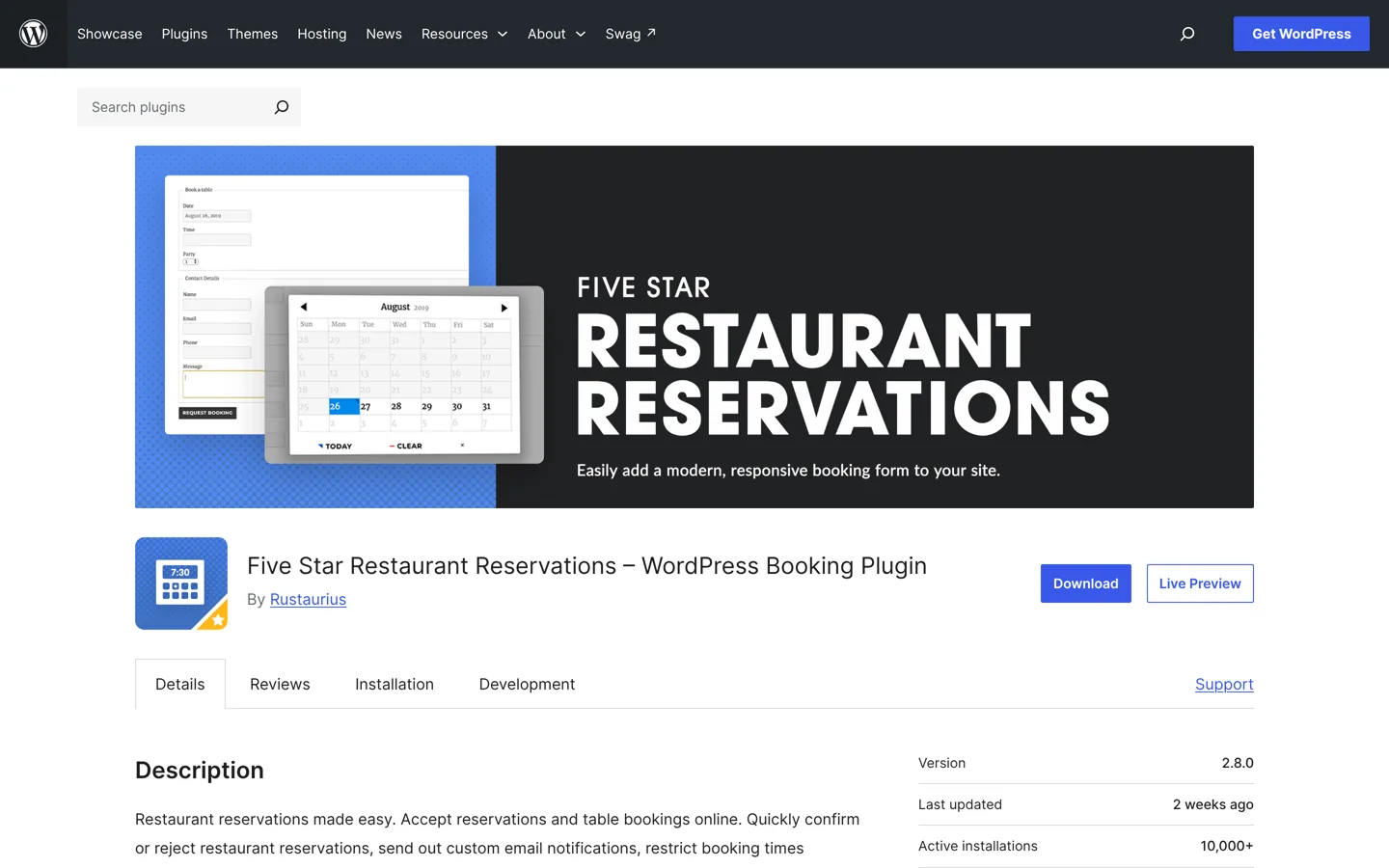
Five Star Restaurant Reservations is the most installed of these plugins, with 10,000+ active installations, a 4.7 rating, and an update two weeks before we checked. It describes itself as “restaurant reservations made easy”: guests fill in a form, you confirm or reject the request, and the plugin emails both the guest and you.
- A setup walk-through runs when you activate it, to add the form and set key options.
- Add the form with its block or the
[booking-form]shortcode, or pick a reservation page in the settings. - Set the days and times you take bookings, with exceptions for holidays and events.
- Set minimum and maximum party sizes, require a phone number, and write a custom success message.
- Add and edit bookings in the admin, and customise each email with template tags.
Its page notes that SMS notifications need its paid Ultimate version. It suits restaurants that are happy to review requests, such as a small bistro checking each booking against the evening’s plan.
ReDi: instant confirmation based on capacity
ReDi Restaurant Reservation checks that the restaurant is open, that capacity is enough and that seats are free at that time before it confirms, so guests get an answer straight away (manual confirmation is optional). It says it’s used by about 400 restaurants. It had 800+ installations on WordPress.org, a 4.5 rating and an update a week before we checked.
Setup uses an API key: you install the plugin, register, and a “Reservation” page with the booking form is created for you. Bookings are managed from ReDi’s own dashboard, which ReDi says works even when your WordPress site is offline. Its free plan has no time limit but allows up to 100 guests a month; paid plans add unlimited reservations, a host dashboard, statistics and, on the top plan, table management, pre-payment to reduce no-shows and SMS. Check ReDi’s pricing page for current prices.
WPCafe: reservations plus menus and ordering
WPCafe is a broader restaurant plugin: a responsive menu with 34+ templates, online food ordering through WooCommerce for delivery, pickup and dine-in, table reservations with email notifications, QR-code ordering and a visual table layout where guests pick their table. It had 5,000+ installations, a 4.6 rating and an update hours before we checked, with a paid Pro version. Choose it if you want menus, ordering and bookings in one plugin rather than three.
VikRestaurants: rooms, tables and take-away
VikRestaurants lets you draw rooms and tables, take table reservations and run take-away or delivery orders, with reservation statuses such as “arrived” or “bill paid” and staff accounts to update them. It had 600+ installations and a 4.8 rating. The free version limits how many menu and product records you can create; the Pro version adds a table layout designer, unlimited menus and products, deals and stock management.
Which plugin should you choose?
- Small restaurant, few covers, happy to approve requests: Five Star Restaurant Reservations.
- Busy service where guests expect an instant answer: ReDi.
- You also sell food online: WPCafe or VikRestaurants.
- You need a visual table layout: VikRestaurants (rooms and tables) or WPCafe (guests pick their table).
Whatever you choose, install it on a staging copy of your site first and make a few test bookings from your phone. Try the awkward cases too: a party larger than your limit, a booking on a closed day, and a cancellation, so you know exactly what guests will see before you go live.
How to set up table bookings, step by step

- Write down your rules: service times, the largest party you’ll book online, how far ahead guests can book, and days you’re closed.
- Install the plugin from Plugins → Add New Plugin and run its setup.
- Enter your schedule and exceptions, including public holidays and private events.
- Set the form fields: keep it short, with party size, date, time, name, phone and a notes box for allergies or occasions.
- Set notifications and send yourself a test booking. Check that emails don’t land in spam; if they do, an SMTP plugin or your host’s mail settings usually fix it.
- Place the form on a dedicated “Book a table” page and link it from the menu and the home page.
- Train the team on confirming bookings and adding phone reservations, so online and offline bookings never clash.
A plugin or a booking platform?
Many restaurants take bookings through a third-party reservation platform instead of their own website. A platform can bring new diners who browse it, but it’s a separate system with its own terms. Before choosing one, check how it charges (a monthly fee, a fee per diner, or both), who owns the guest list if you leave, and whether guests book under the platform’s brand or yours.
A plugin keeps bookings on your own site and the guest data in your control, with no per-booking fee from the free versions above. The trade-off is that you bring the visitors yourself, through your website, Google and social profiles. Some restaurants use both: a platform for discovery and a plugin for regulars who book direct. If you do, make sure one system is the master list, or you’ll double-book tables.
Large groups and special requests
Set a maximum party size for online bookings and ask larger groups to call or email. Big tables affect the whole evening’s plan, so a quick conversation about timing, set menus or a deposit avoids surprises. Use the form’s notes field for allergies, high chairs, accessibility needs and celebrations, and make sure whoever runs the floor reads those notes before service. A birthday noted in advance and remembered on the night is the kind of detail guests mention in reviews.
For private hire or events, a simple enquiry form on a separate page works better than the table booking form, because the details you need are different: date, number of guests, budget and the kind of event.
Make the booking page easy to find
- Put a “Book a table” button in the header on every page, in your main brand colour.
- Add your opening hours and address next to the form, so guests can check before they book.
- Link the booking page from your Google Business Profile and social profiles.
- Keep the page fast on phones; large photos are the usual cause of slow pages, so compress them first, as our guide to compressing images shows.
Reducing no-shows
No-shows hurt small restaurants most. Send a clear confirmation with the date, time and how to cancel, and a reminder the day before if your plugin supports it. Let guests cancel easily online; a cancelled table can be rebooked, while a no-show can’t. For busy nights or large groups, a deposit or pre-payment, offered by some plugins’ paid plans, makes guests more likely to turn up or cancel properly. Keep a note of repeat no-shows and ask for a phone confirmation next time.
Privacy and guest data
A booking form collects personal data: names, phone numbers, emails and sometimes health details such as allergies. Only ask for what you need, explain in your privacy policy how you use it, and don’t add guests to marketing emails unless they’ve agreed. Delete old bookings you no longer need, and keep the plugin and WordPress updated, because booking data is exactly what attackers look for.
Common mistakes
- Taking online bookings you can’t honour because phone bookings aren’t entered in the same system.
- Forgetting holidays and private events, so guests book tables on days you’re closed.
- Long forms that ask for more than the booking needs.
- Confirmation emails in spam, leaving guests unsure whether they’re booked.
- Hiding the booking page three clicks deep instead of in the header.
- Never testing on a phone, where most bookings happen.
Questions people ask
What is the best free WordPress restaurant reservation plugin?
Five Star Restaurant Reservations is the most installed free option, with 10,000+ active installations: guests send a request, you confirm or reject it, and both sides get emails.
Can WordPress confirm table bookings automatically?
Yes. ReDi checks opening hours, capacity and free seats before confirming instantly; manual confirmation is optional.
Is ReDi free?
Its free plan has no time limit but allows up to 100 guests a month. Paid plans add unlimited reservations, a host dashboard and, on the top plan, table management and pre-payment.
Can I take reservations and food orders in one plugin?
Yes. WPCafe combines menus, WooCommerce ordering and table bookings, and VikRestaurants handles table reservations and take-away orders.
Why aren't guests getting confirmation emails?
WordPress emails often land in spam. Send a test booking, and if it goes missing, set up an SMTP plugin or your host's mail settings.
How do I reduce no-shows?
Send clear confirmations with a cancel option, send reminders if your plugin can, and use deposits or pre-payment for busy nights where your plugin's paid plan offers it.
Sources
- Five Star Restaurant Reservations (WordPress.org) wordpress.org · checked October 12, 2026
- ReDi Restaurant Reservation (WordPress.org) wordpress.org · checked October 12, 2026
- WPCafe (WordPress.org) wordpress.org · checked October 12, 2026
- VikRestaurants (WordPress.org) wordpress.org · checked October 12, 2026
- Plugin search: restaurant reservations (WordPress.org) wordpress.org · checked October 12, 2026

Building websites since 2006: 500+ web projects of every size and $300K+ in website deals sold or brokered. Founder of A Digital Motive and DigiFlippers. I share the whole process here, plainly.
Founder of A Digital Motive and DigiFlippers