
- The free plugin has no limits on teams, players or events.
- Tables and statistics update when you publish a result.
- Presets cover over 20 sports, plus esports.
- Pro adds tournaments, scoreboards and sponsor tracking.
- League licence $199, Agency $499, 30-day money-back.
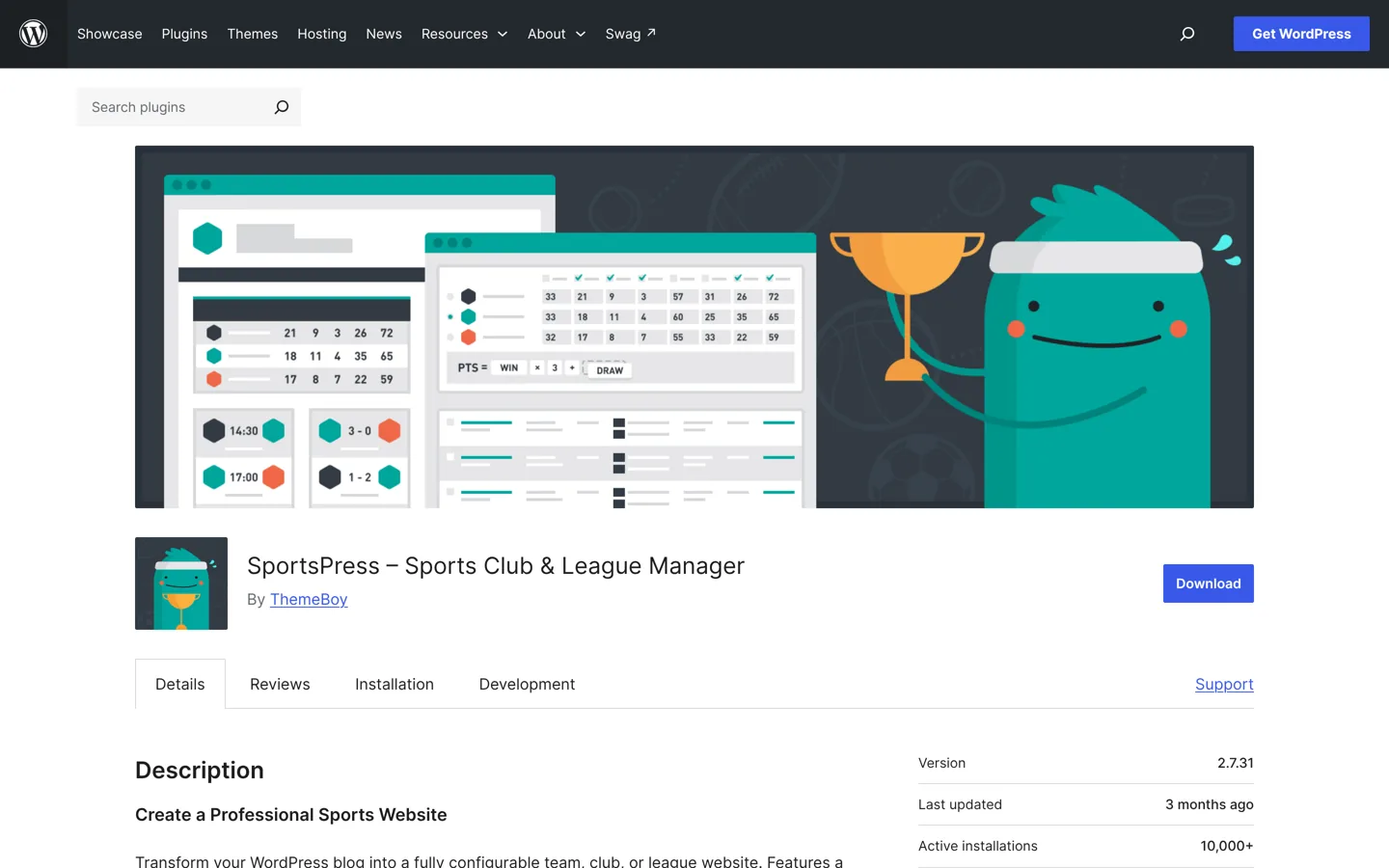
SportsPress is a free WordPress plugin from ThemeBoy that turns a site into a team, club or league website, with fixtures, results, automatically updated league tables, and profiles for clubs, players and staff. It has presets for over 20 sports, imports teams, players and fixtures from CSV files, and works with any theme, though you may need some styling to make it fit. A paid SportsPress Pro adds tournaments, scoreboards, sponsors and team access. This guide shows how to set up SportsPress step by step and when Pro is worth it, checked on WordPress.org and ThemeBoy’s site on 12 October 2026.
Choosing other plugins for your site? Our list of the best WordPress plugins covers the essentials. This page is about one job: running a sports website.

What SportsPress does
SportsPress describes itself as a way to “transform your WordPress blog into a fully configurable team, club, or league website”. Its WordPress.org page lists these core features in the free plugin:
- Events: fixtures and results with player performance, an events calendar, and iCal integration so fans can add fixtures to their own calendars.
- League tables: automated standings with club logos, and configurable columns and statistics.
- Profiles: clubs with player lists, player profiles with statistics, staff profiles, and current and previous clubs.
- Organisation: season archives, venue information with maps, and a switch between club-vs-club and player-vs-player modes.
- Tools: an equation builder for custom statistics, CSV import for events, clubs, players and staff, and a shortcodes menu in the editor.
Its FAQ says there are “no limitations to the number of events, players, staff members, teams, clubs, or leagues” in the free plugin. Once you publish a result, league tables and team and player statistics update automatically.
Which sports it supports
SportsPress includes presets for American football, association football (soccer), Australian rules football, baseball, basketball, cricket, darts, golf, handball, ice hockey, lacrosse, netball, both rugby codes, snooker, softball, squash, table tennis, tennis, volleyball and water polo, plus esports presets for Counter-Strike: Global Offensive, Dota 2 and League of Legends. Its FAQ says it supports “most team sports with a scoring system”, and you can customise table columns and player statistics or build your own preset. Free extensions add extra features for baseball, basketball, cricket, football, golf and volleyball.
Is SportsPress still maintained?
When we checked on 12 October 2026, WordPress.org showed version 2.7.31, last updated 3 months ago, with 10,000+ active installations and a rating of 4.7 out of 5 from about 370 reviews. It was tested up to WordPress 7.0.7, while the current version was 7.1.3, which usually just means the developer hasn’t marked the newest release as tested yet. The support forum showed 2 of 3 issues resolved in the last two months. Developers can contribute on GitHub and translators through WordPress’s translation platform; the page lists 24 languages.
How to set up SportsPress, step by step
- Install the plugin from Plugins → Add New Plugin by searching for SportsPress, then activate it.
- Choose your sport preset in SportsPress’s settings, so the right statistics and table columns are created.
- Add your league and season, such as “Sunday League” and “2026–27”.
- Add clubs and players, or import them from CSV under Tools → Import; the FAQ says the importers also accept files generated by LeagueLobster.
- Add venues so each fixture shows where it’s played, with a map.
- Create events (fixtures) with dates, teams and venue.
- Publish results after each game; the tables and statistics update themselves.
- Add the displays to pages using the shortcodes menu or widgets: a league table on the home page, a calendar on a fixtures page, player lists on a squad page.
Build your menu around what visitors look for most often: fixtures, results, table, squad and contact. Most of them arrive on a phone, often minutes before a game, so check every page on a small screen.
Plan your pages before you add data
A sports site works best when visitors can find the three things they come for in one tap: the next fixture, the latest result and the table. Sketch the menu first. A single club usually needs a home page with the next game and latest result, a fixtures and results page, a squad page with player profiles, a news page, and a contact or “join us” page. A league site adds a page per division with its table, a page per club, and a page with rules and venues.
Decide early how you’ll name seasons and leagues, because every fixture, table and statistic hangs off them. Consistent names such as “2026–27” and “Division One” make archives easy to browse later and stop you creating duplicates halfway through a season. If you run junior and senior teams, treat them as separate leagues or teams from the start rather than mixing them.
Who SportsPress suits
- Amateur and semi-pro clubs that want fixtures, results and player pages on their own site rather than only on social media.
- Local leagues whose volunteers need tables that update without spreadsheets.
- Sports bloggers covering a league in depth, who want tables and statistics next to their articles.
- Web designers building sites for several clubs, who can reuse one setup.
If all you need is a list of dates, a simple events page may be enough; SportsPress pays off once you track results, standings or player statistics, because those are the parts that take hours to keep up to date by hand.
Your theme and hosting
The FAQ says SportsPress “will work with any theme, but may require some styling to make it match nicely”. ThemeBoy also sells themes built for it, listed on the plugin page as Courtside, Emblem, Football Club, Marquee, Premier, Rookie Plus and Varsity. If you use a general theme, choose a clean, fast one with good table styling; our guide to choosing a WordPress theme covers what to check.
Sports sites get busy at predictable times: just after kick-off and right after the final whistle. Choose hosting that copes with those peaks and caches pages well; our ranking of the best WordPress hosting compares options. If you’re starting from scratch, see how to install WordPress first.
SportsPress free vs Pro

According to the plugin’s FAQ, SportsPress Pro adds modules for tournaments (brackets and knockout cups), timelines of player performance, a horizontal scoreboard of results, sponsors with click and impression tracking, staff directories, team access (limiting users to their own team’s data), team colours, a league menu across team sites, a Twitter feed on profile pages, admin branding and a duplicator for cloning events. You can upgrade without losing data.
ThemeBoy’s pricing page lists three licences:
- Club: for teams and small clubs, one site with a year of updates (the price didn’t display when we checked; see ThemeBoy’s page).
- League: $199 for leagues and larger clubs, unlimited sites, a year of updates.
- Agency: $499 for agencies and organisations, unlimited sites, free updates forever.
Prices are in US dollars, Club and League licences can be renewed each year at 50% off to keep receiving updates, and all come with a 30-day money-back guarantee. A League or Agency licence is needed for updates on a WordPress multisite network, which ThemeBoy suggests for running several sports on subdomains.
Is Pro worth it?
For a single club or a small league, the free plugin usually covers what you need: fixtures, results, tables and profiles, with no limits on how many you add. Pro earns its cost when you run cup competitions, want a professional scoreboard across the top of the site, need to show and report on sponsors, or have several people managing different teams who should only edit their own. Start free, run a season, and upgrade if a specific missing module would save you real work.
An alternative: JoomSport
JoomSport is another sports league plugin on WordPress.org, developed since 2009, with standings, team and player profiles, fixtures and match results organised into seasons and leagues. When we checked, it had 1,000+ active installations, a 4.9 rating, was updated a week earlier and was tested up to WordPress 7.1.3. If SportsPress’s layouts don’t suit you, it’s worth testing on a staging site before you enter a whole season of data.
Tips for running a sports website
- Enter results the same day. A league table that’s a week behind is the quickest way to lose visitors.
- Give one person each job: results, news and photos. Clear ownership keeps the site current.
- Add the calendar feed link to your newsletter and social profiles, so players and parents always have the latest fixtures.
- Get permission before publishing players’ photos and details, especially for junior teams.
- Thank sponsors visibly on match pages; it’s often what keeps them renewing.
- Back up before each season and before updating the plugin.
Common mistakes
- Choosing the wrong preset and building a season on the wrong statistics.
- Entering players twice in different seasons instead of keeping one profile per player.
- Skipping venues, so visitors can’t find where the game is.
- Testing only on a laptop, when most fans check scores on their phones.
- Updating mid-season without a backup.
Questions people ask
Is SportsPress free?
Yes. The plugin is free on WordPress.org with no limits on events, players, staff, teams, clubs or leagues. SportsPress Pro is a paid upgrade with extra modules.
Which sports does SportsPress support?
Most team sports with a scoring system. It has presets for over 20 sports, including soccer, cricket, basketball, rugby and tennis, plus esports, and you can customise statistics or create your own.
Does SportsPress work with any theme?
Yes, according to its FAQ, though it may need some styling to match. ThemeBoy also sells themes designed for it.
How much does SportsPress Pro cost?
ThemeBoy lists the League licence at $199 and the Agency licence at $499, with a Club licence for single sites; Club and League renew at 50% off, with a 30-day money-back guarantee.
Can I import teams and fixtures?
Yes. Go to Tools → Import and choose a SportsPress CSV importer for events, teams, players or staff. Files from LeagueLobster are supported.
Is there an alternative to SportsPress?
JoomSport is another WordPress sports league plugin, with standings, profiles, fixtures and results organised into seasons and leagues.
Sources
- SportsPress (WordPress.org) wordpress.org · checked October 12, 2026
- SportsPress Pro (ThemeBoy) www.themeboy.com · checked October 12, 2026
- JoomSport (WordPress.org) wordpress.org · checked October 12, 2026

Building websites since 2006: 500+ web projects of every size and $300K+ in website deals sold or brokered. Founder of A Digital Motive and DigiFlippers. I share the whole process here, plainly.
Founder of A Digital Motive and DigiFlippers