Some links on this page are affiliate links. If you buy through them I may earn a commission, at no extra cost to you. It never changes a rating. Read the disclosure
- A lightweight theme plus an affiliate plugin is the safest setup for most sites.
- Features built into a theme stop working if you switch theme; plugins keep them.
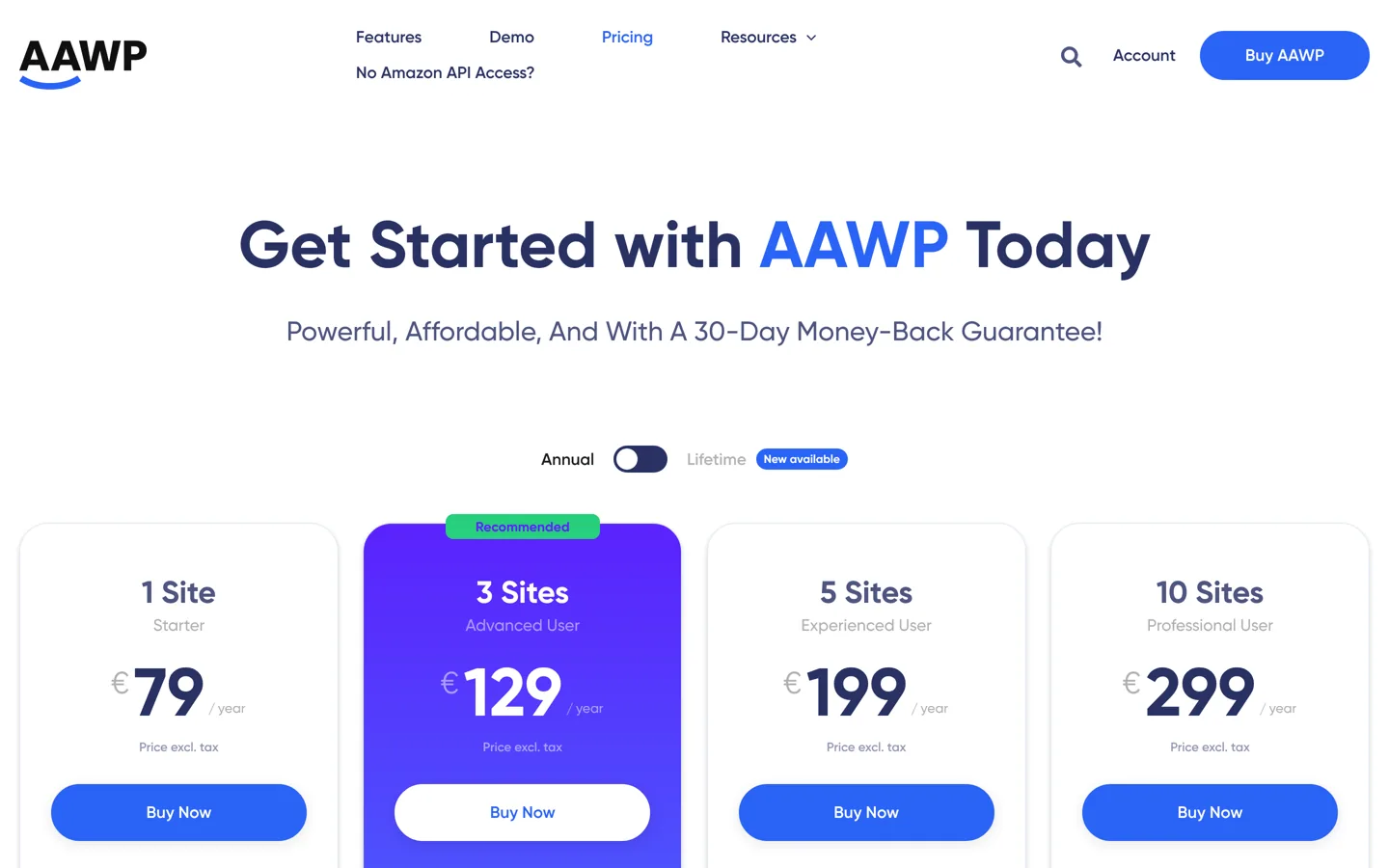
- Lasso has a free plan; AAWP starts at €79 a year; ThirstyAffiliates is free.
- Amazon Associates requires the statement "As an Amazon Associate I earn from qualifying purchases."
- Schema Lite, once a popular free niche theme, is no longer on WordPress.org.
The best WordPress themes for affiliate marketing are fast, show products clearly and leave room for disclosures, comparison tables and buttons. For most Amazon niche sites and affiliate blogs, that means a lightweight theme such as GeneratePress, Astra or Kadence paired with an affiliate plugin, rather than a heavy all-in-one theme. This guide compares both routes, with prices from each developer’s site checked on 12 October 2026, and covers the plugins that do the affiliate work and Amazon’s disclosure rule.
Looking for themes for other kinds of sites? Our list of the best WordPress themes ranks them by site type. This page is only about affiliate and niche sites.

What an affiliate site needs from a theme
An affiliate site earns when readers trust a recommendation and click through. A theme helps by doing four jobs well:

- Speed. Most affiliate traffic comes from search, often on phones. A light theme with few bundled extras keeps pages fast, which helps both rankings and readers.
- Product content. You’ll publish reviews, “best of” lists and comparisons, so you need comparison tables, product boxes and pros-and-cons lists. These can come from the theme, a block plugin or an affiliate plugin.
- Trust. A clean review layout, visible author and update dates, and a natural spot for your affiliate disclosure near the top of each post.
- Earnings. Clear buttons, places for ads if you run them, and hooks or layout tools to add a box after every post. Link tracking is better handled by a plugin than a theme.
WordPress themes for affiliate marketing compared
| Theme | Type | Price | Best for |
|---|---|---|---|
| GeneratePress | Lightweight | Free; GP Premium $59/yr | Fast review and list sites |
| Astra | Lightweight | Free; Astra Pro $69/yr | Beginners, starter templates |
| Kadence | Lightweight + blocks | Free; Essentials $99/yr | Building product boxes in the editor |
| Schema (MyThemeShop) | SEO-focused blog theme | $39 (sale; regular $49), unlimited sites | Simple niche blogs |
| REHub | All-in-one affiliate | Sold on ThemeForest; check the current price | Price comparison and deal sites |
| Flatsome | WooCommerce shop | $59 regular licence on ThemeForest, with 6 months of support | Affiliate stores built on WooCommerce |
Flatsome’s price is from its ThemeForest page; REHub’s page blocked our check, so confirm its price there. Other prices are from each developer’s own pricing page.
How to test a theme’s speed yourself
Every theme developer says its theme is fast, so check before you commit. Install the theme on a test site (or a staging copy) with a typical review post: a few images, a comparison table and some buttons. Then run that post through Google’s free PageSpeed Insights, which reports Core Web Vitals and a mobile score, and repeat the test with the next theme on the same post. Compare the mobile results, because that’s where most search visitors read. Keep in mind that your hosting, images and plugins usually affect speed more than the theme itself, so test them all together, as your real site will run.
Lightweight themes: the safe choice
A lightweight theme handles design and speed and leaves the affiliate features to plugins. That split matters for a site you hope to run for years: if you change theme later, your product boxes and links stay in place because they belong to the plugin, not the theme.
GeneratePress
GeneratePress is known for lean code and is used on 500,000+ sites, rated 4.9 on WordPress.org. The free theme is enough for a clean review site. GP Premium ($59 a year, 30-day money-back guarantee) adds a theme builder in the block editor and layout hooks, useful for placing a disclosure line or a “top pick” box on every review automatically.
Astra
Astra has 1,000,000+ active installs and ready-made starter templates, which makes it the quickest way for a beginner to get a professional-looking niche site. Astra Pro ($69 a year) adds custom layouts and WooCommerce styling; our Astra Pro review covers whether you need it.
Kadence
Kadence comes with Kadence Blocks, so you can build info boxes, icon lists, buttons and tabbed product sections right in the block editor, alongside WordPress’s own table block, without another affiliate plugin. The free theme and blocks go a long way; Essentials ($99 a year) adds premium blocks and templates.
All-in-one affiliate themes
All-in-one themes build affiliate features into the theme itself. They save plugin setup, but they’re heavier and harder to leave: if you switch theme, features built into it stop working.
REHub
REHub, sold on ThemeForest, describes itself as a price comparison and multi-vendor marketplace theme. It’s aimed at comparison, deal, coupon and review sites, works with WooCommerce and its developer publishes step-by-step guides for affiliate, comparison and cashback sites on wpsoul.com. Choose it if price comparison is the core of your site; for a review blog it’s more than you need.
Flatsome
Flatsome, by UX Themes, is a best-selling WooCommerce theme with its own UX Builder. It suits affiliate sites set up as a shop, where WooCommerce “external/affiliate” products send buyers to the retailer. For article-led niche sites, a lightweight theme is simpler.
Schema
MyThemeShop’s Schema calls itself its fastest-loading, most SEO-friendly theme. It costs $39 on sale (regularly $49) for unlimited sites with a year of updates and support, and a free version is available from MyThemeShop. Note that Schema Lite, the free version our old post recommended, is no longer listed in the WordPress.org theme directory.
Plugins that do the affiliate work

- Lasso builds product displays, tables and grids and pulls Amazon images and prices through your Amazon API access. There’s a free plan for one site; Creator costs $19 a month or $190 a year, Pro $29 or $289 (three sites), and Studio $59 or $549 (five sites).
- AAWP is built for Amazon: product boxes, bestseller lists and comparison tables. It costs €79 a year for one site or €129 for three (prices exclude tax), with a 30-day money-back guarantee. It also sells optional paid access to Amazon product data if you don’t yet have Amazon’s API.
- ThirstyAffiliates is a free link manager on WordPress.org (30,000+ installs, rated 4.6) that turns long affiliate links into short, branded ones and tracks clicks.

Selling to readers in several countries? Our guide to Geniuslink (geni.us) explains how localised Amazon links work.
Amazon niche sites: the disclosure rule
If you join Amazon Associates, its operating agreement says you must clearly and prominently state: “As an Amazon Associate I earn from qualifying purchases.” (or a similar statement Amazon previously allowed) on your site. A good theme makes this easy: put the statement in a disclosure line at the top of each review, using your theme’s hooks, a reusable block or your affiliate plugin, and on your disclosure page.
Other programmes and local laws have their own disclosure rules, so add a general affiliate disclosure near the top of any post with affiliate links, not just at the bottom of the page.
How to set up an affiliate site’s layout
- Pick one lightweight theme and keep it simple: one sidebar or none, a readable content width and a clear menu.
- Create a review layout with your theme’s builder or hooks: disclosure line, quick verdict box, then the full review.
- Add a comparison table block for your “best” lists, built with WordPress’s table block or your affiliate plugin’s table tool.
- Style one button for every “check price” link, in your brand colour, and use it everywhere.
- Link related posts: each review should link to its “best” list and to comparisons.
- Test on a phone: tables must scroll or stack, and buttons must be easy to tap.
Pages every affiliate site needs
- Single reviews of one product, with a quick verdict near the top.
- “Best” lists that compare several products for one need, with a comparison table.
- Head-to-head comparisons of two products buyers often weigh up.
- How-to guides that answer questions and link to the relevant reviews.
- An affiliate disclosure page, linked from every post’s disclosure line, plus an About page that says who you are and how you test.
Your theme should make each of these look consistent, which is another reason to set up layouts once with hooks or templates instead of styling each post by hand.
Mistakes to avoid
- Choosing a theme for its demo. Demo sites look busy and rich; your site will be judged on speed and clarity.
- Locking features into the theme. Product boxes built into a theme vanish if you switch; use a plugin or blocks.
- Hiding the disclosure. Amazon requires it to be clear and prominent; don’t tuck it in the footer.
- Too many ads and boxes. A page full of offers reads like an ad, not advice.
- Buying a theme you can’t update. “Free” copies of premium themes from unofficial sites often carry malware and never get updates; buy from the developer or the official marketplace.
- Forgetting the phone. Wide comparison tables must scroll or stack on small screens, or readers can’t compare anything.
Which theme should you choose?
- Most affiliate and Amazon niche sites: GeneratePress or Astra, plus Lasso or AAWP.
- If you want to build product boxes in the editor: Kadence with Kadence Blocks.
- Price comparison or deal sites: REHub.
- Affiliate stores on WooCommerce: Flatsome.
Next, choose what to promote: our list of recurring affiliate programmes and our guide to earning money from a blog cover the options.
Questions people ask
What is the best WordPress theme for affiliate marketing?
For most sites, a lightweight theme such as GeneratePress, Astra or Kadence with an affiliate plugin. REHub is the best all-in-one choice for price comparison and deal sites.
Do I need a special affiliate theme for an Amazon niche site?
No. Any fast, clean theme works; plugins such as Lasso or AAWP add product boxes, tables and Amazon data.
Is REHub worth it?
If price comparison, deals or coupons are the core of your site, yes. For a review blog it's heavier than you need, and its built-in features stop working if you switch theme.
What disclosure does Amazon require?
Amazon's operating agreement requires a clear, prominent statement: "As an Amazon Associate I earn from qualifying purchases." or a similar statement Amazon previously allowed.
Which plugin is best for Amazon product boxes?
AAWP is built for Amazon (boxes, bestseller lists, comparison tables); Lasso covers Amazon and other programmes and has a free plan.
Is Schema Lite still available?
Not on WordPress.org: it's no longer in the theme directory. MyThemeShop sells Schema ($39 on sale, regularly $49) and offers a free version on its own site.
Sources
- Amazon Associates Program Operating Agreement affiliate-program.amazon.com · checked October 12, 2026
- Lasso pricing getlasso.co · checked October 12, 2026
- AAWP pricing getaawp.com · checked October 12, 2026
- ThirstyAffiliates (WordPress.org) wordpress.org · checked October 12, 2026
- Kadence Blocks (WordPress.org) wordpress.org · checked October 12, 2026
- Schema theme (MyThemeShop) mythemeshop.com · checked October 12, 2026
- UX Themes (Flatsome) uxthemes.com · checked October 12, 2026
- WPSoul (REHub developer) wpsoul.com · checked October 12, 2026
- WordPress.org theme directory wordpress.org · checked October 12, 2026

Building websites since 2006: 500+ web projects of every size and $300K+ in website deals sold or brokered. Founder of A Digital Motive and DigiFlippers. I share the whole process here, plainly.
Founder of A Digital Motive and DigiFlippers