
Some links on this page are affiliate links. If you buy through them I may earn a commission, at no extra cost to you. It never changes a rating. Read the disclosure
- Kinsta is managed hosting with isolated resources per site; SiteGround is well-tuned shared hosting.
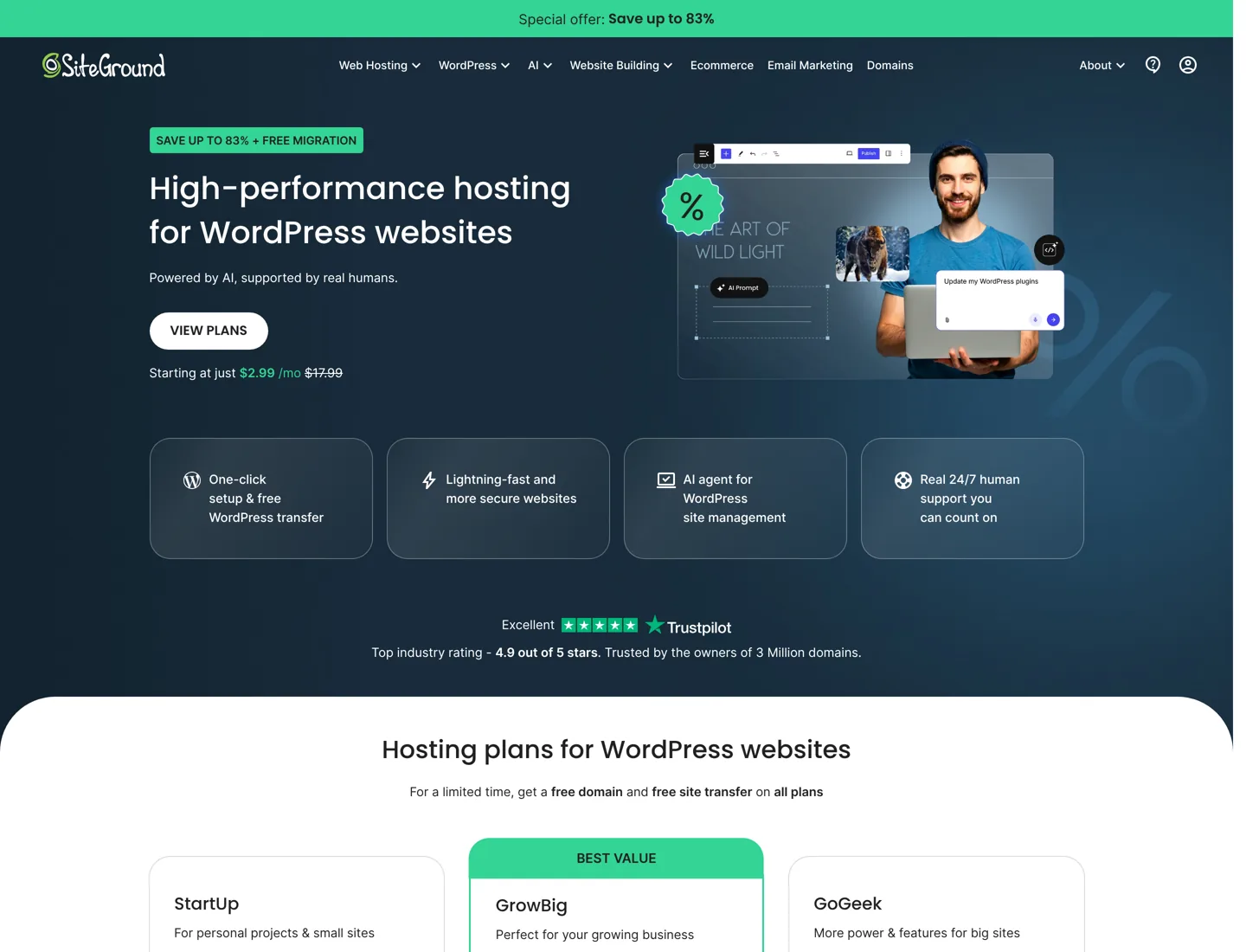
- SiteGround's $2.99 is a first-year price; StartUp renews at $17.99 a month.
- Kinsta charges per site; SiteGround fits unlimited sites on GrowBig and GoGeek.
- Both include a CDN, daily backups, staging and 24/7 support, with a 30-day money-back guarantee.
- Kinsta migrates sites for free without limit, so moving up later is easy.
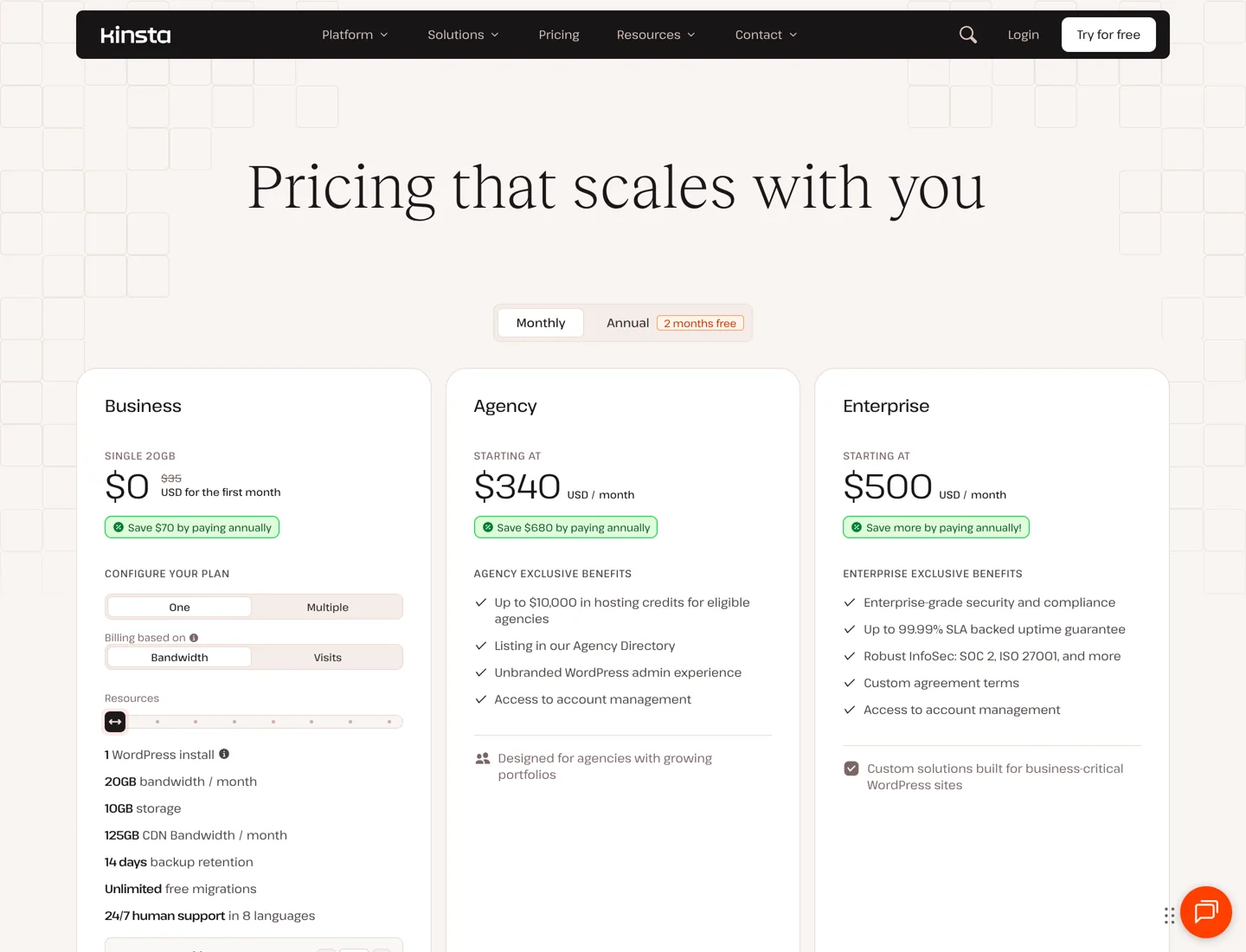
Kinsta vs SiteGround comes down to what you’re paying for. Kinsta is premium managed WordPress hosting: each site gets its own isolated resources, a global CDN and engineer-level support, from $35 a month for one site. SiteGround is shared WordPress hosting with strong tools and support at a much lower first-year price, from $2.99 a month, rising to $17.99 at renewal.
For one or two small sites on a budget, SiteGround is the better value. For a business site where speed and uptime earn money, or for an agency hosting client sites, Kinsta is worth the higher price. This comparison covers the real cost at one, five and twenty sites, what each includes, and who should pick which. Every price and feature comes from the two companies’ own pricing pages, checked on the date at the end.
Kinsta vs SiteGround at a glance
| Feature | Kinsta | SiteGround |
|---|---|---|
| Type of hosting | Managed WordPress, isolated per site | Shared WordPress hosting (Cloud plans separate) |
| Cheapest plan | $35 a month, or $30 paid yearly (1 site) | $2.99 a month for 12 months, then $17.99 (1 site) |
| Unlimited sites from | Priced per site (2, 5, 10, 20, 40…) | GrowBig: $4.99 first year, then $29.99 a month |
| Storage on the entry plan | 10 GB | 10 GB |
| Traffic limit | 20 GB server bandwidth a month (entry plan) | Unlimited traffic |
| CDN | Included, 300+ edge locations | Free CDN included |
| Backups | Daily, kept 14 days; hourly as a paid add-on | Daily, stored in another location; on-demand from GrowBig |
| Free migrations | Unlimited | Free WordPress migrations |
| Free domain and email | Not listed on its plans | Free domain for the first year; free email |
| Money-back guarantee | 30 days (first month free on select plans) | 30 days |
Prices in US dollars before tax, from each company’s pricing page when this guide was updated. SiteGround’s low prices are prepaid for the first 12 months.

How they’re built: managed vs shared hosting
The price gap makes sense once you see what you’re buying.
Kinsta runs each WordPress site in its own isolated environment and sells plans by the number of sites and the bandwidth they use. It runs 30 data centres and a CDN with more than 300 edge locations, and includes a managed firewall with DDoS protection, free malware removal, a built-in performance monitoring tool, staging environments and 24/7 support from WordPress engineers in eight languages. The point is that a busy neighbour can’t slow your site down, and support can dig into your WordPress setup.
SiteGround is shared hosting: many sites share a server’s resources, which is why it can cost a few dollars a month. It’s well-tuned shared hosting, though. Plans include free SSL, a free CDN, daily backups stored in a different location, free email, one-click staging, a smart firewall and SiteGround’s own speed and security plugins. SiteGround says its PHP setup makes pages load up to 30% faster. It also has Cloud plans from $100 a month (4 CPU cores, 8 GB of memory) for sites that outgrow shared hosting; those are the closer match to Kinsta.
Kinsta vs SiteGround pricing: what you really pay
SiteGround’s headline price is a first-year price. Here’s the cost at first and at renewal, next to Kinsta’s plans for the same number of sites:
| Sites | Kinsta (monthly / paid yearly) | SiteGround (first year / renewal) |
|---|---|---|
| 1 site | $35 / $30 | StartUp: $2.99 / $17.99 |
| 2 sites | $70 / $59 | GrowBig: $4.99 / $29.99 |
| 5 sites | $115 / $96 | GrowBig: $4.99 / $29.99 |
| 20 sites | $340 / $284 | GoGeek: $7.99 / $44.99 |
Two things to notice. First, SiteGround’s renewal price is six times its first-year price on StartUp, so budget for the renewal, not the offer. Second, SiteGround’s plans fit many sites into one plan because they share resources; Kinsta charges per site because each gets its own. For a portfolio of small, low-traffic sites, that makes SiteGround far cheaper. For a few sites that matter a lot, the per-site price buys isolation and support.

Speed and performance
Both companies are built for fast WordPress, in different ways. Kinsta’s speed comes from isolated resources, edge caching on its CDN and a choice of 30 data centres, so you can host close to your visitors. Its plans also let you buy more PHP performance (extra PHP threads and memory) if a site needs it.
SiteGround’s speed comes from server-level caching (its multilevel caching), its own PHP setup and the Speed Optimizer plugin. SiteGround publishes its own before-and-after measurements, saying sites are on average 78% faster after moving to it. That’s the company’s own number from its own sample, so treat it as a claim, not a benchmark.
In practice, a small site with modest traffic will be fast on either. The difference shows when traffic grows or spikes: shared resources can slow down under load, isolated resources don’t depend on neighbours. If you’re seeing slowdowns at traffic peaks on shared hosting, that’s the moment Kinsta (or SiteGround Cloud) makes sense. The guide to Kinsta and Cloudflare explains Kinsta’s caching in more detail.
Security, backups and support
- Security: Kinsta includes a managed firewall with DDoS protection and free malware removal on every plan. SiteGround includes a smart web application firewall, free SSL and its Security Optimizer plugin.
- Backups: Kinsta backs every site up daily and keeps 14 days on the entry plan; backups every 6 hours cost $20 per site a month, hourly $100. SiteGround backs sites up daily and stores them in a different location; on-demand backups come with GrowBig and higher.
- Support: both offer 24/7 support. Kinsta’s is from WordPress engineers in eight languages. SiteGround gives GoGeek customers priority, assigning their chats and tickets to its most experienced agents.
- Developer tools: both include staging. SiteGround adds WP-CLI, SSH and Git integration (Git on GoGeek); Kinsta adds an API, SAML single sign-on and unlimited users on every plan.
Ease of use: the dashboards
Both companies have their own control panels, and both are friendly for beginners.
Kinsta’s dashboard puts everything about a site in one place: cache, redirects, PHP versions, backups, the CDN, staging and debugging tools, plus a built-in performance monitoring (APM) tool for tracking down slow pages. Every plan allows unlimited users with their own logins and access levels, which matters if a developer, a writer and a client all need access.
SiteGround’s panel is called Site Tools. Beyond the usual site, email and domain settings, it includes an AI agent for WordPress and an AI workspace, with 20,000 free tokens a month for every customer. On GoGeek you can give clients white-label Site Tools access, which is useful if you build sites for others and want them to manage their own email.
What happens when you outgrow your plan
Growth is where the two differ most, so it’s worth knowing the next step before you sign up.
- Kinsta: you can change plans at any time from the dashboard, and billing is prorated. On a single-site plan you can add sites at $30 a month each and extra storage at $20 a month per 20 GB. Paid add-ons include more frequent backups, backups to your own AWS or Google Cloud storage ($2 per site a month), more PHP performance, premium staging environments and dedicated servers from $300 a month.
- SiteGround: the path is StartUp to GrowBig (unlimited sites, on-demand backups) to GoGeek (more storage, priority support, Git), then to Cloud hosting from $100 a month with dedicated CPU and memory. Each move is a bigger jump in price, so check both the offer and the renewal price of the plan you move to.
Kinsta also lets you choose how a plan is measured: its pricing page offers plans based on bandwidth or on monthly visits, so a site with heavy media but few visitors (or the other way round) can pick the cheaper fit.
The practical rule: if you expect a site to grow fast, compare the cost of the plan you’ll need in a year, not the one you start on.
Moving between them
Kinsta includes unlimited free migrations on every plan, so moving from SiteGround to Kinsta costs nothing. SiteGround offers free automatic migration of existing WordPress sites and its own Migrator plugin. Either way, test the site on the new host’s temporary address before you point your domain at it, and keep the old plan running for a week.
Kinsta vs SiteGround: which should you choose?
- Choose SiteGround for a new blog, a small business site or several low-traffic sites on a tight budget. GrowBig gives you unlimited sites, staging and on-demand backups for far less than Kinsta, even at renewal.
- Choose Kinsta for a site that earns real money, a busy WooCommerce store, or client sites where speed, uptime and expert support matter more than the monthly bill.
- Choose SiteGround Cloud if you like SiteGround but have outgrown shared hosting and want dedicated resources from $100 a month.
If neither fits, the best managed WordPress hosting guide compares more premium hosts, the cheap WordPress hosting guide covers budget options, and the Cloudways alternatives guide covers running your own cloud server. For Kinsta on its own, see the full Kinsta review.
Questions people ask
Is Kinsta better than SiteGround?
For busy or business-critical sites, yes: each Kinsta site runs in its own isolated environment with a global CDN and engineer-level support. For new blogs and small sites, SiteGround gives far more for the money, with unlimited sites on GrowBig.
Why is Kinsta so much more expensive than SiteGround?
Kinsta sells managed hosting priced per site, with isolated resources so other sites can't slow yours down. SiteGround is shared hosting, where many sites share a server, and its lowest prices are first-year offers prepaid for 12 months.
How much does SiteGround cost after the first year?
StartUp renews at $17.99 a month, GrowBig at $29.99 and GoGeek at $44.99. The first-year prices of $2.99, $4.99 and $7.99 a month are prepaid for 12 months.
Does Kinsta have a free trial?
Kinsta offers the first month free on select plans for new customers, and all plans are covered by a 30-day money-back guarantee after any free period. SiteGround also has a 30-day money-back guarantee.
Can I move from SiteGround to Kinsta for free?
Yes. Kinsta includes unlimited free migrations on every plan. Test the site on Kinsta's temporary address before you point your domain at it.
Is SiteGround Cloud the same as Kinsta?
It's the closer match. SiteGround Cloud plans start at $100 a month for 4 CPU cores and 8 GB of memory, dedicated to your sites, while Kinsta prices by site. Both remove the shared-hosting limits.
Sources
- Kinsta pricing kinsta.com · checked October 11, 2026
- Kinsta WordPress hosting (infrastructure) kinsta.com · checked October 11, 2026
- SiteGround WordPress hosting plans www.siteground.com · checked October 11, 2026
- SiteGround Cloud hosting www.siteground.com · checked October 11, 2026

Building websites since 2006: 500+ web projects of every size and $300K+ in website deals sold or brokered. Founder of A Digital Motive and DigiFlippers. I share the whole process here, plainly.
Founder of A Digital Motive and DigiFlippers